
The Magento 2 Import Export Order Extension allows you to easily import and export order data in bulk, simplifying the process of managing large volumes of orders and facilitating seamless data transfers between systems or for reporting purposes.
User Guide & Documentation
Step-by-step setup manual for Import Export Order Extension
Changelog v1.1.0
Compatible with Magento CE, EE · 2.3.x, 2.4.x
Import Export Order Extension
- Import orders to the relevant views or specify a special view of the store.
- Only pick the export orders in the order grid.
- Enable import orders for all types of shipping.
- Will produce import invoices, shipments and credit memos.
- Permit import/export orders for all styles, including simple, bundle, grouped, etc.

$99
No surprise fees
We are committed to being open and transparent with our customers. When you purchase our module, you automatically receive one year of free support service and free updates.
Why is this important?
- Seamless Installation and Configuration: We understand that setting up a new module can take time to configure according to your specific needs. That's why we offer a full year of free support. Our experienced team is here to assist you with installation, configuration, and any questions you might have. We're eager to share our expertise to ensure you get the most out of your purchase.
- Stay Updated with Magento (Adobe Commerce) Releases: Magento releases new versions approximately every three months. These updates can sometimes introduce compatibility challenges. To keep your store running smoothly, we provide a year of free access to the latest versions of our modules, ensuring that you can upgrade Magento and our modules without encountering any obstacles.
- Subscription Included: Renewing your subscription ensures continued access to the latest updates and support from our team. This means you can be confident that any issues you encounter with the extension will be resolved quickly and efficiently. You can cancel your subscription at any time without any additional fees.
Hyvä Bronze Partner
Adobe Commerce
Secure Checkout
Highlighted Features
-
Bulk Order Import/Export
The extension facilitates the import and export of multiple orders simultaneously, saving time and effort. It supports various file formats, such as CSV making it easy to work with different data formats and systems.
-
Customizable Data Mapping
Users can map fields between Magento and external systems, ensuring that data is correctly aligned during the import/export process. This feature is especially useful for businesses with custom order fields or specific data requirements.
-
Order Status and Information
The extension allows the transfer of comprehensive order details, including order status (pending, processing, complete, etc.), customer details, billing and shipping addresses, payment methods, and a list of purchased products. This ensures a complete record of transactions is maintained.
-
Support for Multiple Store Views
For businesses operating multiple stores or websites under a single Magento installation, the extension supports handling orders from different store views. This ensures that all order data is accurately represented across various storefronts.
Description
Import Orders Steps
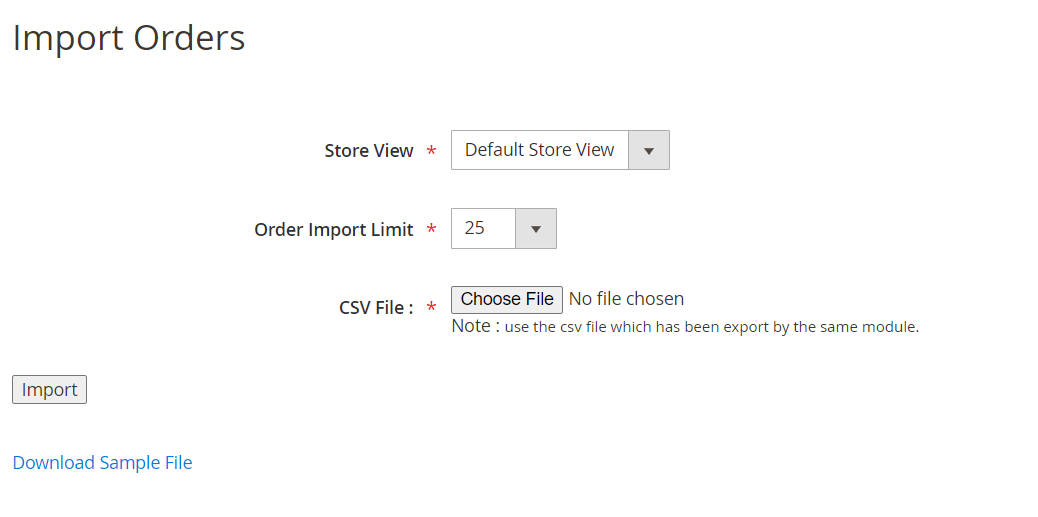
This module enables your store orders such as order details, customer information, product details, etc., to be imported and exported in bulk via CSV format. This extension allows you to import data from one store to another for all Magento orders. Users can export order data from the store in a structured format.
- Prepare your CSV file according to our documentation.
- Go to Your Site Backend -> SYSTEM -> Mavenbird– Import/Export Orders -> Import Orders.
- Upload your prepared CSV file and click on the “Import Orders” button.
- Your orders will now be successfully imported.
Export Orders Steps
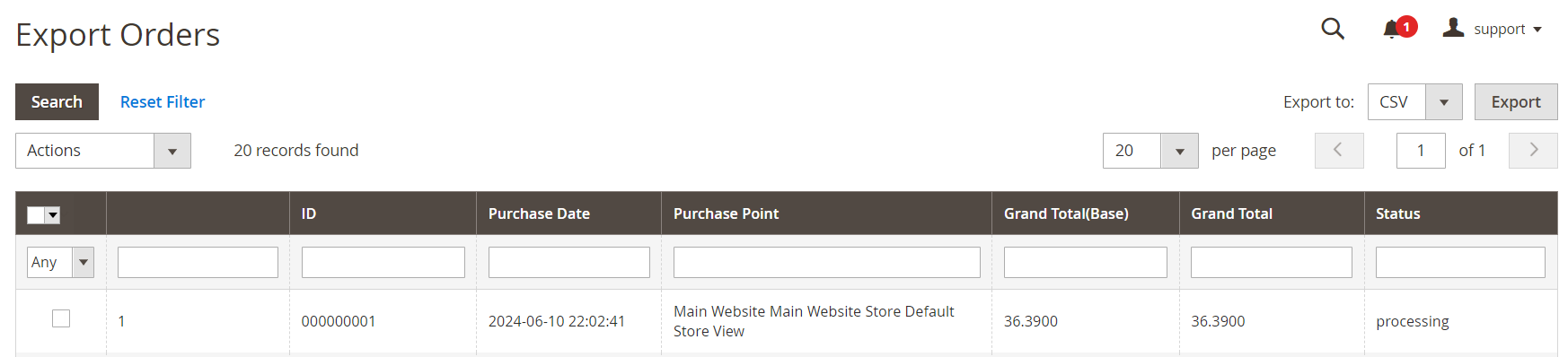
- Go to Your Site Backend -> SYSTEM -> Mavenbird– Import/Export Orders -> Export Orders.
- Click on the “Export Orders” button.
- Your orders data will now be successfully exported. You can find the exported CSV file in /var/export/ directory.
FAQs
Frequently Asked Questions
The module allows store admins to import orders from CSV files or export orders to CSV files for easy manipulation or reporting.
Yes, this module supports bulk importing and exporting, so you can handle multiple orders at once without manual entry.
The module supports CSV file format for both import and export processes, ensuring compatibility with most data systems.
Yes, the module is compatible with Magento 2.x versions and ensures smooth functionality across supported platforms.
Yes, it supports custom fields in order data, allowing flexibility in handling different types of orders or custom workflows.
Yes, data is securely processed during import/export with Magento’s standard data handling protocols, ensuring your orders remain protected.
Ask a question
REVIEWS
Useful for Reporting and Data Management
With thousands of orders in our system, having a bulk export option is extremely helpful. It allows our team to generate reports, analyze order trends, and manage historical data more efficiently.
Reliable Solution for Order Migration
We relied on this module during a full store migration and it performed very well. Orders were exported accurately and imported into the new system without data loss, which made the transition smooth and predictable.
Efficient Handling of Large Order Volumes
This extension has greatly simplified the way we manage large volumes of order data. Being able to export and import orders via CSV has reduced manual work and made it much easier to move data between environments without errors.
Excellent Order Data Control
Being able to control order imports including status and related records is extremely useful.
Excellent for Bulk Order Updates
If we need to update multiple orders we export them, modify the data, and import the updated file again.
Great for Multi Store Businesses
Businesses running multiple Magento stores will benefit from being able to move order data easily between environments.
Great Extension for Order Migration
We used this module during a store migration and it worked perfectly. Exporting orders from one Magento instance and importing them into another was simple and reliable.
Helpful for System Integrations
We use exported order data for integration with external accounting systems and ERP tools.
Efficient Order Migration Solution
Moving orders between staging and production environments is now much easier with this extension.
Well Designed Magento Utility
The module is lightweight and performs exactly as expected for order data management tasks.
Smooth Import Workflow
The step by step import process in the admin panel makes order imports simple even for non technical users.
Easy Order Import Process
The import process is simple and well documented. Preparing the CSV file according to the format was easy and the orders were imported without any issues.
Stable and Reliable Extension
The module has been running for months without issues and handles order exports reliably.
Reliable Magento Extension
The module works smoothly and processes large order datasets without errors. It is a dependable tool for managing order data.
Great Tool for Developers
Developers working with Magento migrations or integrations will find this extension very helpful. It simplifies order data transfers.
Supports Multiple Store Views
Our Magento installation has several store views and this extension handles them properly during order imports and exports.
Highly Recommended Magento Extension
If you need a reliable way to import or export Magento orders in bulk this extension is definitely worth using.
Very Useful for Reporting
Exporting orders in CSV format makes it easier for us to analyze sales data in spreadsheets and reporting tools.
Clean Data Management Tool
This extension gives us full control over order data management and migration.
Perfect for Data Transfers
When transferring order data between systems this extension works very well. The CSV based approach makes it compatible with many external systems.
Great for Migration Projects
We used it when moving data between development and production environments and it worked flawlessly.
Excellent Data Mapping Feature
The ability to map CSV fields to Magento order attributes is very useful when importing custom order data.
Excellent Bulk Order Management Tool
This extension helped us manage large volumes of order data easily. Importing and exporting orders through CSV files saves a lot of manual effort and makes data migration between environments much faster.
Good Performance with Large Files
Even when importing large CSV files the module processes data efficiently without slowing down the admin panel.
Works Perfectly with Magento 2.4
Installed on Magento 2.4 and everything works exactly as expected. No compatibility issues so far.
Very Practical Magento Module
The module fills an important need for bulk order import and export functionality.
Very Convenient CSV Format
The CSV format makes editing and reviewing order data very convenient before importing it back into Magento.
Very Helpful for Large Order Data
Our store processes thousands of orders and this extension makes handling that data much easier. Bulk export functionality is extremely useful for reporting and analysis.
Great Support for Order Records
The extension can generate related order records such as invoices and shipments during import which is very helpful.
Reliable Order Export Module
Exporting orders with complete information works consistently and accurately.
Helpful Data Synchronization Tool
It allows us to synchronize order information between different Magento installations quickly.
Huge Time Saver for Bulk Orders
The M2 Import/Export Order extension is a game-changer! It makes importing and exporting orders a breeze
Bulk Order Export Made Easy
Exporting large numbers of orders is extremely quick. The CSV file structure is clean and easy to work with.
Supports Complete Order Data
The extension exports all important information including customer details, shipping addresses, and purchased products.
Great Time Saving Tool
Instead of entering order data manually we can import everything in bulk. It saves our team many hours of work.
Very Helpful for Data Backup
We occasionally export orders as a backup of transaction data. This extension makes the process simple.
Simple and Effective Interface
The admin panel interface for importing and exporting orders is straightforward and easy to understand.
Good Admin Experience
The import and export process is integrated nicely into the Magento admin panel.
Time-Saver for Bulk Orders
This extension made importing and exporting orders a breeze. It’s a huge time-saver when managing large order volumes!
Very Useful for Analytics
Exported order data helps our team analyze purchasing trends and customer behavior more easily.
Great Performance
Fast and efficient! The module integrates smoothly with Magento 2, and we noticed immediate performance improvement in order processing.
Intuitive & Robust
Very intuitive interface! Our team has no trouble using it, and it handles order exports perfectly.
Makes Bulk Import Easy
Ideal for importing bulk orders from multiple platforms. Excellent functionality for businesses with large inventories.
Highly Reliable
The module performs reliably with every import. Even with large datasets, it works without any hitches.
Quick Installation and Setup
Setup was quick, and it works as promised. It really enhanced our order handling.
A Lifesaver for Data Management
As an eCommerce manager, I found this invaluable for managing bulk order data efficiently. Highly recommend for large stores!
Efficient & Easy to Use!
This module made importing and exporting orders so straightforward. Our team saved hours on data entry, and it’s seamless with our workflow.
Changelog
1.1.0 – December 30, 2025
- Upgraded for compatibility with Magento 2.4.8-p3.
- Compatible with PHP version 8.4.
1.0.7 – May 13, 2024
- Compatible with Magento Version 2.4.7-p3.
1.0.6 – March 6, 2024
- Compatible with Magento Version 2.4.3
1.0.0 – February 19, 2018
- Release Initial Version.