📘
User Guide & Documentation
Step-by-step setup manual for Predefined admin Order Comments Extension
View →
Changelog v1.3.0 Compatible with Magento CE, EE · 2.3.x, 2.4.x

Predefined admin Order Comments Extension

Predefined Admin Order Comments Extension allows store admins to add quick, predefined comments to orders from the backend, streamlining communication and order processing. This saves time, ensures consistency, and enhances customer service efficiency.


  • Allows admin users to quickly add predefined comments to orders from the admin panel.
  • Provides a list of predefined comments that can be easily selected and added to orders.
  • Ideal for streamlining communication, ensuring consistent messaging, and saving time when managing orders.
  • Configurable to add or modify predefined comments.
  • Works seamlessly with other order management and communication modules.
  $0
No surprise fees

We are committed to being open and transparent with our customers. When you purchase our module, you automatically receive one year of free support service and free updates.

Why is this important?

  • Seamless Installation and Configuration: We understand that setting up a new module can take time to configure according to your specific needs. That's why we offer a full year of free support. Our experienced team is here to assist you with installation, configuration, and any questions you might have. We're eager to share our expertise to ensure you get the most out of your purchase.
  • Stay Updated with Magento (Adobe Commerce) Releases: Magento releases new versions approximately every three months. These updates can sometimes introduce compatibility challenges. To keep your store running smoothly, we provide a year of free access to the latest versions of our modules, ensuring that you can upgrade Magento and our modules without encountering any obstacles.
  • Subscription Included: Renewing your subscription ensures continued access to the latest updates and support from our team. This means you can be confident that any issues you encounter with the extension will be resolved quickly and efficiently. You can cancel your subscription at any time without any additional fees.
Hyvä Bronze Partner
Adobe Commerce
Secure Checkout

Highlighted Features

  • Predefined Comment Templates

    Administrators can create, organize, and manage a library of frequently used comment templates, making it easy to select and apply consistent messages for various scenarios, such as shipping updates or payment reminders.

  • Customizable Templates

    The extension allows for the customization of predefined comments with placeholders for dynamic data, enabling personalized yet standardized messaging that aligns with the brand's tone and style.

  • Easy Selection

    A user-friendly dropdown menu integrated into the admin panel enables quick selection of predefined comments, significantly reducing the time needed to communicate standard information to customers or internal teams.

  • Audit Trail

    A comprehensive log of all comments added to orders, including timestamps and admin user details, provides a clear audit trail for tracking communication history and maintaining accountability within the team.
Description

Manage Comments

manage_comments

The Predefined Admin Order Comments Extension for Magento 2 lets admins quickly add preset comments to orders, saving time and ensuring consistency. Ideal for repetitive messages, it reduces errors, streamlines communication, and enhances order management efficiency with easy-to-use comment templates.
  • Enable the Predefined Admin Order Comments module from the configuration.
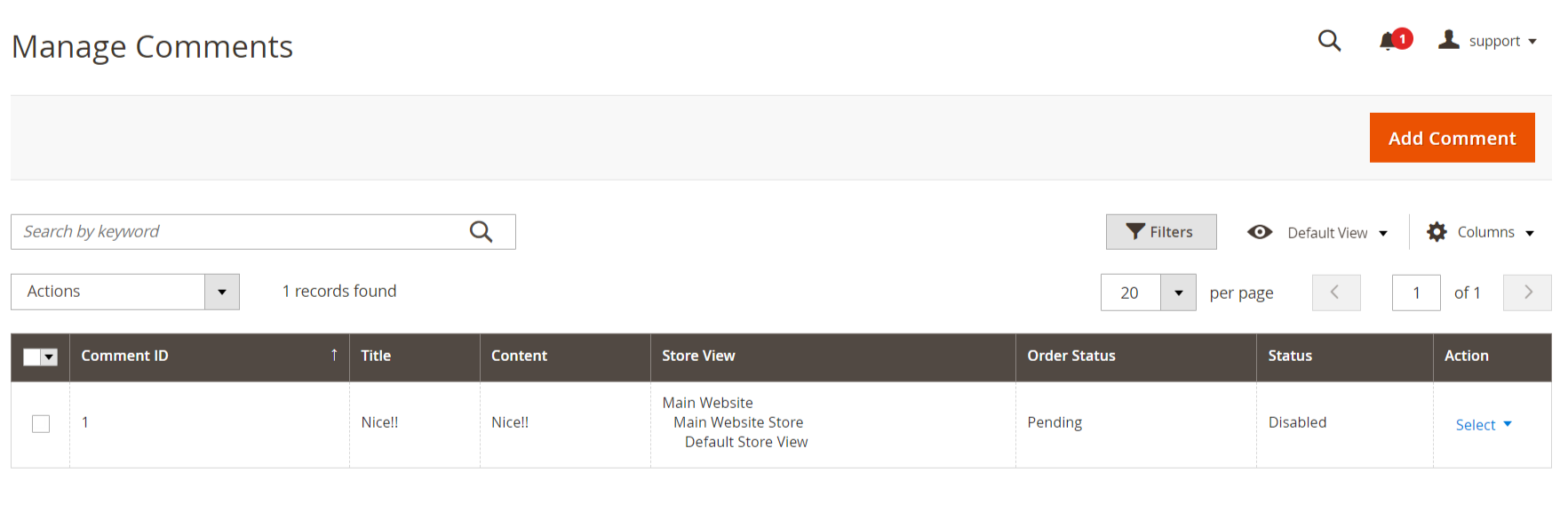
  • Go to Content → Predefined Admin Order Comments → Comments
  • Click on Comments to open the Comment module where you can manage and view comments. The Comment module displays a list of all existing comments, allowing you to select and edit specific comments from the list.
  • Click on the Add Comment button to start creating a new comment.

Add New Comments

add_new_comments
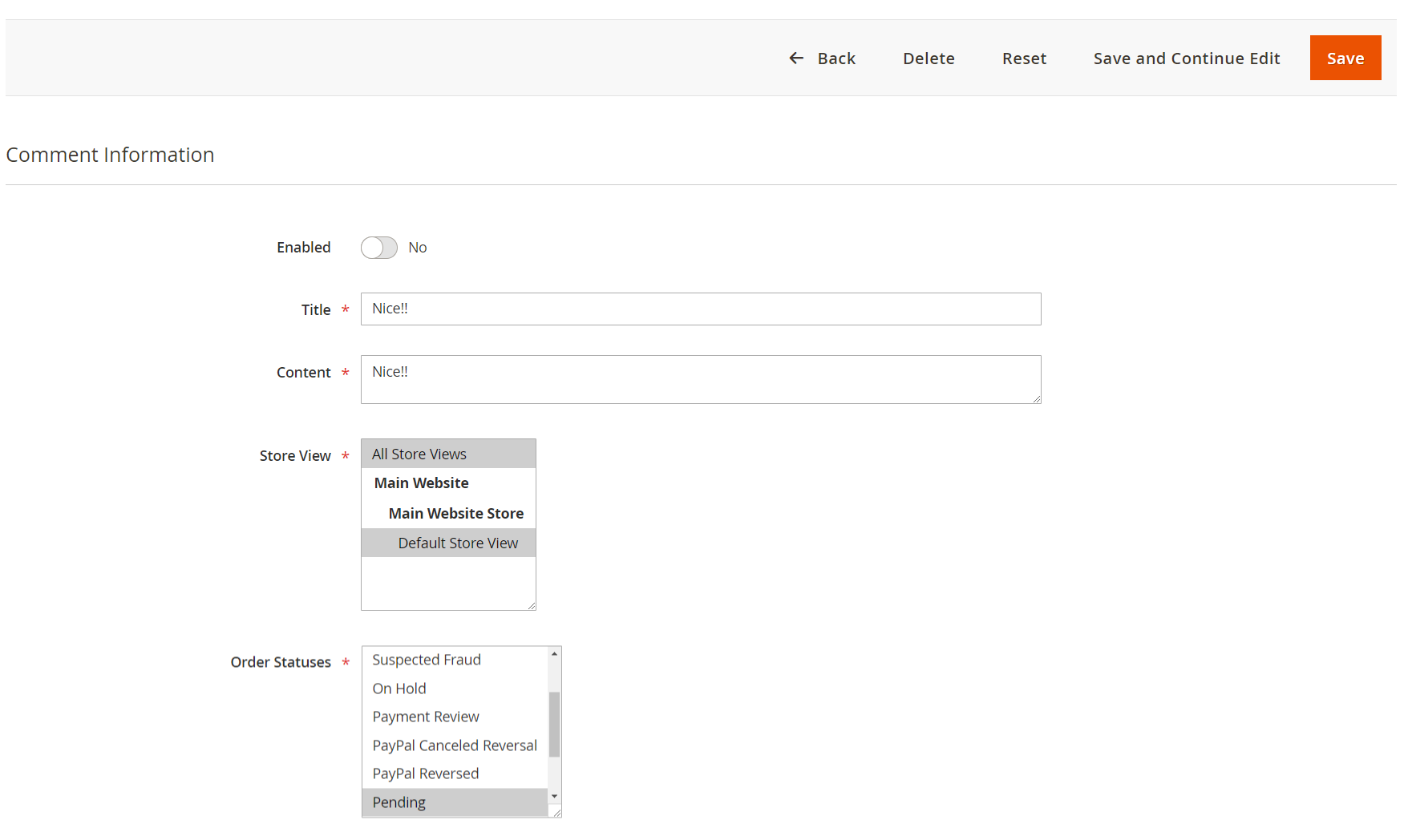
  • Set the comment to Enabled if you want it to be active immediately or Disabled if you want to save it for future use.
  • Enter a descriptive title for the comment in the Title field.
  • Provide the full text of the comment in the Content field.
  • Select the relevant store view(s) where this comment should be applicable.
  • Choose the order statuses to which this comment will apply.
  • Comment Order Notes

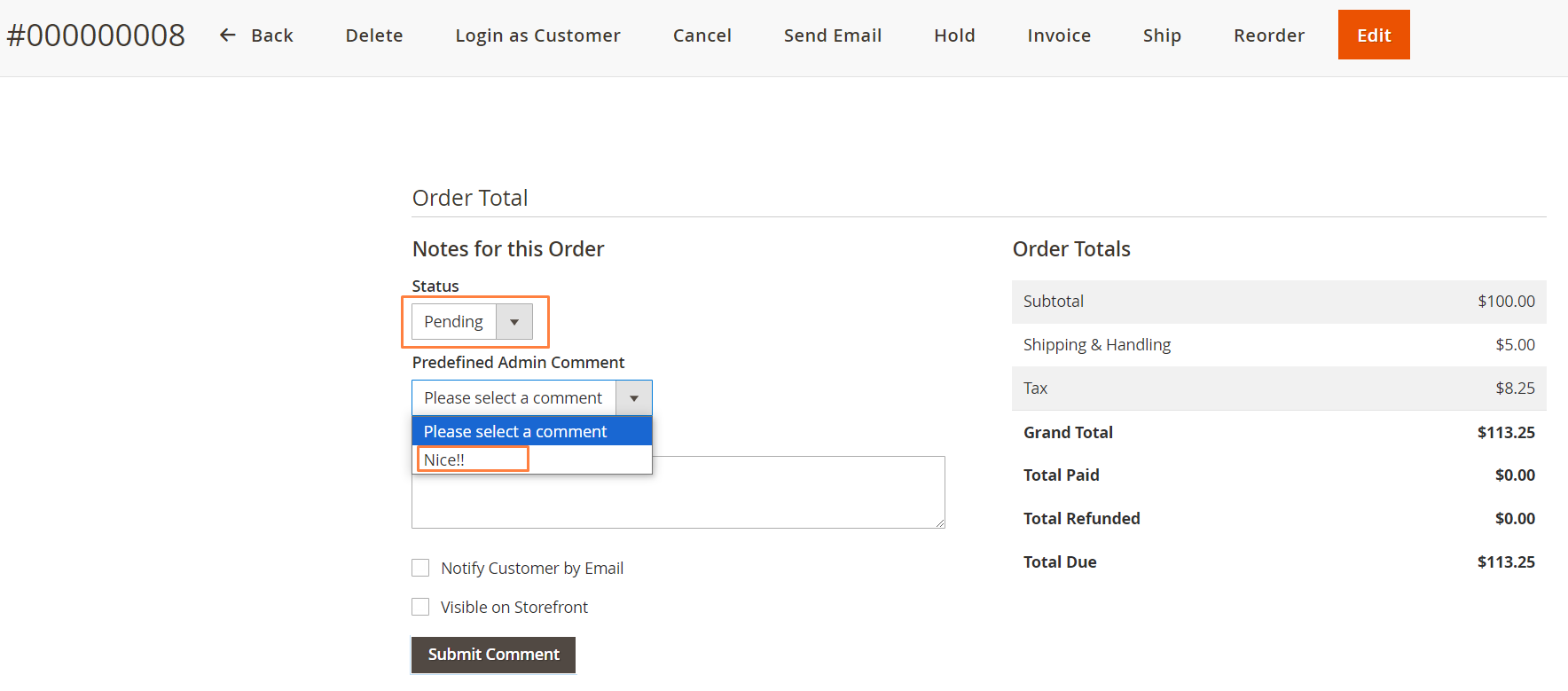
    comments_in_sales_order_view
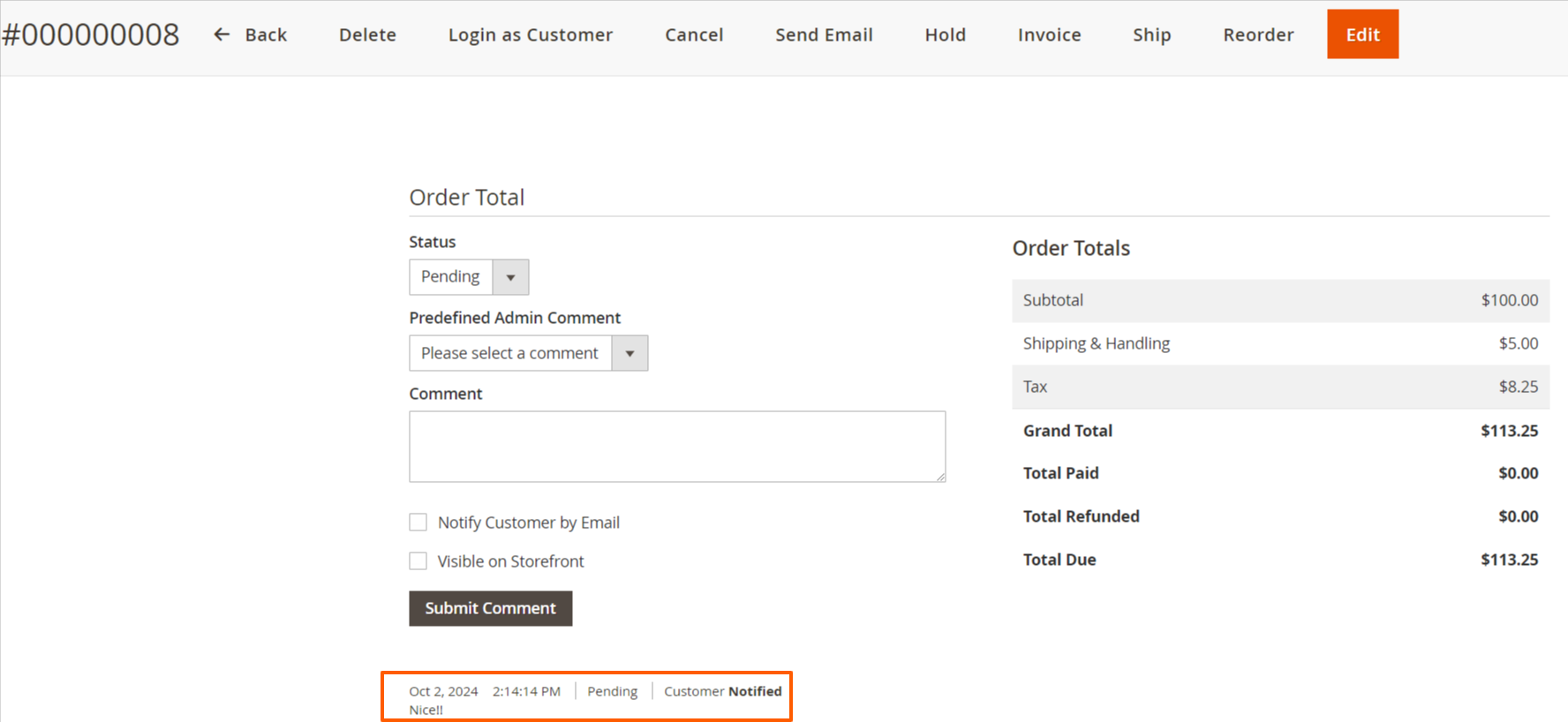
  • Go to Sales → Order → View page.
  • Scroll to the Order Notes section where you can see the status dropdown (e.g., Pending, Closed, Complete) and existing comments.
  • Choose the appropriate status from the dropdown.
  • As per Dropdown that loads Related Comment Contents.
  • Submit Comment

    submit_comment
    • When you click the submit button, the comments are displayed in the sales order view, as shown in the image.
    • Click the Submit Comment button to add the comment to the order and save your changes.
    FAQs

    Frequently Asked Questions

    It lets admins add preset (predefined) comments to orders quickly, saving time and ensuring consistent communication.
    Admins can use predefined comments in the order view page under the "Comments History" section.
    Yes, you can easily create, edit, or delete comment templates from the admin panel.
    Yes, you can check the "Notify Customer" box to send the comment via email.
    Yes, predefined comments can be customized per store view for multilingual or regional use.
       Ask a question
    REVIEWS

    Changelog

    1.3.0 – january 12, 2026

    • Upgraded for compatibility with Magento 2.4.8-p3.
    • Compatible with PHP version 8.4.

    1.2.1 – December 30, 2025

    • Upgraded for compatibility with Magento 2.4.8-p3.
    • Verified and compatible with PHP version 8.3.

    1.0.8 – June 24, 2025

    • Compatible with Magento Version 2.4.8-p1.

    1.0.7 – May 16, 2024

    • Compatible with Magento Version 2.4.7-p3.

    1.0.6 – March 9, 2024

    • Compatible with Magento Version 2.4.3

    1.0.5 – March 19, 2023

    • Compatible with Magento Version 2.4.2
    • Small code adjustments.

    1.0.4 – September 16, 2022

    • Compatible with Magento Version 2.4.1

    1.0.3 – April 18, 2022

    • Compatible with Magento Version 2.4.0

    1.0.2 – May 14, 2020

    • Updated for improved compatibility with Magento versions 2.3 and 2.4.

    1.0.1 – January 28, 2019

    • Fully compatible with Magento 2.0, 2.1, 2.2, and 2.3 Community Edition.

    1.0.0 – February 22, 2018

    • Release Initial Version.