📘
User Guide & Documentation
Step-by-step setup manual for Order Archive Extension
View →
Changelog v1.1.1 Compatible with Magento CE, EE · 2.3.x, 2.4.x

Order Archive Extension

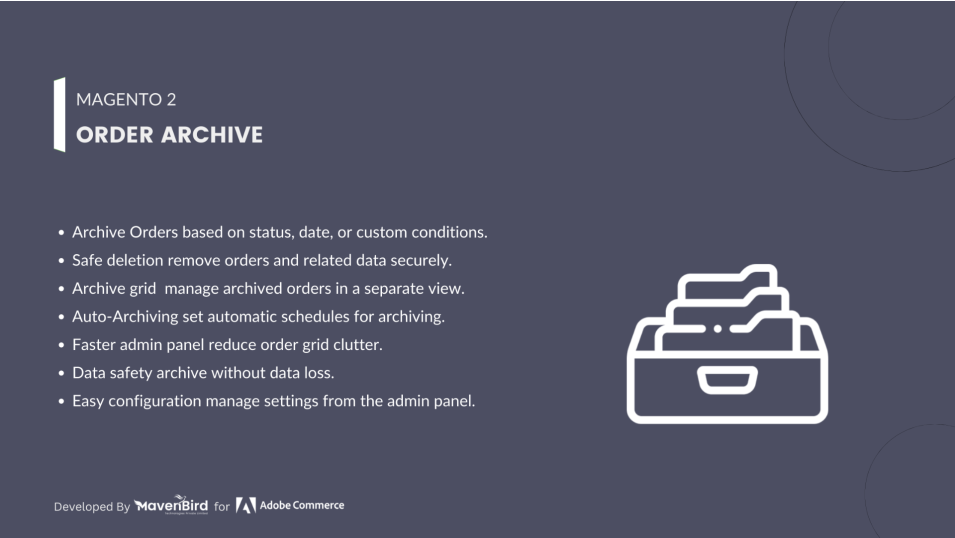
Order Archive Extension streamlines your existing Magento 2 (Adobe Commerce/Adobe Commerce Cloud) store by allowing you to archive old or completed orders, keeping your order grid clean and organized—just like decluttering your digital stockroom for better efficiency and performance.

  • Automatically archive orders based on your needs.
  • Delete orders along with related data effortlessly.
  • View and manage archived orders in a dedicated grid.
  • Set and control the archive schedule with ease.
  • API support for managing archived orders externally.
  • Built-in compatibility with Hyvä themes.
  $89
No surprise fees

We are committed to being open and transparent with our customers. When you purchase our module, you automatically receive one year of free support service and free updates.

Why is this important?

  • Seamless Installation and Configuration: We understand that setting up a new module can take time to configure according to your specific needs. That's why we offer a full year of free support. Our experienced team is here to assist you with installation, configuration, and any questions you might have. We're eager to share our expertise to ensure you get the most out of your purchase.
  • Stay Updated with Magento (Adobe Commerce) Releases: Magento releases new versions approximately every three months. These updates can sometimes introduce compatibility challenges. To keep your store running smoothly, we provide a year of free access to the latest versions of our modules, ensuring that you can upgrade Magento and our modules without encountering any obstacles.
  • Subscription Included: Renewing your subscription ensures continued access to the latest updates and support from our team. This means you can be confident that any issues you encounter with the extension will be resolved quickly and efficiently. You can cancel your subscription at any time without any additional fees.
Hyvä Bronze Partner
Adobe Commerce
Secure Checkout

Highlighted Features

  • Manual Archiving Option

    Need to archive specific orders right away? Manually archive individual or multiple orders directly from the order grid with just a few clicks, giving you complete control over your order management.

  • Dedicated Archive Grid

    View, filter, and manage archived orders in a separate grid within the admin panel. This keeps your active order list clean while still allowing easy access to historical order data when needed.

  • Order & Data Deletion

    Delete old or unwanted orders along with related data, like invoices, shipments, and credit memos, to keep your database optimized and improve overall site performance.

  • Archive Scheduling

    Set up automatic archiving schedules to run at specified intervals — daily, weekly, or monthly — so you can automate the entire archiving process and focus on running your store.

  • Restore Archived Orders

    Bring archived orders back to the main order grid when needed. This ensures you can easily retrieve and process historical orders without permanently losing access to them.

  • Performance Boost

    Reduce the number of orders in the main grid to improve admin panel speed and responsiveness. By archiving old or completed orders, you prevent slowdowns and make your backend more efficient.

  • Customizable Archiving Rules

    Create flexible archiving rules based on specific order attributes, such as order status, payment method, shipping method, or order amount. Tailor the extension to fit your unique business requirements.

  • Admin Notifications

    Get real-time notifications when orders are archived, restored, or deleted. This helps you keep track of archiving actions without constantly monitoring the grid.

  • Multi-Store Support

    Fully compatible with multi-store Magento setups. Manage order archiving separately for each store view or website, giving you the flexibility to handle orders differently across your stores.

  • Bulk Actions Support

    Archive, delete, or restore multiple orders at once using bulk actions. This saves you time and makes order management a breeze, especially during high-volume sales periods.

Description

Manual Order Archiving

order-archive-in-sales-order-grid

Simplify Magento 2 order management with the Order Archive Extension—automatically archive or delete orders, keep your order grid clean, access archived data separately, and enjoy flexible scheduling, API support, and built-in Hyvä compatibility.

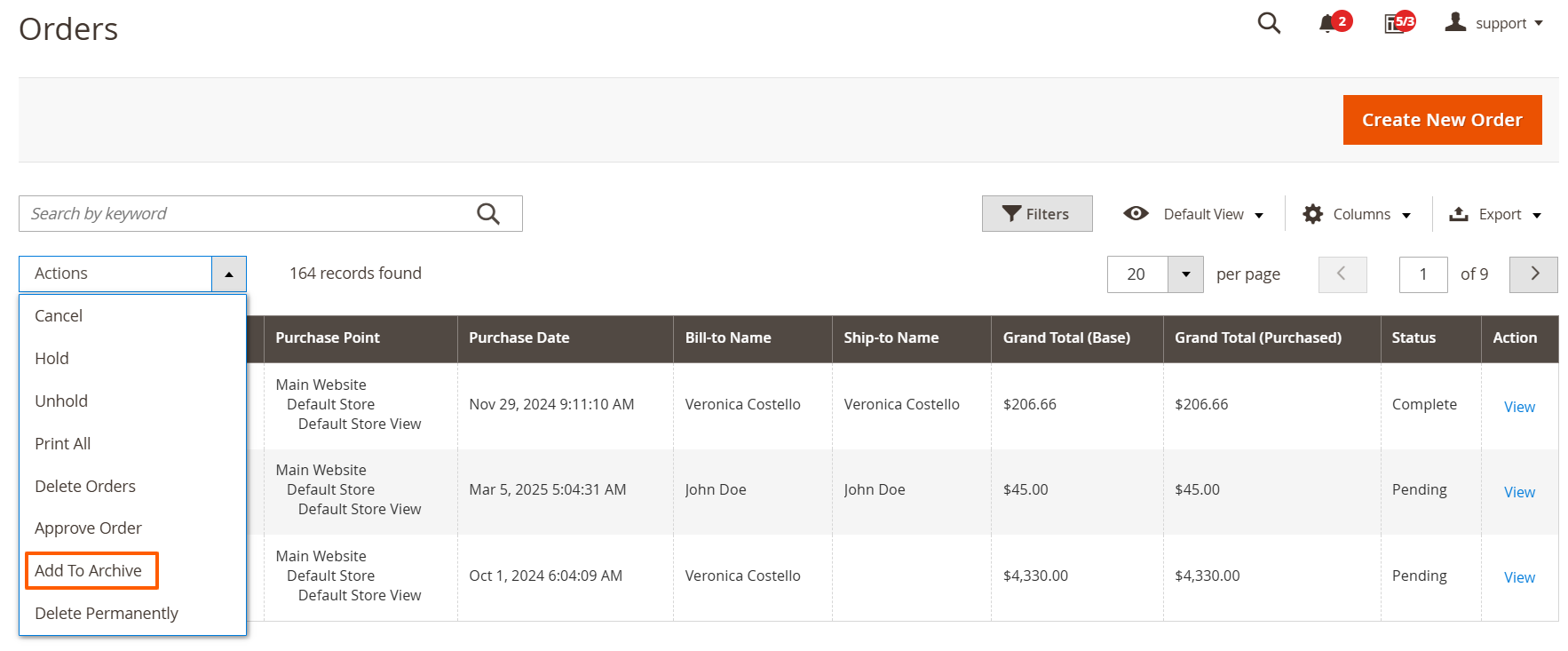
  • To archive specific orders, navigate to Sales > Orders and select the orders to archive. Archived orders can be restored to the Orders Grid at any time.
  • Choose the orders you want to archive, then select the 'Add To Archive' action. The archived orders will then be moved to the dedicated Archived Orders grid.

Permanently Delete Orders

delete-permanetly-in-sales-order-grid
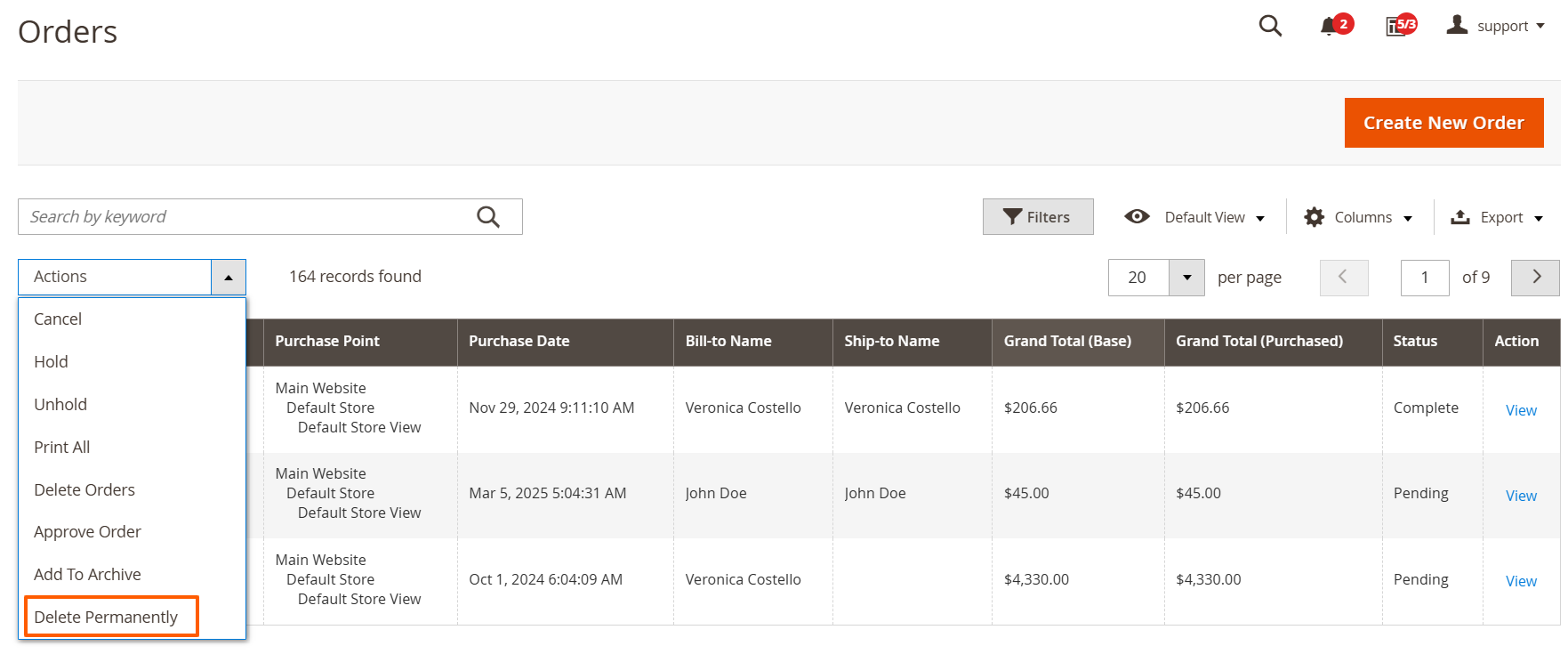
  • To permanently delete orders, go to Sales > Orders and select the orders to delete.
  • Select the orders you wish to delete from the Orders Grid, then apply the “Delete Permanently” action.

Managing Archived Orders

order-archive-grid-with-options
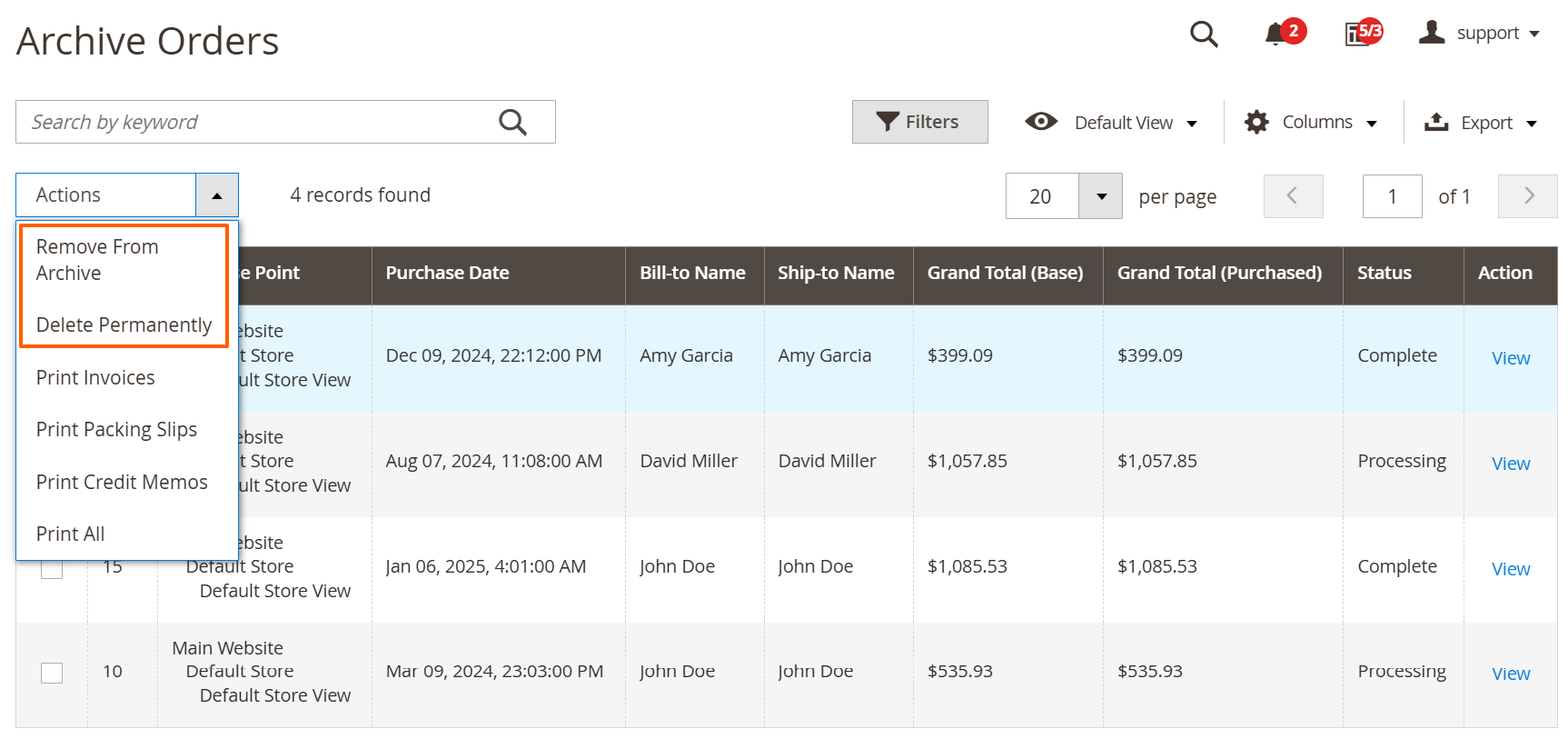
  • In the Order Archive grid, you have two options: permanently delete orders, or restore them to the Orders grid.

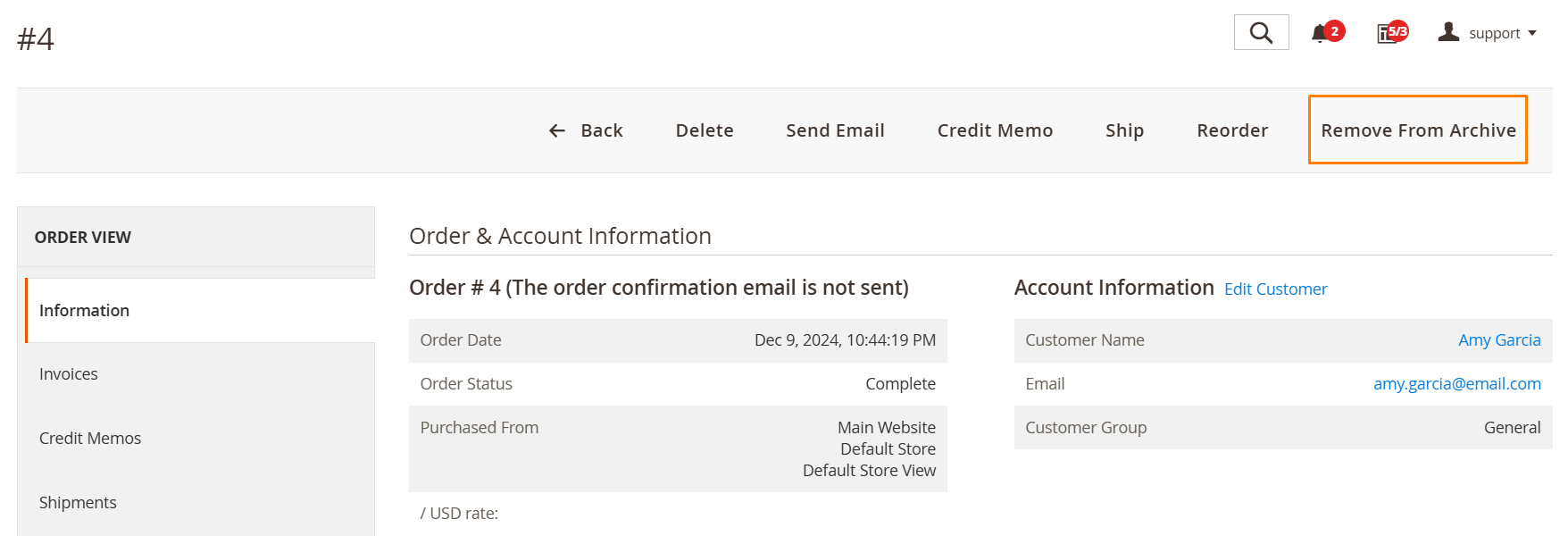
Restoring Orders from the Order Info Page

order-archive-on-sales-order-view-page
  • You can view the details of any archived order. Simply click the “View” link in the right-hand column of the grid.
  • You can restore archived orders directly from the Order Info page.
FAQs

Frequently Asked Questions

It allows admins to archive old orders to keep the order grid clean and improve backend performance.  
Archiving reduces database load, speeds up order grids, and simplifies daily order processing.  
Yes. Archived orders can be restored to the main order grid at any time when needed.  
No. Archived orders remain available for reports, invoices, and compliance purposes.  
Yes. It is designed to handle large order volumes and enterprise-level Magento stores.  
   Ask a question
REVIEWS

Changelog

1.1.1 – December 30, 2025

  • Upgraded for compatibility with Magento 2.4.8-p3.
  • Compatible with PHP version 8.4.

1.1.0 - September 1, 2024

  • Minor Bug Fixes

1.0.9 – June 25, 2025

  • Compatibility with Magento 2.4.8-p1.

1.0.8 – July 6, 2024

  • Compatibility with Magento 2.4.7 versions.

1.0.7 – February 1, 2023

  • Resolved the issue with the Back button on the archived order grid.
  • Removed archive-related mass actions for users with restricted permissions.

1.0.6 – August 5, 2022

  • The extension is now compatible with PHP versions up to 8.1.
  • The extension now supports Magento 2.4.5.
  • Introduced an "Archived Orders" tab in the customer view section of the admin panel, allowing easy access to archived orders.

1.0.5 – August 5, 2022

  • The extension is now compatible with PHP versions up to 8.1.
  • The extension now supports Magento 2.4.5.
  • Introduced an "Archived Orders" tab in the customer view section of the admin panel, allowing easy access to archived orders.

1.0.4 – December 12, 2020

  • Fixed the issue where orders were not appearing in the main Orders grid after updating order information from the Archive Orders grid.
  • Resolved the issue where invoices, shipments, and credit memos were not being archived along with their associated orders.

1.0.3 – February 27, 2020

  • Resolved validation issues in order-related tables.
  • Fixed timeout issue when accessing the order page from the admin panel.

1.0.2 – April 27, 2019

  • Minor visual enhancements for the extension settings in the admin panel.

1.0.1 – September 16, 2018

  • Invoices and shipments are now correctly displayed in the archive section.
  • Resolved the issue where invoices, shipments, and credit memos were being archived for orders that should not have been archived.

1.0.0 – March 6, 2018

  • Initial launch.