📘
User Guide & Documentation
Step-by-step setup manual for Fraud Detector Extension
View →
Changelog v2.2.0 Compatible with Magento CE, EE · 2.3.x, 2.4.x

Fraud Detector Extension

Fraud Detector Extension enhances your existing Magento 2 (Adobe Commerce/Adobe Commerce Cloud) store with intelligent fraud prevention capabilities, allowing you to automatically detect and block suspicious transactions—ensuring a safer shopping environment for both merchants and customers.

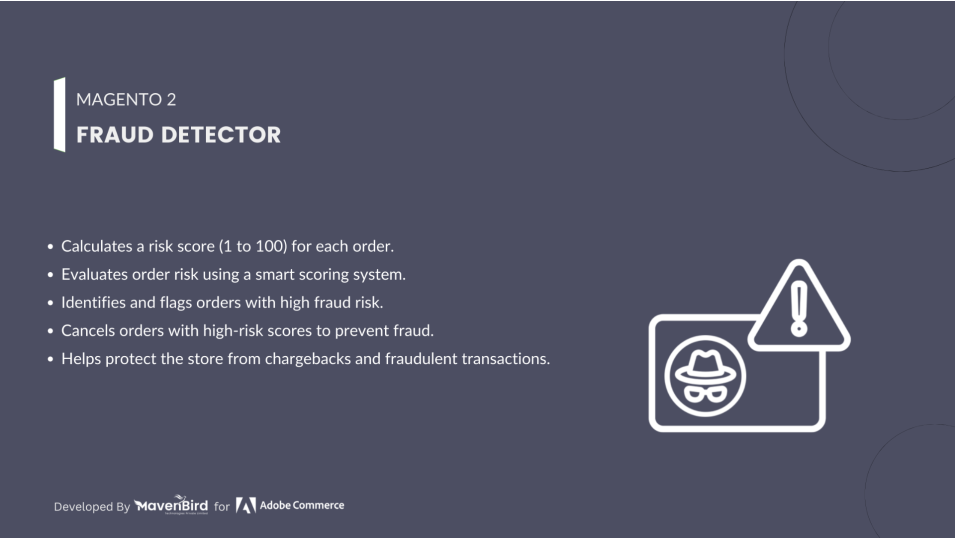
  • Protects your store by detecting and preventing fraudulent orders.
  • Calculates a fraud risk score for every order (1 to 100).
  • Higher scores indicate a higher risk of fraud.
  • Helps decide whether to approve or cancel orders based on risk scores.
  • Minimizes losses by preventing high-risk transactions.
  $89
No surprise fees

We are committed to being open and transparent with our customers. When you purchase our module, you automatically receive one year of free support service and free updates.

Why is this important?

  • Seamless Installation and Configuration: We understand that setting up a new module can take time to configure according to your specific needs. That's why we offer a full year of free support. Our experienced team is here to assist you with installation, configuration, and any questions you might have. We're eager to share our expertise to ensure you get the most out of your purchase.
  • Stay Updated with Magento (Adobe Commerce) Releases: Magento releases new versions approximately every three months. These updates can sometimes introduce compatibility challenges. To keep your store running smoothly, we provide a year of free access to the latest versions of our modules, ensuring that you can upgrade Magento and our modules without encountering any obstacles.
  • Subscription Included: Renewing your subscription ensures continued access to the latest updates and support from our team. This means you can be confident that any issues you encounter with the extension will be resolved quickly and efficiently. You can cancel your subscription at any time without any additional fees.
Hyvä Bronze Partner
Adobe Commerce
Secure Checkout

Highlighted Features

  • Fraud Risk Scoring

    Assigns a fraud score (1–100) to each order. Higher scores indicate higher fraud risk, helping merchants assess order safety quickly.

  • Risk-Based Order Evaluation

    Analyzes customer, payment, and order details. Orders above a set score can be flagged or marked as high-risk automatically.

  • Real-Time Fraud Detection

    Instantly evaluates orders as they're placed, detecting fraud before completion to reduce chargebacks and losses.

  • Customizable Risk Threshold

    Merchants can define score ranges for low, medium, or high risk, enabling flexible and proactive fraud control.

  • Order Status Control

    Automatically updates order status based on risk score—putting risky orders on hold, flagging, or canceling them.

  • Detailed Fraud Reports

    View in-depth reports from the admin panel, including risk factors, scores, and trends for smarter fraud management.

  • Seamless Integration with Magento 2

    Fully compatible with Magento 2, blending with order grids, customer accounts, and sales rules for easy use.

  • Data-Driven Insights & Risk Analysis

    Analyze past fraud data to spot trends and adjust thresholds, improving fraud prevention over time.

Description

Managing Fraud Risk Ratings

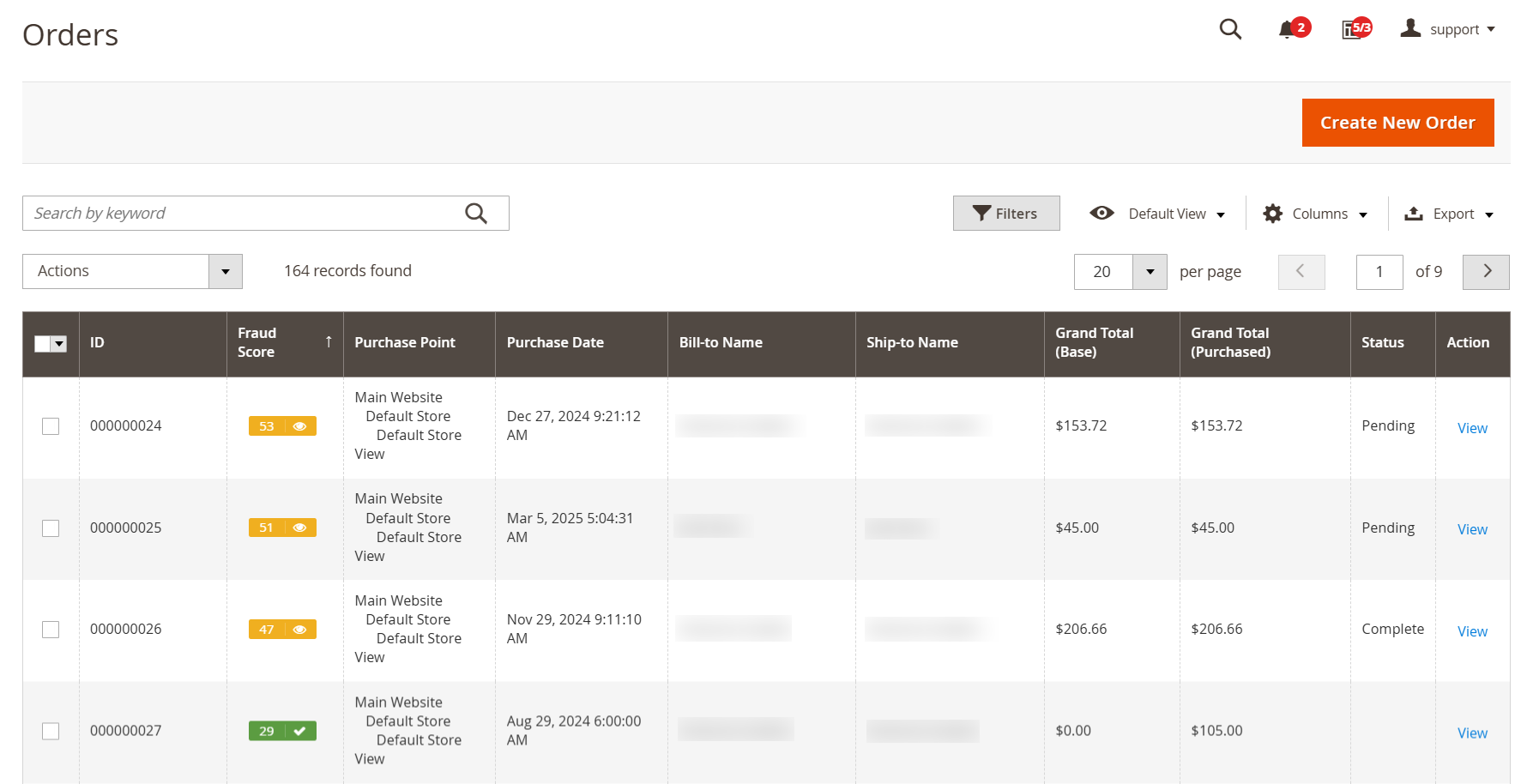
fraud-score-in-sales-order-grid

Protect your Magento 2 store from fraud with the Fraud Detector extension, which assigns a risk score (1–100) to each order, helping you flag, hold, or cancel suspicious transactions. Improve fraud prevention, make risk-based decisions, boost efficiency, protect customers, and set custom risk thresholds—all backed by insightful reporting.

  • The Fraud Detection extension evaluates all incoming orders in your store, assigning them a Risk Score based on a multi-factor assessment defined by specific indicators and rules.
  • This score will be displayed in the Sales → Orders grid, represented by a colored marker in the Fraud Score column alongside the numerical rating.

Setting Up Fraud Scores

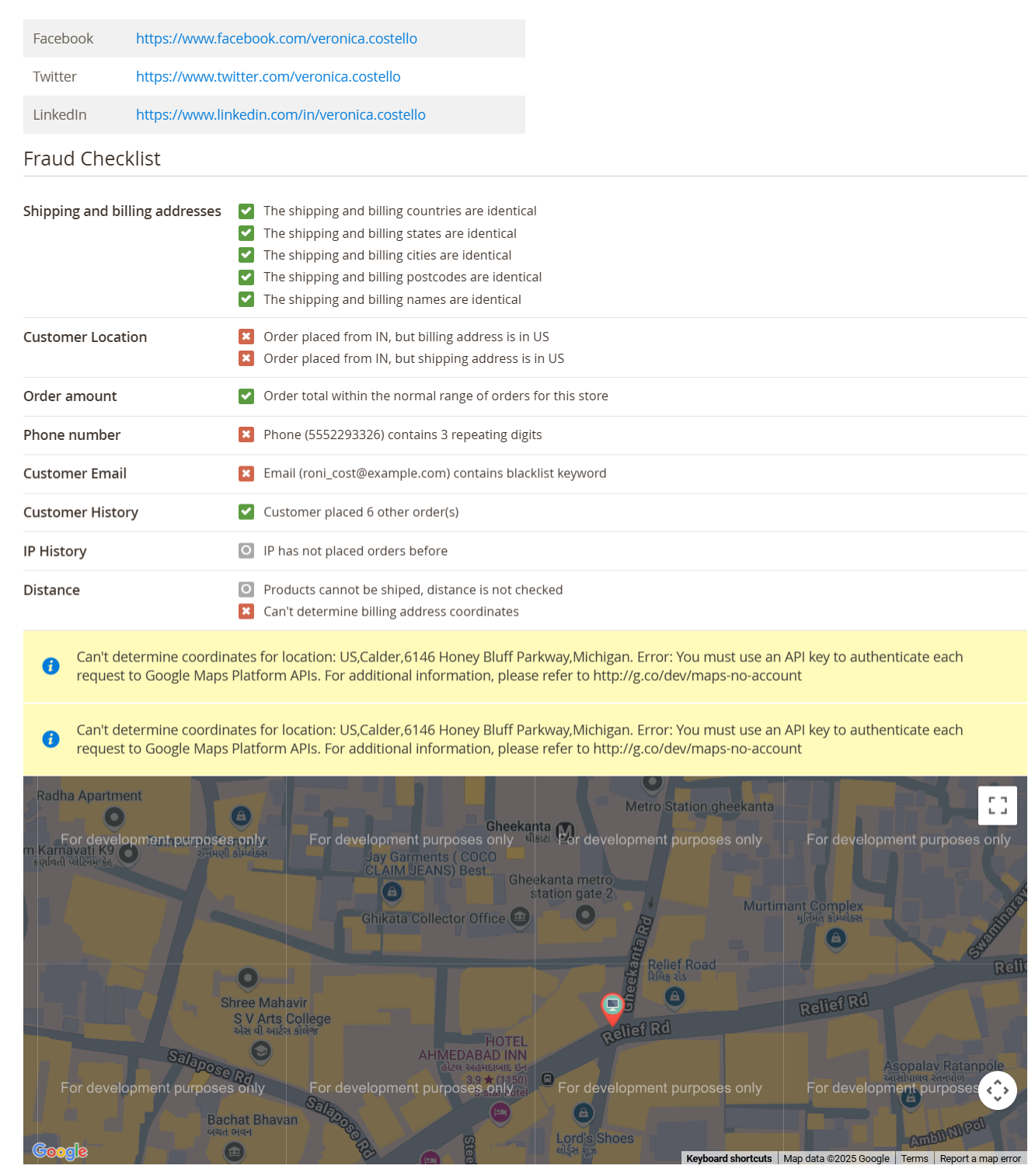
fraud-detector-details-on-order-view-page

Our extension generates Fraud Scores based on a series of indicators and rules. Each indicator represents an individual check, and the results are presented in a dedicated tab on the Order Edit page.

  • Social Network Verification: Displays social media profile links for initial verification.
  • Address Matching: Compares shipping and billing addresses, which must match, and checks customer location against IP address.
  • Order Analysis: Evaluates the order amount against the store’s average to identify significant deviations.
  • Fraud Indicators: Analyzes phone numbers and emails for unusual patterns and risky terms.
  • Customer and IP History: Reviews customer sales history and IP address consistency, ensuring most orders come from the same IP. Additionally, checks geographic distance between the customer’s location and billing/shipping address.

Modifying Indicator Importance

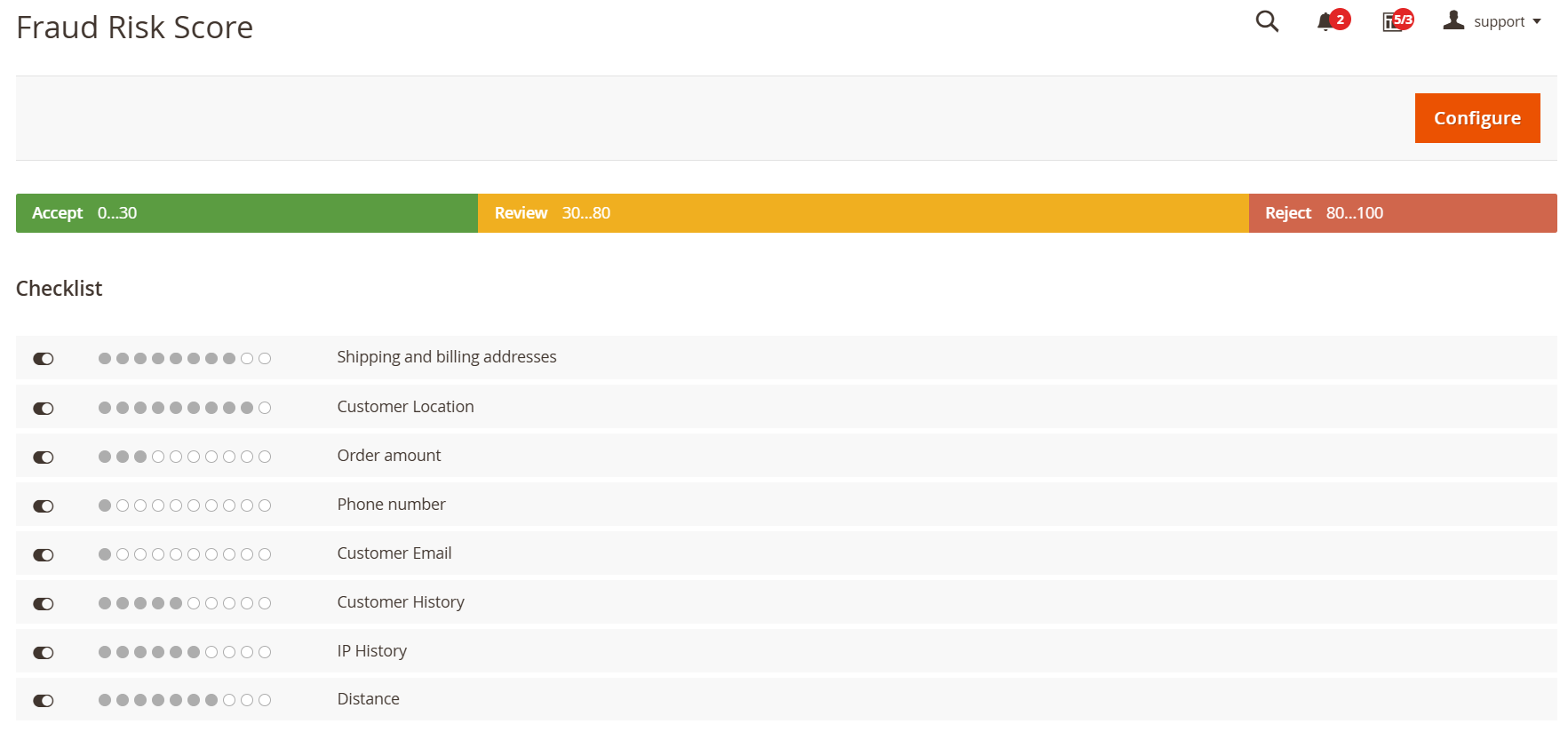
fraud-risk-score
  • To modify the importance of indicators, navigate to System → Fraud Detection → Fraud Risk Score
  • Click the Configure button to access the Risk Configuration Page.
  • From this point forward, our extension will evaluate orders and assign scores based on these indicators.
  • However, keep in mind that these scores can be overridden by Fraud Score Rules, allowing for a more flexible approach to assessing orders for fraud.

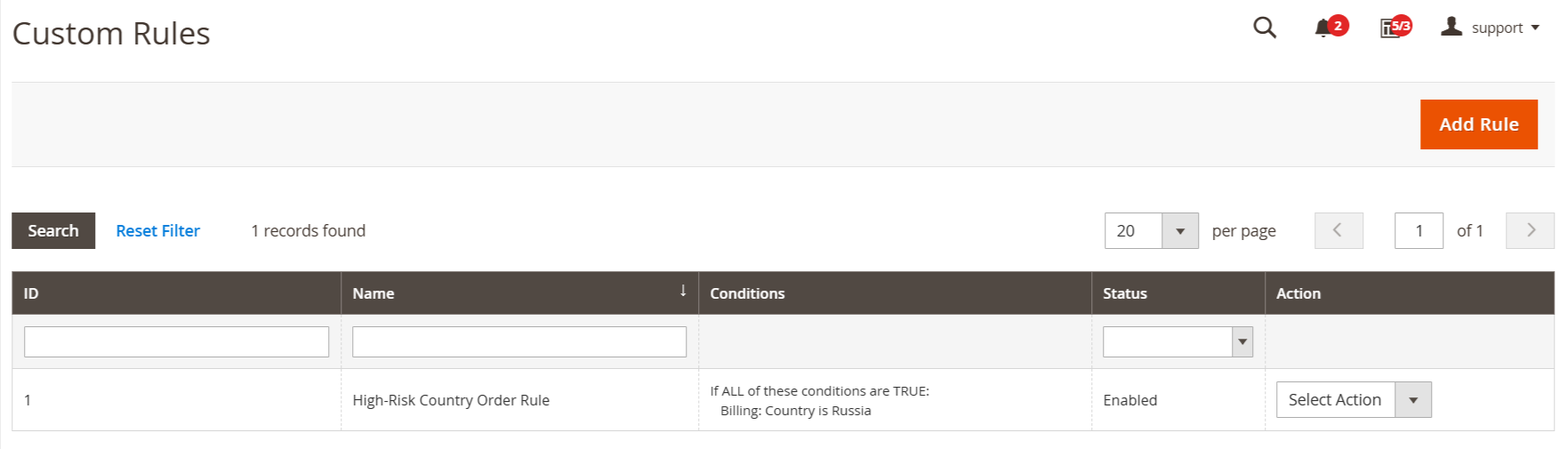
Custom Fraud Detection Rules

create-rule-grid

Our extension generates Fraud Scores based on a series of indicators and rules. Each indicator represents an individual check, and the results are presented in a dedicated tab on the Order Edit page.

  • Custom rules enable you to tailor indicators for assessing orders for fraudulent activity. These rules take precedence over predefined indicators, offering enhanced flexibility and control.
  • You can find all custom rules in the dedicated grid under System → Fraud Detection → Custom Rules.
FAQs

Frequently Asked Questions

A Fraud Detector identifies suspicious transactions using predefined rules, behavior analysis, and risk scoring to prevent fraud.  
It analyzes transaction data such as IP address, location, order value, and behavior patterns to flag risky orders.  
Yes. By blocking or reviewing high-risk orders, it significantly lowers chargebacks and payment disputes.
Yes. Orders can be flagged for manual review, allowing admins to approve or cancel suspicious transactions.  
Yes. It integrates with major eCommerce platforms and payment gateways without affecting checkout performance.
   Ask a question
REVIEWS

Changelog

2.2.0 – january 15, 2026

  • Upgraded for compatibility with Magento 2.4.8-p3.
  • Compatible with PHP version 8.4.

2.1.1 – December 30, 2025

  • Upgraded for compatibility with Magento 2.4.8-p3.

* Verified and compatible with PHP version 8.3.

2.1.0 - September 1, 2024

  • Minor Bug Fixes

2.0.0 – August 9, 2024

  • Compatible with Magento version 2.4.7 version.

1.0.8 – September 2, 2023

  • Resolved Google Maps loading issue.

1.0.7 – June 30, 2023

  • Resolved: Calculation of Fraud Risk Score for orders containing virtual or downloadable products.
  • Fixed: Display of recent orders on the Fraud Risk Score Configuration page.
  • Issue resolved: Error when changing Fraud Risk Score statuses using the slider.

1.0.6 – September 26, 2022

  • Resolved compatibility issues with PHP 8.1.

1.0.5 – August 28, 2021

  • Resolved issue with score calculation.
  • Fixed problem with editing the custom rule.

1.0.4 – July 25, 2020

  • Issue with actions in the Admin Panel related to Custom Rules.
  • Support for Magento 2.4.

1.0.3 – May 10, 2019

  • Fixed validation for payment method.
  • Enhancements rules for Shipping Methods.

1.0.2 – August 6, 2018

  • Resolved an issue related to updating the fraud score.

1.0.1 – March 2, 2018

  • Initial launch.