
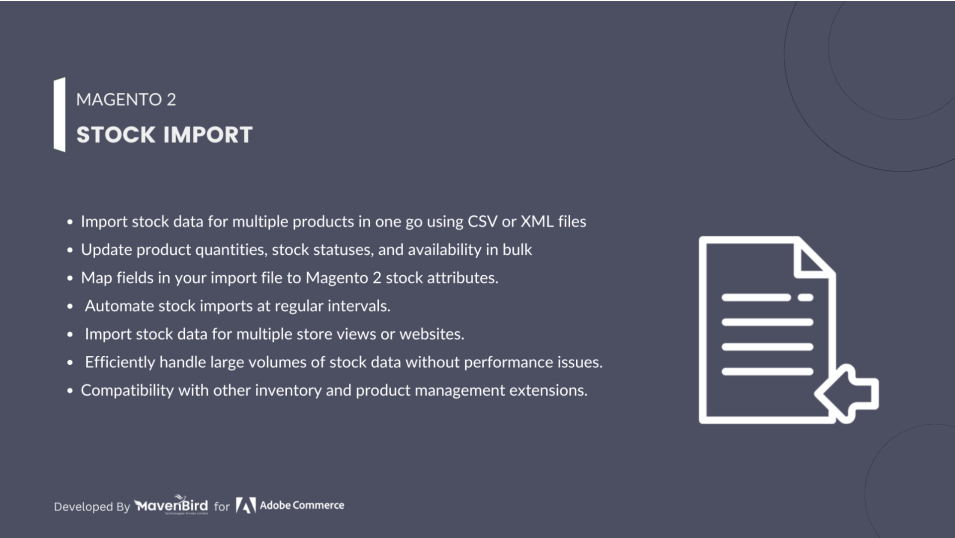
The Magento 2 Import Stock Extension enables you to quickly import and update large quantities of product stock data, streamlining inventory management and ensuring accurate stock levels across your store with minimal manual effort.
User Guide & Documentation
Step-by-step setup manual for Import Stock Extension
Changelog v2.2.0
Compatible with Magento CE, EE · 2.3.x, 2.4.x
Import Stock Extension
- CSV, XML, TXT, Tab, ASCII and Fixed length files are imported.
- Build an unlimited number of import profiles.
- Update all fields of product stock.
- Imports from the backend to monitor control.
- Capability for importing & checking files from the backend.
- Import relative updates of stock level.
- Custom Product Attribute Updates,& Bulk Price updates.
- Support for Multi-Warehouse (MSI)


$79
No surprise fees
We are committed to being open and transparent with our customers. When you purchase our module, you automatically receive one year of free support service and free updates.
Why is this important?
- Seamless Installation and Configuration: We understand that setting up a new module can take time to configure according to your specific needs. That's why we offer a full year of free support. Our experienced team is here to assist you with installation, configuration, and any questions you might have. We're eager to share our expertise to ensure you get the most out of your purchase.
- Stay Updated with Magento (Adobe Commerce) Releases: Magento releases new versions approximately every three months. These updates can sometimes introduce compatibility challenges. To keep your store running smoothly, we provide a year of free access to the latest versions of our modules, ensuring that you can upgrade Magento and our modules without encountering any obstacles.
- Subscription Included: Renewing your subscription ensures continued access to the latest updates and support from our team. This means you can be confident that any issues you encounter with the extension will be resolved quickly and efficiently. You can cancel your subscription at any time without any additional fees.
Hyvä Bronze Partner
Adobe Commerce
Secure Checkout
Highlighted Features
-
Bulk Stock Import Capability
The extension allows for the efficient importation of large quantities of stock data, enabling merchants to update stock levels for multiple products simultaneously using CSV,XML and Excel files, which can significantly reduce manual data entry and time.
-
Versatile Product Identification
It supports multiple methods for identifying products during the import process, such as using SKU, product ID, or other custom attributes, ensuring flexibility and accuracy in stock updates.
-
Comprehensive Stock Level Management
Merchants can set precise stock levels for products, including marking items as in-stock, out-of-stock, or available for backorder, helping to maintain accurate inventory records and manage customer expectations.
-
Support for Multi-Warehouse Systems
The extension accommodates businesses with multiple warehouses by allowing separate stock levels to be maintained and updated for each warehouse or source, providing better inventory control and logistics management.
-
Robust Error Handling and Logging
The extension includes comprehensive error reporting and logging mechanisms that help identify and track issues encountered during the import process, allowing for quick troubleshooting and corrections.
-
Rigorous Data Validation
To prevent incorrect stock data from being imported, the extension performs thorough data validation checks, ensuring that only accurate and valid stock information is applied to the inventory.
Description
Import Profile
The Import Stock Extension for Magento 2 allows store owners to bulk import inventory data via CSV, saving time and reducing errors. It supports multi-store inventory, automatic SKU matching, and real-time updates, offering a user-friendly interface for efficient stock management.
- Go to Store → Configuration → MAVENBIRD EXTENSIONS →Stock Import
- Enable the stock import extension.
- First of all click on Catalog → Stock Import → Import Profiles. Then Add New profile for stock import.
- Then click on the Add New Profile button.
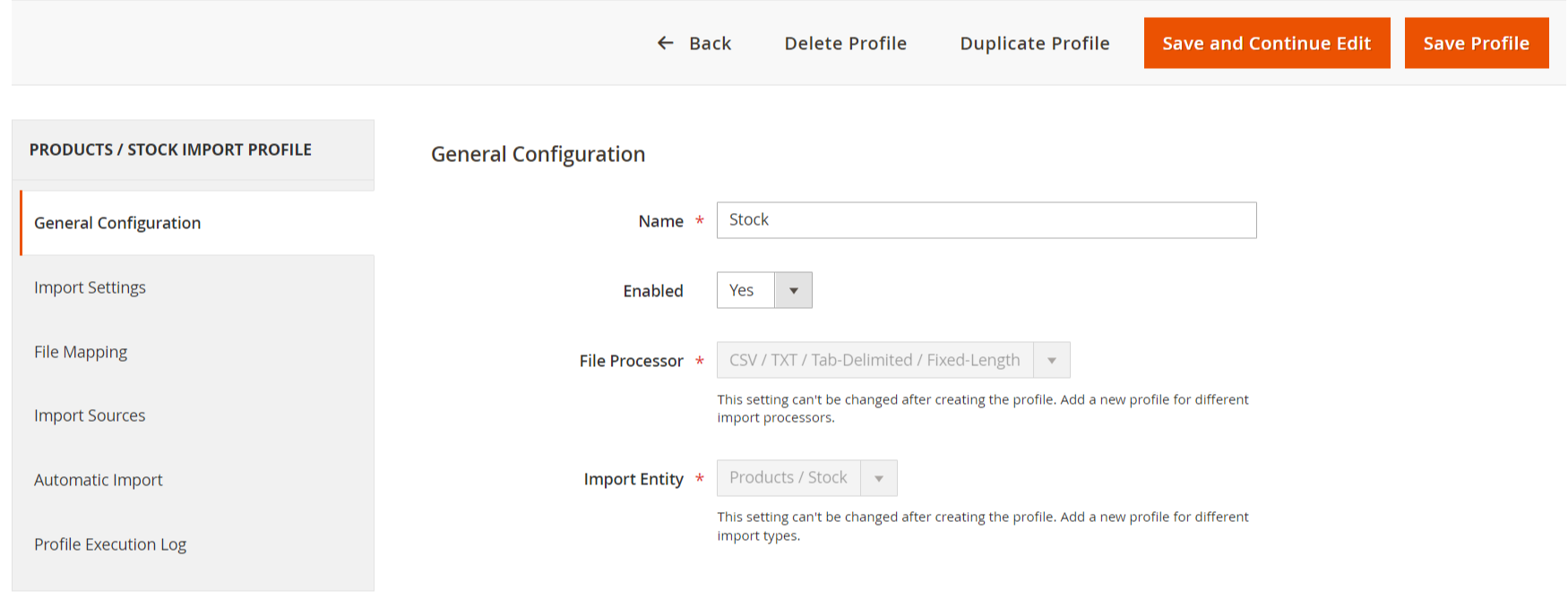
Add New Profile
The Import Stock Extension for Magento 2 allows store owners to bulk import inventory data via CSV, saving time and reducing errors. It supports multi-store inventory, automatic SKU matching, and real-time updates, offering a user-friendly interface for efficient stock management.
- Enter profile name here.
- Select one option from dropdown.
- Import entity for product stock.
File Mapping
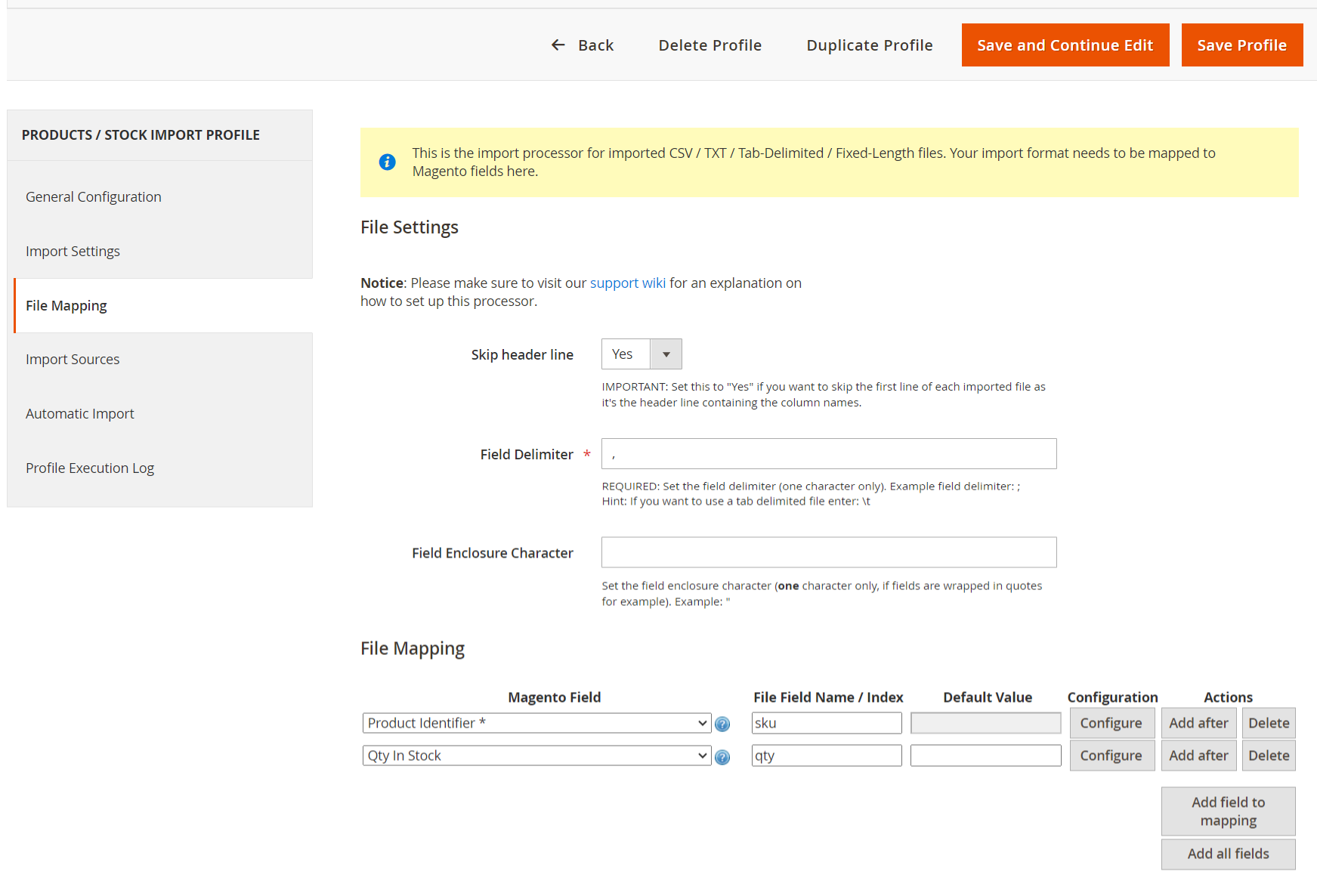
- A dropdown option to choose whether to skip the first line of the imported file, which typically contains column names.
- A required field to specify the character that separates data fields in the file (e.g., a comma).
- An optional field to define a character that encloses data fields, useful for handling fields with special characters.
- Dropdowns for selecting Magento fields such as “Product Identifier” and “Qty In Stock.”
- Input fields for specifying the corresponding names in the import file (e.g., “sku” for Product Identifier and “qty” for Quantity).
- An option to set default values for the fields if needed.
Stock Import Tools
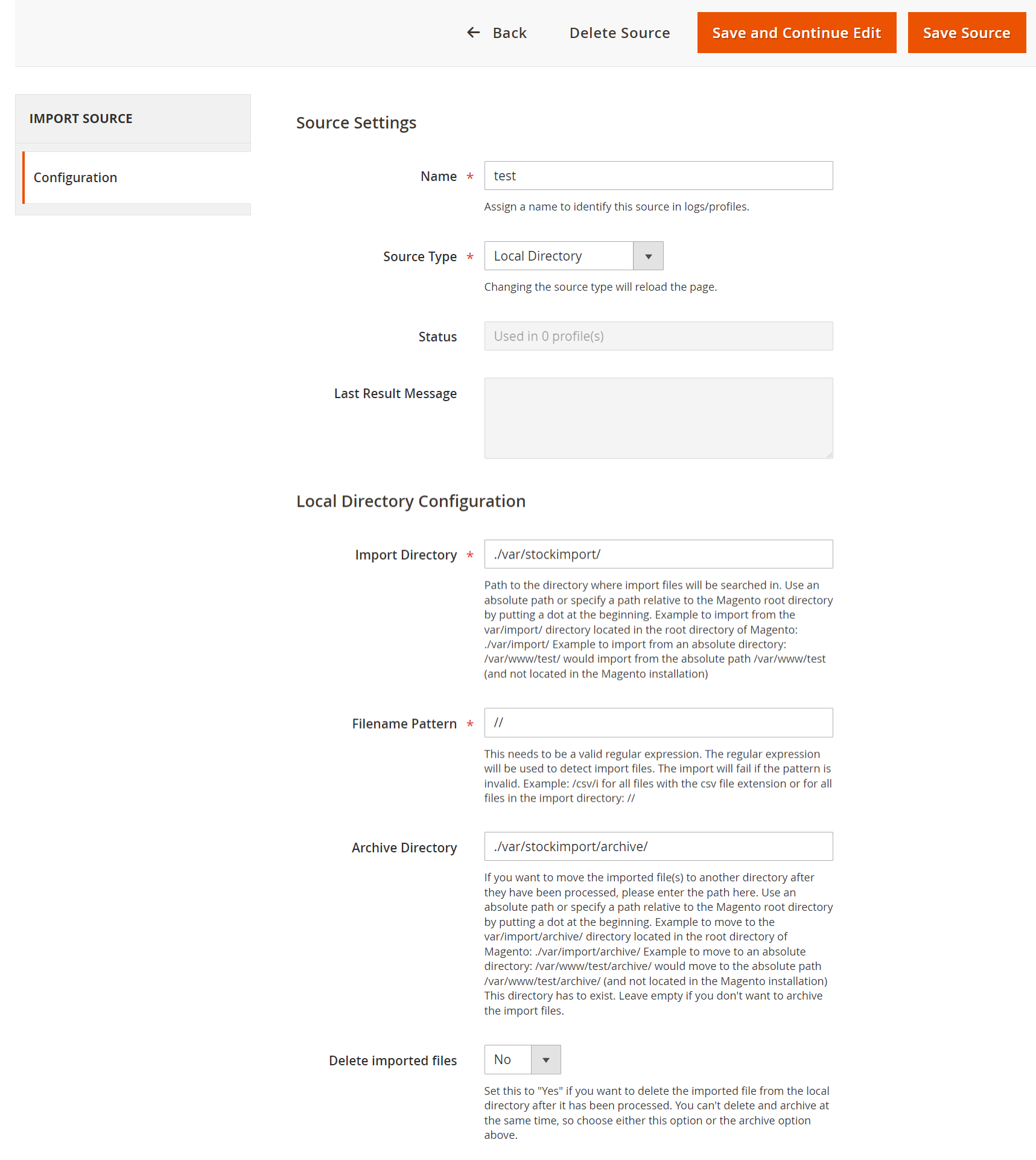
- First of all click on Catalog → Stock Import → Import Sources. Then Add New Sources for stock import.
- Then click on the Add New Source button.
- A dropdown menu to select the type of source, with “Local Directory” currently selected.
- Specifies the path (/var/stockimport/) where import files will be searched. It allows for absolute or relative paths.
- A field for entering a valid regular expression to detect import files. The current entry is , which is invalid.
- Path (/var/stockimport/archive/) where processed files can be moved. Similar to the import directory, it allows for absolute or relative paths.
Import Source
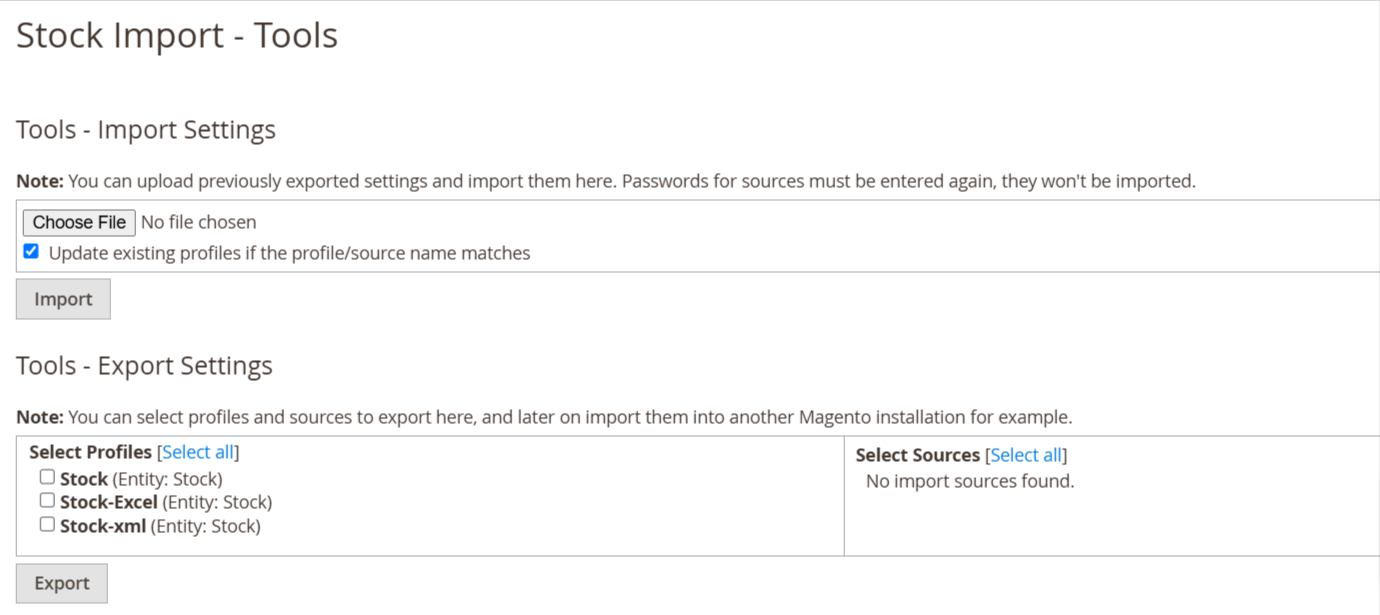
- First of all click on Catalog → Stock Import → Tools.
- After creating a profile and sources you have to export your profile and sources from here using the Export Settings button.
- Then you have an export profile json file then you can change anything and same changes file you have uploaded in Import Settings.
Execution Logs
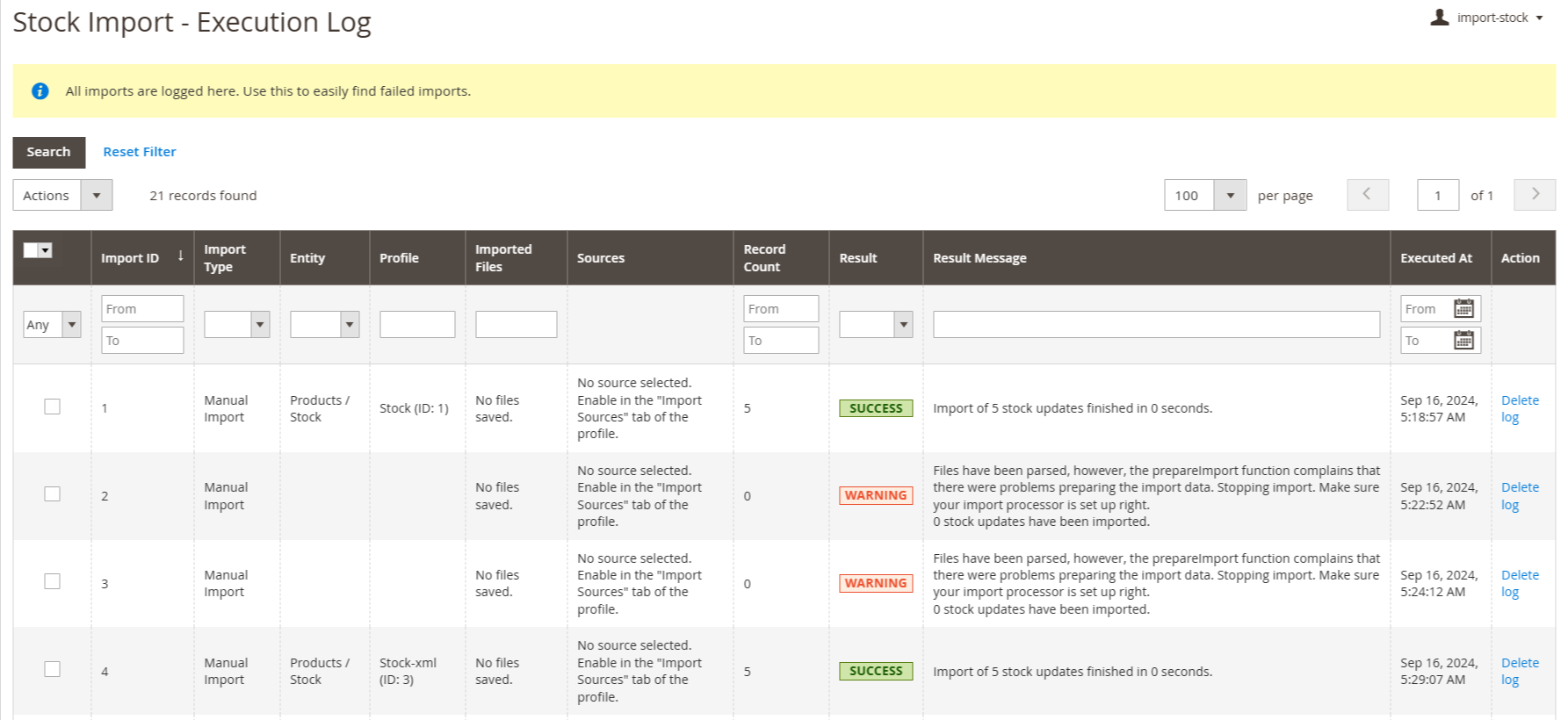
- First of all click on Catalog → Stock Import → Execution Log.
- When import a file then some logs is create so this log entry in this table.
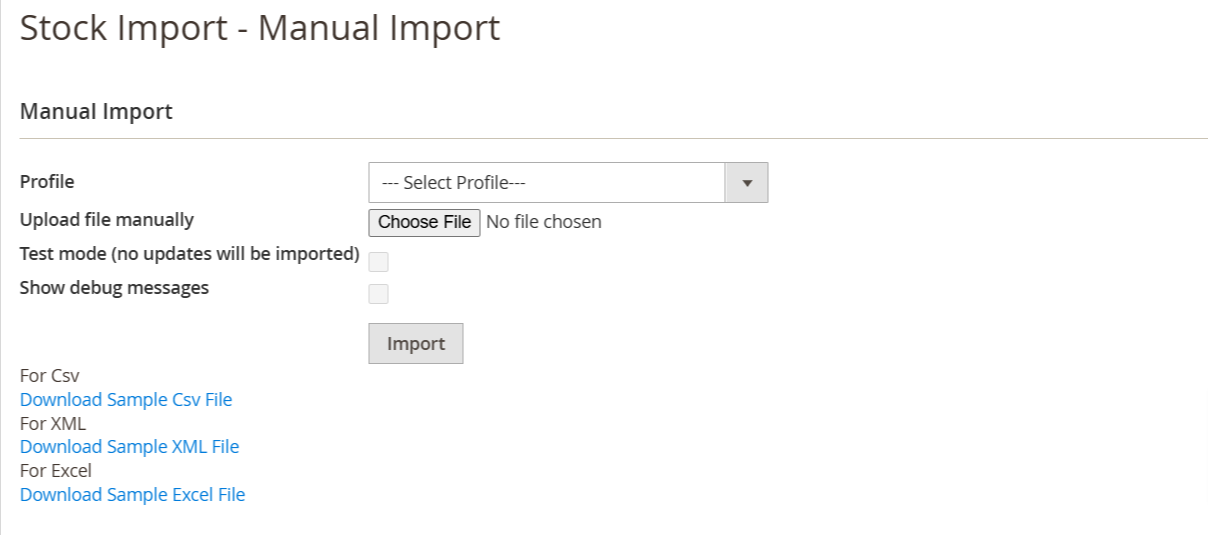
Manual Import
- First of all click on Catalog → Stock Import → Manual Import.
- After exporting the profile and sources file you can import changes file in the Manual Import section and also you can download sample files for csv and xml so based on profile you can import csv or xml file.
- In this section you have to import stock and also you have to see test mode and debug messages from here.
- Then click on Download Sample CSV file then download sample data in csv file.
Update Product Quantity
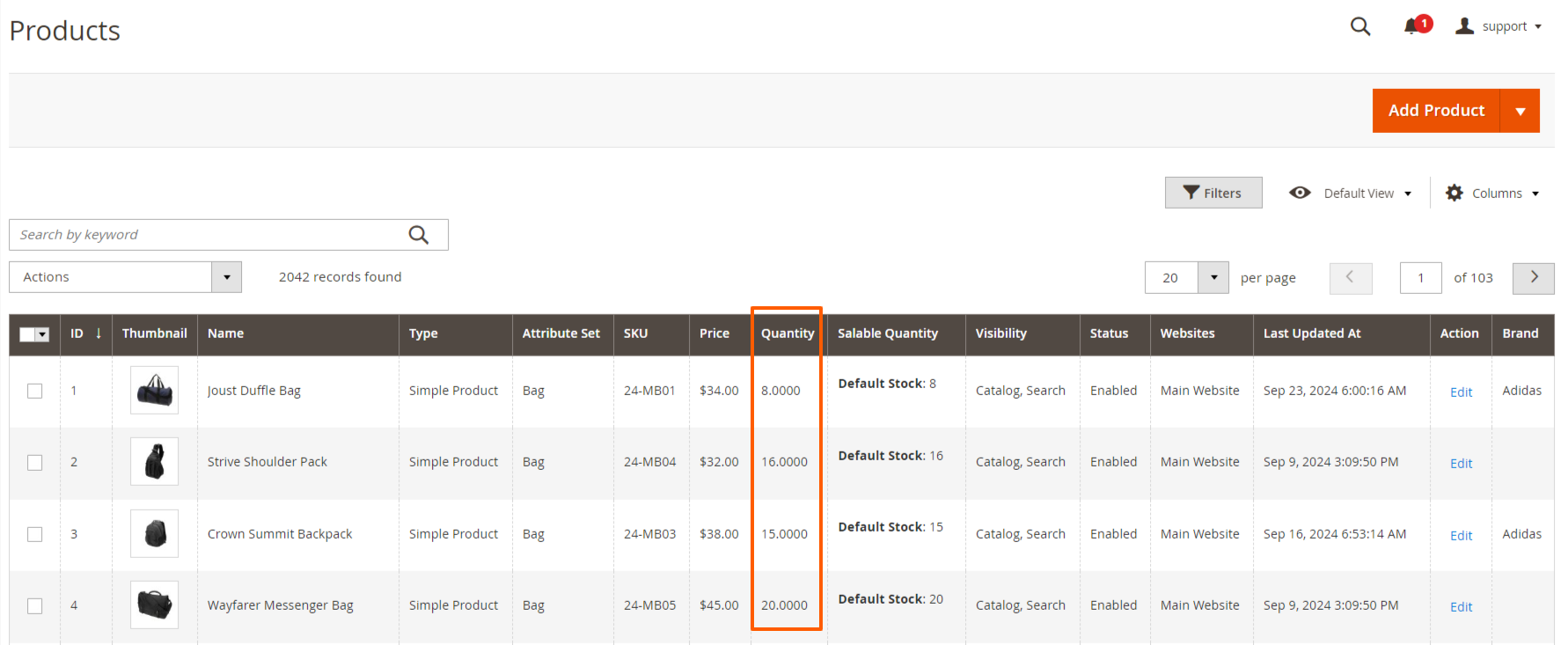
- First of all click on Catalog → Products
- when you import the csv or xml or excel file the product quantity are changed as per the sample file. That are updated in that image.
FAQs
Frequently Asked Questions
It allows admins to import product stock quantities in bulk using CSV or spreadsheet files.
It automates bulk inventory updates, eliminating manual stock edits for large product catalogs.
The extension supports CSV and spreadsheet formats compatible with Magento’s import structure.
Yes. It validates data before import to prevent errors and stock inconsistencies.
Ask a question
REVIEWS
Excellent bulk stock management
This extension made updating product inventory extremely easy. We can now import stock quantities for hundreds of products in a single CSV file which saves a huge amount of manual work.
Improves inventory accuracy
Automated stock imports reduce human errors and keep product quantities accurate.
Speeds up store operations
Updating stock manually used to take hours but now it only takes a few minutes.
Reliable and stable
We have been using this extension for several months and it works consistently without errors.
Helpful error logging
The error reporting feature makes it easy to identify problems in import files and fix them quickly.
Reliable stock update tool
We regularly update product quantities using CSV files and the extension processes them quickly and accurately.
Stock Management Made Easy
Very useful extension for importing stock levels. It works without issues and helps keep my stock in sync.
Supports multiple file formats
The support for CSV, XML, and Excel files makes it very flexible for importing stock data.
Lightweight extension
The module performs imports efficiently without slowing down the admin panel.
Perfect for automated stock updates
We use scheduled imports to keep inventory synchronized with external systems.
Smooth Magento integration
The module integrates perfectly with Magento and updates product quantities correctly.
Perfect for large catalogs
Our store has thousands of products and updating stock manually was very time consuming. This extension allows us to update everything quickly using import files.
Highly recommended module
If you manage large inventories in Magento, this extension is extremely helpful.
Efficient Stock Management
This extension has helped me maintain accurate stock levels with ease. It works perfectly for bulk stock imports and exports.
Very useful for daily updates
Our warehouse team updates stock levels every day using the import feature.
Excellent inventory tool
This extension provides exactly what we needed for managing product inventory updates.
Great inventory automation
The ability to import stock data in bulk has simplified our inventory management process significantly.
Very efficient extension
Updating stock levels for multiple products at once saves our team hours of work every week.
Fast import performance
Even large stock files import quickly without affecting store performance.
Great admin interface
The admin panel for managing import profiles is well designed and easy to use.
Easy to configure
The import profiles and file mapping settings are easy to configure even for non-technical users.
Simple CSV mapping
The field mapping system allows us to match CSV columns with Magento attributes easily.
Helpful sample CSV files
The sample files provided helped us set up our first stock import quickly.
Great for multi-warehouse stores
The multi-warehouse stock support is extremely helpful for managing inventory across different locations.
Good compatibility
The extension works perfectly with our Magento 2.4 installation.
Perfect for ERP integrations
We export stock from our ERP system and import it into Magento using this extension.
Excellent for inventory updates
Bulk stock imports allow us to synchronize inventory from our ERP system easily.
Very flexible stock updates
The extension supports relative stock updates and multiple identification methods like SKU.
User-Friendly Interface
The interface is intuitive, making it easy to import and manage stock levels. Highly recommended!
Highly Efficient
The import feature works flawlessly. It's incredibly fast and saves us so much time.
Saves Time on Stock Management
This tool has simplified our inventory management. Importing stock has never been easier!
Changelog
2.2.0 – january 15, 2026
- Upgraded for compatibility with Magento 2.4.8-p3.
- Verified and compatible with PHP version 8.4.
2.1.1 – December 30, 2025
- Upgraded for compatibility with Magento 2.4.8-p3.
- Verified and compatible with PHP version 8.3.
2.1.0 - September 1, 2024
- Minor Bug Fixes
2.0.2 – July 4, 2024
- Ensured compatibility with Magento versions 2.4.7, 2.4.7-p3, 2.4.7-p4.
- Verified compatibility with PHP 8.3.
- Resolved issues related to PHP 8.x compatibility.
2.0.1 – December 4, 2023
- Added an option to disable automatic MSI reindexing in the "Import Settings" tab of import profiles.
- Ensured compatibility with Magento version 2.4.0.
2.0.0 – February 11, 2023
- Enhanced compatibility with FTP servers operating behind firewalls.
- Improved error messages for FTP directory listing failures.
1.0.8 – May 13, 2022
- Enhanced display of error and result messages in the execution log for better readability.
- Optimized performance by accurately detecting field value changes to prevent redundant updates.
1.0.7 – October 10, 2021
- Enhanced support for importing stock levels and product data directly from Excel files, including XLS, XLSX, ODS, and Excel XML formats.
1.0.6 – April 23, 2021
- The module code has been updated to align with Magento Coding Standards.
1.0.5 – September 22, 2020
- Resolved issues with sorting, filtering, and searching functionality in log/history grids while editing a profile.
- Fixed a JavaScript error caused by the file mapper component.
1.0.4 – March 16, 2020
- Log entries with zero records updated are now retained if they contain warnings or errors, instead of being deleted as before.
- Resolved an issue in the "Tools" import functionality that previously caused errors when importing profiles.
1.0.3 – August 7, 2019
- Updated "Execution Log" grid column types to longtext to prevent truncation of lengthy result messages.
- Resolved an issue in Tools > Import where the source was not automatically re-assigned to profiles during import.
- Fixed a bug in the stock update process where unintended fields (e.g., price) were mistakenly inserted into the stock_item table when adding new stock items.
- Addressed a configuration loading error for profiles caused by a type mismatch: expected string, but array was given.
1.0.2 – January 16, 2019
- Resolved issues with the SFTP source type by updating to use namespaced class names in the Net_SFTP library.
- Cron jobs associated with deleted profiles are now automatically removed.
1.0.1 – July 10, 2018
- If a product appears multiple times in the import file, its quantities are combined.
1.0.0 – February 27, 2018
- Initial launch.