
The Magento 2 FAQs + Product Questions Extension enables you to create a comprehensive FAQ section for your store, while also allowing customers to ask questions about specific products, helping to reduce uncertainty and improve the overall shopping experience.
User Guide & Documentation
Step-by-step setup manual for FAQs + Product Questions Extension
Changelog v2.1.1
Compatible with Magento CE, EE · 2.3.x, 2.4.x
FAQs + Product Questions Extension
- User-friendly layout for quick access to key information.
- Structured sections to improve search engine ranking.
- Grouped FAQs for easier navigation and clarity.
- Efficient search feature to locate answers instantly.
- Adjustable design to fit your website's look and feel.

$79
No surprise fees
We are committed to being open and transparent with our customers. When you purchase our module, you automatically receive one year of free support service and free updates.
Why is this important?
- Seamless Installation and Configuration: We understand that setting up a new module can take time to configure according to your specific needs. That's why we offer a full year of free support. Our experienced team is here to assist you with installation, configuration, and any questions you might have. We're eager to share our expertise to ensure you get the most out of your purchase.
- Stay Updated with Magento (Adobe Commerce) Releases: Magento releases new versions approximately every three months. These updates can sometimes introduce compatibility challenges. To keep your store running smoothly, we provide a year of free access to the latest versions of our modules, ensuring that you can upgrade Magento and our modules without encountering any obstacles.
- Subscription Included: Renewing your subscription ensures continued access to the latest updates and support from our team. This means you can be confident that any issues you encounter with the extension will be resolved quickly and efficiently. You can cancel your subscription at any time without any additional fees.
Hyvä Bronze Partner
Adobe Commerce
Secure Checkout
Highlighted Features
-
Organized FAQ Categories
FAQs can be organized into multiple categories and subcategories, making it easier for customers to find answers to their questions.
-
Product-Specific Questions
FAQs can be organized into multiple categories and subcategories, making it easier for customers to find answers to their questions.
-
Admin Management
Admins have full control over managing questions and answers. They can approve or reject questions, edit answers for clarity, and delete inappropriate content.
-
SEO Optimization
The extension allows for SEO-friendly URLs, meta titles, and descriptions for each FAQ and question page, improving search engine indexing and visibility.
-
Customizable Layout
Admins can customize the layout, design, and display settings of the FAQ and question sections to match the store's branding and design aesthetics.
Description
FAQs Homepage
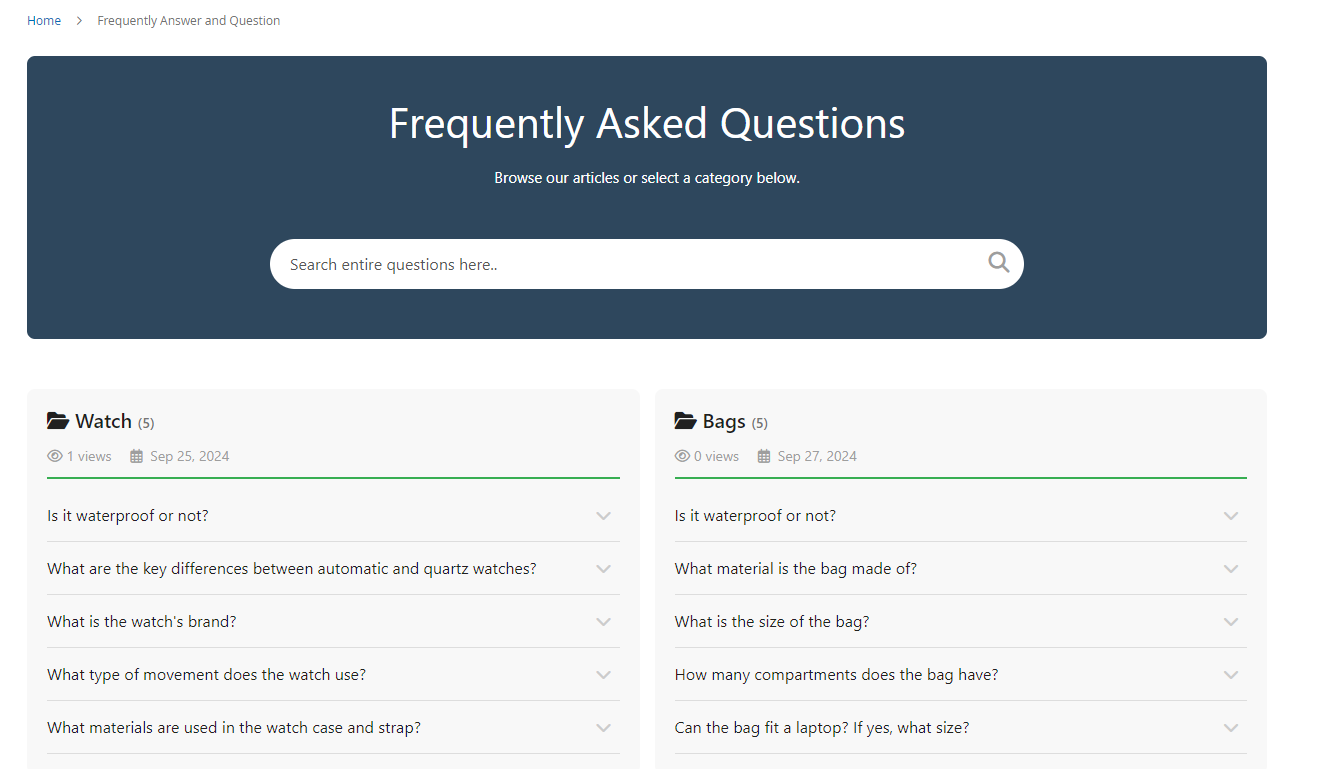
The FAQs Extension for Magento 2 allows merchants to create a well-organized FAQ section, addressing common customer queries and improving satisfaction. It features category management, search functionality, a customizable layout, and a responsive design for a seamless experience across devices. This extension reduces support queries, boosts SEO, enhances trust, and helps increase conversions.
- Allow displaying all categories and dependent question.
- Depending on the installation of admins, FAQ Homepage will display Search box or not. Customers can search any question on FAQ Homepage quickly when using Search box.
FAQs Category Page
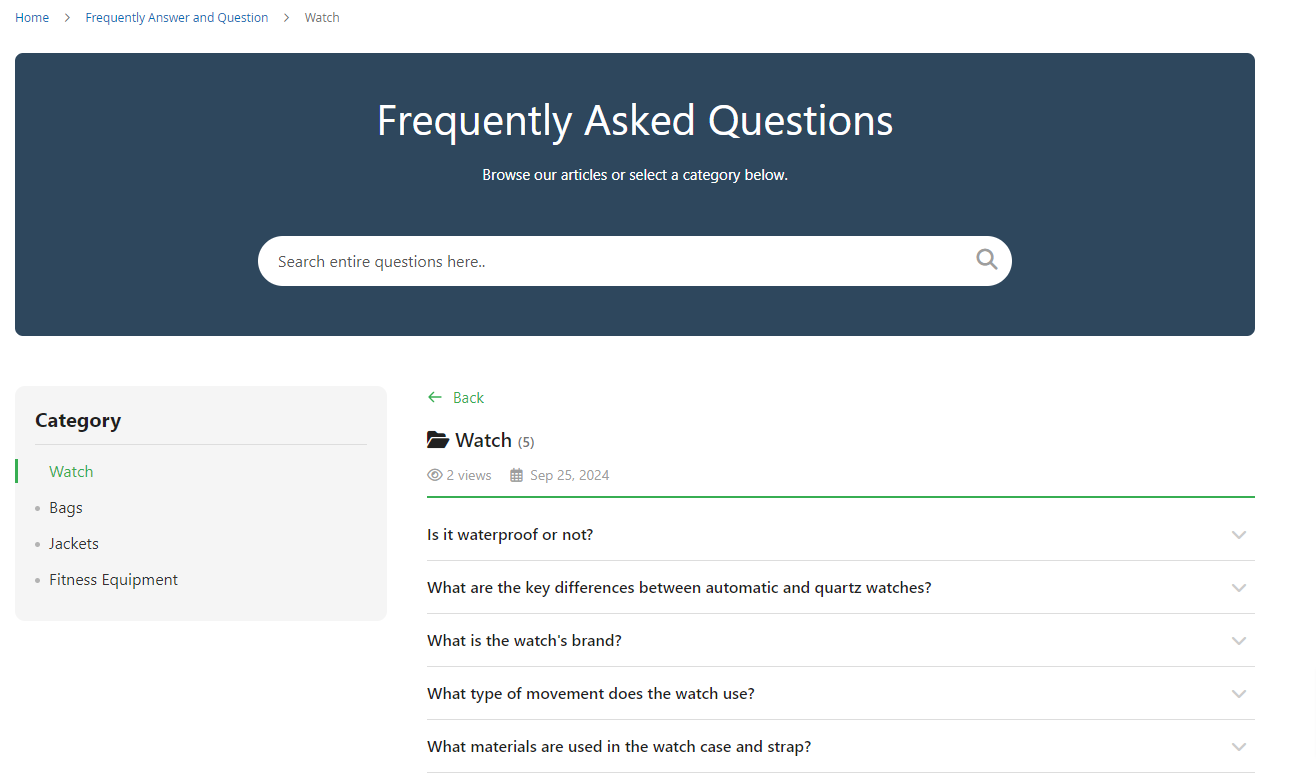
- Display all questions of the category.
- The same as FAQ Homepage, Category page is also displayed on the Search box and performs the function as on FAQ Homepage. When you find by the search box, all satisfied questions (in all categories) will be displayed. To return the current category, you only need to delete the condition that you have just searched.
FAQs Category View Page
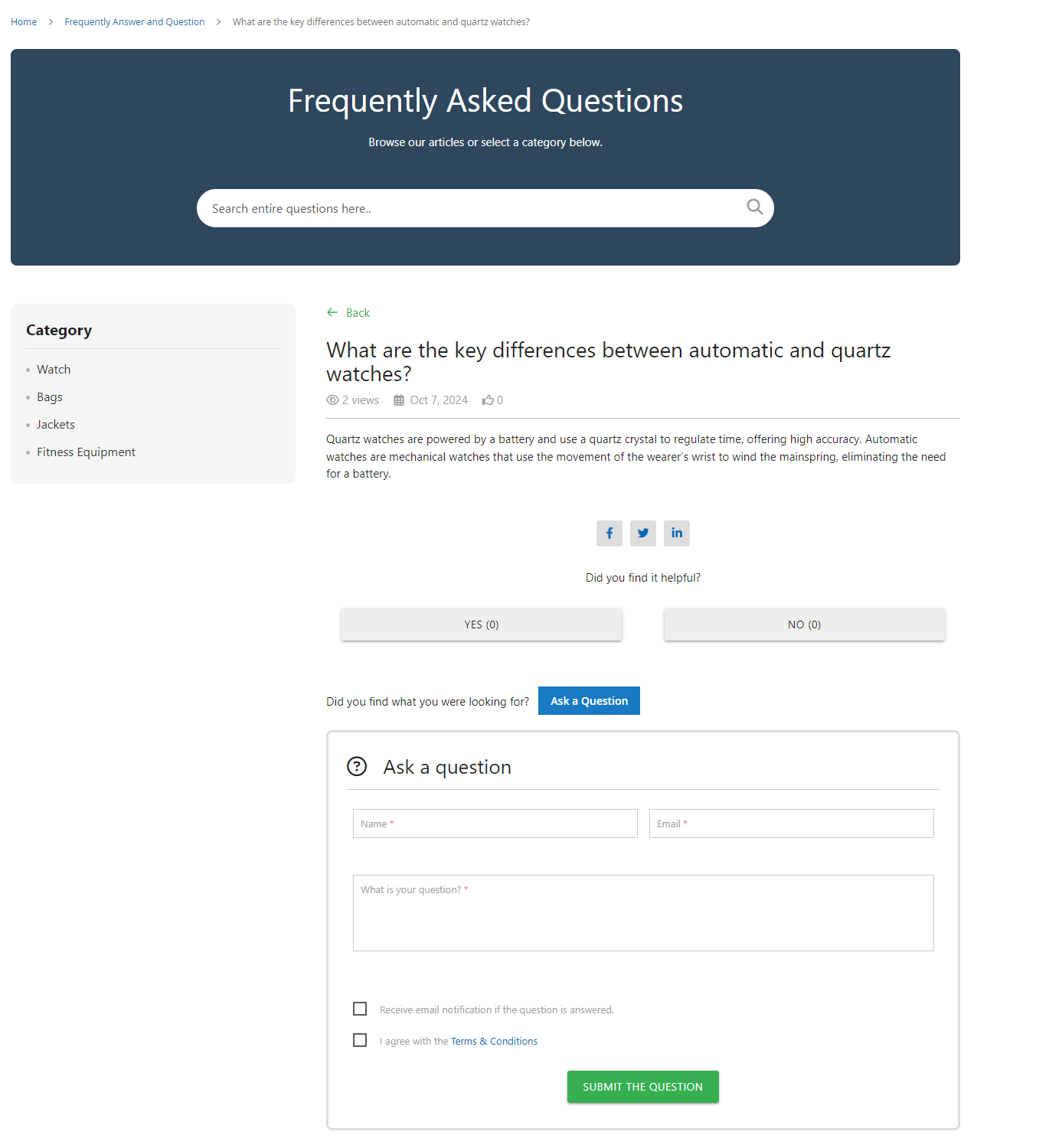
- Here are the category view page in which the answer of the questions are shown.
- Below the question, there are social media sharing buttons for Facebook, Twitter, and LinkedIn, allowing users to share the FAQ content.
- At the bottom of the page, users can submit a new question via the “Ask a Question” form.
- Optional checkboxes to receive email notifications and agree to the terms & conditions.
- A green “Submit the Question” button allows users to send their queries.
FAQs Product Tab
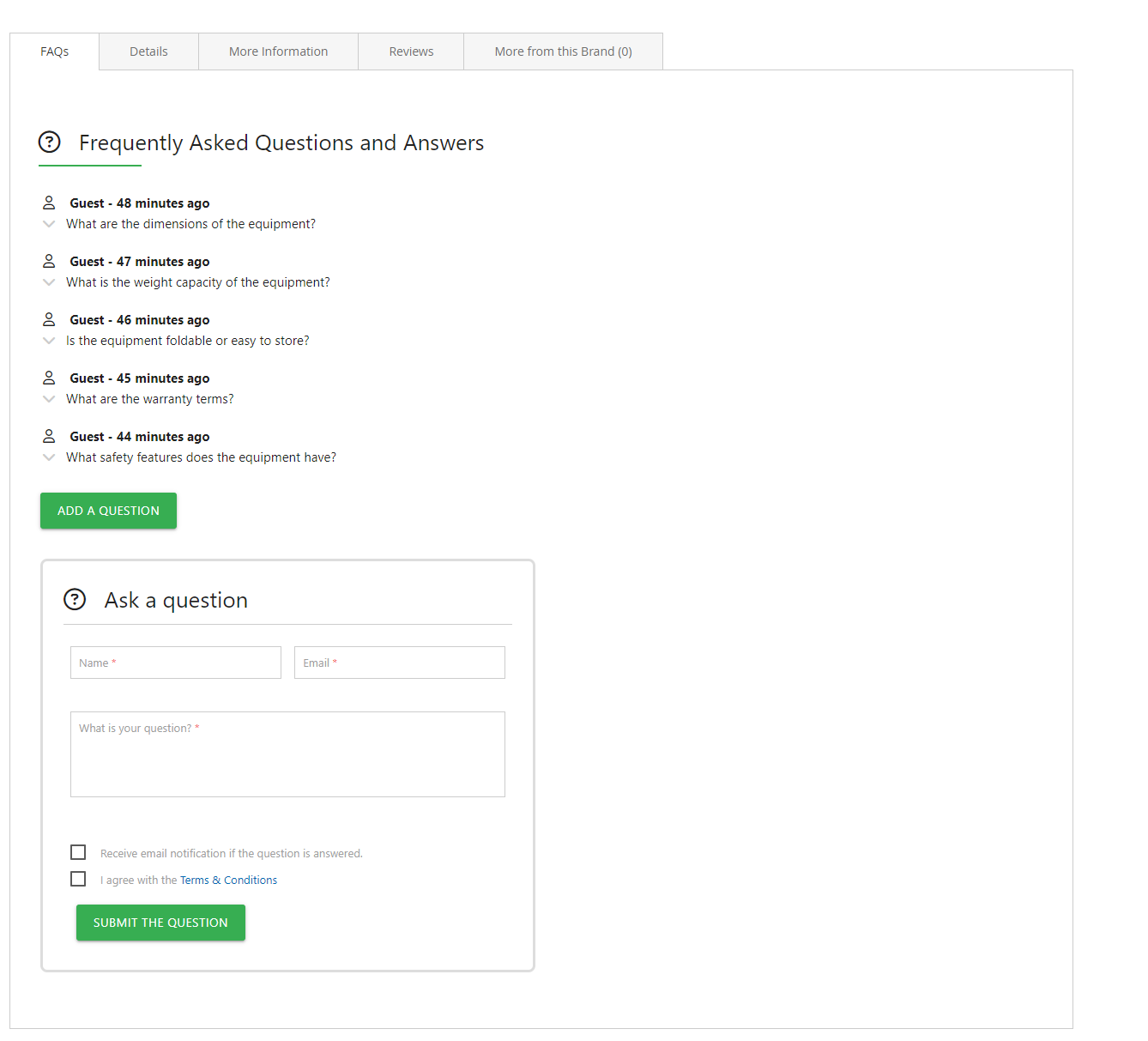
- Display all questions regarding the product.
- Customers can submit a question here. The question submitted by creating the form in the Product Tab will be auto-displayed in the Product Detail when it's public.
- Similar to the submit form in the Question detail page, we don't support the countries that do not use the English alphabet (such as Russian, Japanese, Korean, Chinese, Arabic, etc.)
FAQs
Frequently Asked Questions
It enables customers to view FAQs and submit product-related questions directly on product and CMS pages.
It provides instant answers, reduces confusion, and minimizes support queries during the buying process.
Yes. Admins can approve, edit, reply to, or hide customer questions from the backend panel.
Yes. Structured FAQs improve on-page content and can enhance search visibility and rich results.
Yes. The extension supports multi-store setups and allows FAQs to be assigned per product or category.
Ask a question
REVIEWS
Practical Product Q&A Functionality
Allowing customers to submit questions and view answers on the product page is extremely helpful. It creates a more interactive experience and ensures that important information is visible to all future customers.
Improves Customer Engagement on Product Pages
This extension adds a very useful FAQ and product question section directly on product pages. It helps customers find answers quickly without contacting support, which has reduced repetitive inquiries for our team.
Adds Value to Product Content
By adding FAQs, our product pages have become more informative and detailed. This not only improves the user experience but also helps customers make better purchasing decisions.
Quick Setup and Easy Management
The extension was easy to install and configure from the admin panel. Managing questions and answers is straightforward, making it simple for our team to keep product information updated.
Highly recommended
If you want better customer engagement and fewer support tickets, this extension is extremely useful.
Great for customer engagement
This extension adds a helpful FAQ section on product pages, reducing the number of support tickets about common questions.
Very flexible FAQ layout
We can choose where FAQs appear and how they’re styled which helps match our theme design.
Useful notification feature
Admins get notified when new questions are submitted which helps us reply quickly.
Great admin control
We can easily moderate questions before publishing which helps maintain quality.
Easy moderation options
We can approve or reject customer questions before they appear which gives us full control.
Helpful FAQ editor
The FAQ content editor allows us to format answers clearly which helps customers understand product features better.
Very practical extension
For stores with detailed products, this feature helps reduce support workload.
Very customizable
We can control heading styles, question order, and more which helps match our brand.
Useful export options
The ability to export FAQ content for backups is helpful.
Clean FAQ design
The FAQ section looks professional and integrates nicely with product pages.
Customer questions feature works well
Shoppers can submit questions and we answer them quickly which boosts engagement.
Excellent for reducing FAQs
Instead of repeating answers in support emails, we add common questions to the FAQ section and it’s been very effective.
Enhances Customer Engagement
This extension allows customers to ask questions directly on product pages
Easy to set up
Installation was quick and configuration was intuitive in the admin panel.
Excellent support notes
The documentation and admin hints helped us manage FAQ content easily.
Great documentation
The setup guide helped our team get the FAQ section running quickly.
Perfect for new products
Adding FAQs for new product launches helps educate customers fast.
Clean admin FAQ panel
Within the admin panel it’s easy to manage questions and answers for all products.
Very responsive module
The extension works smoothly with our theme and doesn’t affect page performance.
Very useful product Q&A feature
Customers can now submit questions about specific products and we can answer them directly on the product page — it’s very helpful.
Improves trust
Customers feel more confident purchasing when they see genuine Q&A content on product pages.
Improves product page content
Adding FAQs makes our product pages more informative which has improved conversions.
Customer questions boost sales
When customers see answers from real users it increases trust and conversion.
Very intuitive interface
Both admins and customers find the FAQ section easy to use.
Helpful customer analytics
We track which questions customers ask most often which helps improve content.
Excellent Q&A workflow
Customers can ask and view questions directly on product pages which improves interaction.
Helpful search experience
Customers can search within FAQs which helps them find answers faster.
Perfect for support teams
Our support team loves the reduction in repetitive questions thanks to this feature.
Excellent customer interaction
Customers engage more with product pages now that they can ask questions.
Great user experience
The FAQ section feels natural and improves how customers interact with product pages.
Great for SEO
FAQ content adds rich text to product pages which seems to be improving search visibility.
Very stable
We’ve been using this module for months without any issues.
Boosts Customer Engagement
This extension allows customers to ask questions on product pages. It\'s a great way to engage customers and reduce confusion!
Encourages repeat visits
Some customers return to read answers to common questions which increases engagement.
Great for complex products
When products have many features, FAQs help clarify things for customers.
Detailed FAQ display
We can format answers with lists and highlights which looks great on product pages.
Good performance
The module loads quickly and doesn’t slow down product pages.
Perfect for detailed products
For complex items that inspire many questions, this extension makes product pages much better.
A Great Addition
Our customers appreciate the easy access to FAQs. It's been a wonderful enhancement!
User-Friendly
The interface is intuitive, making it easy to manage FAQs. Great for customer engagement!
Improves Customer Support
This extension has drastically improved our FAQ section. Customers find it very helpful!
Changelog
2.1.1 – December 30, 2025
- Upgraded for compatibility with Magento 2.4.8-p3.
- Compatible with PHP version 8.4.
2.1.0 - September 1, 2024
- Minor Bug Fixes
2.0.3 – August 2, 2024
- Fully compatible with Magento 2.4.7
2.0.2 – July 10, 2024
- Resolved display issue with widget template when the module is disabled.
2.0.1 – May 21, 2023
- Fully compatible with Magento 2.4.6
- Resolved minor issues for improved stability.
2.0.0 – March 20, 2023
- Fully compatible with Magento 2.4.5-p1
- Supports PHP 8.
- Resolved minor bugs.
- Updated Font Awesome to ensure version compatibility.
1.0.8 – August 25, 2022
- Supports Magento version 2.4.4
- Resolved minor issues and improvements.
1.0.7 – March 1, 2022
- Integrate FAQ Schema Code.
1.0.6 – December 23, 2021
- Supports Magento version 2.4.3
- Resolved minor issues and bugs.
1.0.5 – May 31, 2021
- Introduced "Viewed" field for categories to track visibility.
- Added Icon Type selection support for both articles and categories.
- Implemented Related FAQ Assignment feature.
- Enabled Tagging functionality for articles.
- Added a Message Field for the Helpfulness feedback option.
- Resolved Content Security Policy error related to AddThis integration.
- Fixed various minor bugs and performance issues.
1.0.4 – March 30, 2021
- Works seamlessly with Magento 2.4.2
1.0.3 – October 8, 2020
- Magento v2.4.0 Support.
1.0.2 – February 27, 2020
- Resolved design issues.
- Enhanced code quality and performance.
1.0.1 – August 25, 2019
- Compatibility with Magento 2.3
- Resolved minor issues.
1.0.0 – February 1, 2018
- Release Initial Version.