📘
User Guide & Documentation
Step-by-step setup manual for Estimated Profit Extension
View →
Changelog v1.1.1 Compatible with Magento CE, EE · 2.3.x, 2.4.x

Estimated Profit Extension

Estimated Profit Extension empowers your existing Magento 2 (Adobe Commerce/Adobe Commerce Cloud) store by providing real-time profit calculations, allowing you to track your margins and assess profitability with ease—helping you make more informed business decisions and maximize your revenue.

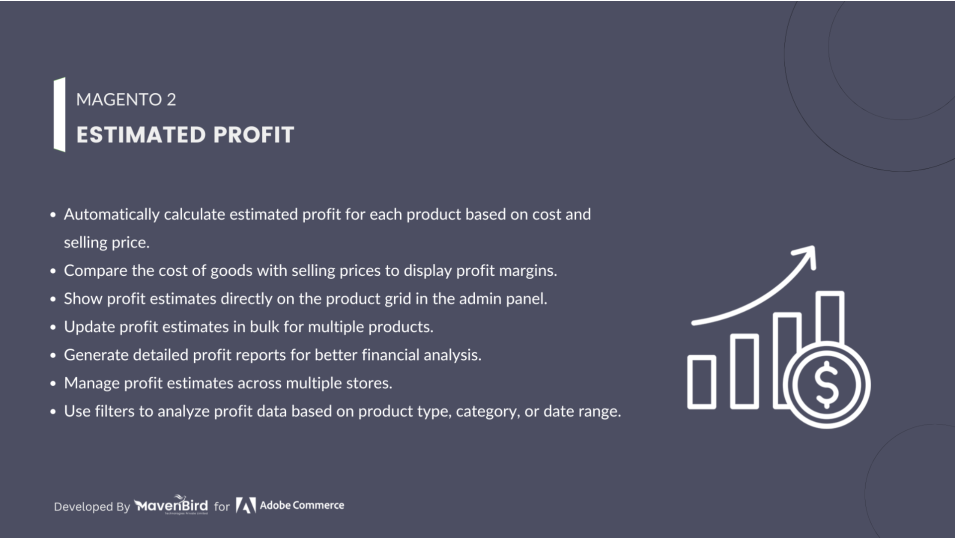
  • Calculates and displays profit margins directly on the product edit page in the admin panel.
  • Automatically calculates profit based on cost and selling price.
  • Allows admin to set custom cost attributes for accurate profit calculation.
  • Provides an overview of estimated profits for multiple products from the product grid.
  • Assists in setting profitable pricing by providing insights on each product’s profitability.
  $0
No surprise fees

We are committed to being open and transparent with our customers. When you purchase our module, you automatically receive one year of free support service and free updates.

Why is this important?

  • Seamless Installation and Configuration: We understand that setting up a new module can take time to configure according to your specific needs. That's why we offer a full year of free support. Our experienced team is here to assist you with installation, configuration, and any questions you might have. We're eager to share our expertise to ensure you get the most out of your purchase.
  • Stay Updated with Magento (Adobe Commerce) Releases: Magento releases new versions approximately every three months. These updates can sometimes introduce compatibility challenges. To keep your store running smoothly, we provide a year of free access to the latest versions of our modules, ensuring that you can upgrade Magento and our modules without encountering any obstacles.
  • Subscription Included: Renewing your subscription ensures continued access to the latest updates and support from our team. This means you can be confident that any issues you encounter with the extension will be resolved quickly and efficiently. You can cancel your subscription at any time without any additional fees.
Hyvä Bronze Partner
Adobe Commerce
Secure Checkout

Highlighted Features

  • Automatic Profit Calculation

    This feature calculates the estimated profit for each product automatically by taking into account the product’s cost and selling price. The calculation also considers other factors like discounts or special pricing if configured. The feature saves time by automating the process, ensuring that store owners always have the latest profit estimations for each product.

  • Detailed Profit Reporting

    The extension provides a centralized profit reporting section in the admin panel. Store owners can view detailed profit reports at various levels, such as by individual orders, by product, or by customer. These reports help store managers quickly assess which products and orders yield the highest profit, enabling them to make more strategic pricing or inventory decisions.

  • Cost Price Management

    Allows administrators to easily add or update the cost price for products directly from the Magento admin interface. The extension supports bulk actions, making it easy to apply cost updates to multiple products at once. Accurate cost price data ensures that profit calculations remain reliable and can adapt to changes in supplier costs.

  • Real-Time Updates

    Profit calculations are updated instantly whenever there are changes to product cost or selling prices. This real-time feature helps maintain accurate profit data and eliminates the risk of outdated or inaccurate profit information when viewing sales and product reports.

  • Advanced Filtering and Sorting

    The extension includes a robust filtering and sorting system, allowing administrators to view profit data based on various parameters like product type, SKU, category, and specific date ranges. These filters enable a more granular analysis, so admins can easily identify profit trends and opportunities within specific product categories or time periods.

  • Profit Display in Order and Product Views

    Estimated profit is displayed directly within the order and product views, making it convenient for admins to assess profitability at a glance. For example, when viewing a specific order, the total estimated profit for that order is shown. Similarly, each product page can display its individual profit margin, aiding quick assessments without needing to consult separate reports.

  • Customizable Profit Margins

    The extension allows admins to set different profit margin percentages based on product or category. For instance, high-demand or exclusive products might have higher margins, while competitive products may have lower ones. This flexibility in setting profit margins lets store owners tailor profitability to align with specific sales strategies.

  • Integration with Multi-Store Views

    This feature supports multi-store configurations by calculating estimated profits for each store view. This is especially useful for international or multi-region setups where each store view may have unique pricing and cost structures. Admins can view store-specific profit reports, making it easier to analyze profitability across different market regions.

Description

Product List

product_grid

This extension integrates with product pages to provide real-time profit calculation, data-driven insights, and improved pricing strategies, while enhancing reporting and optimizing inventory management.

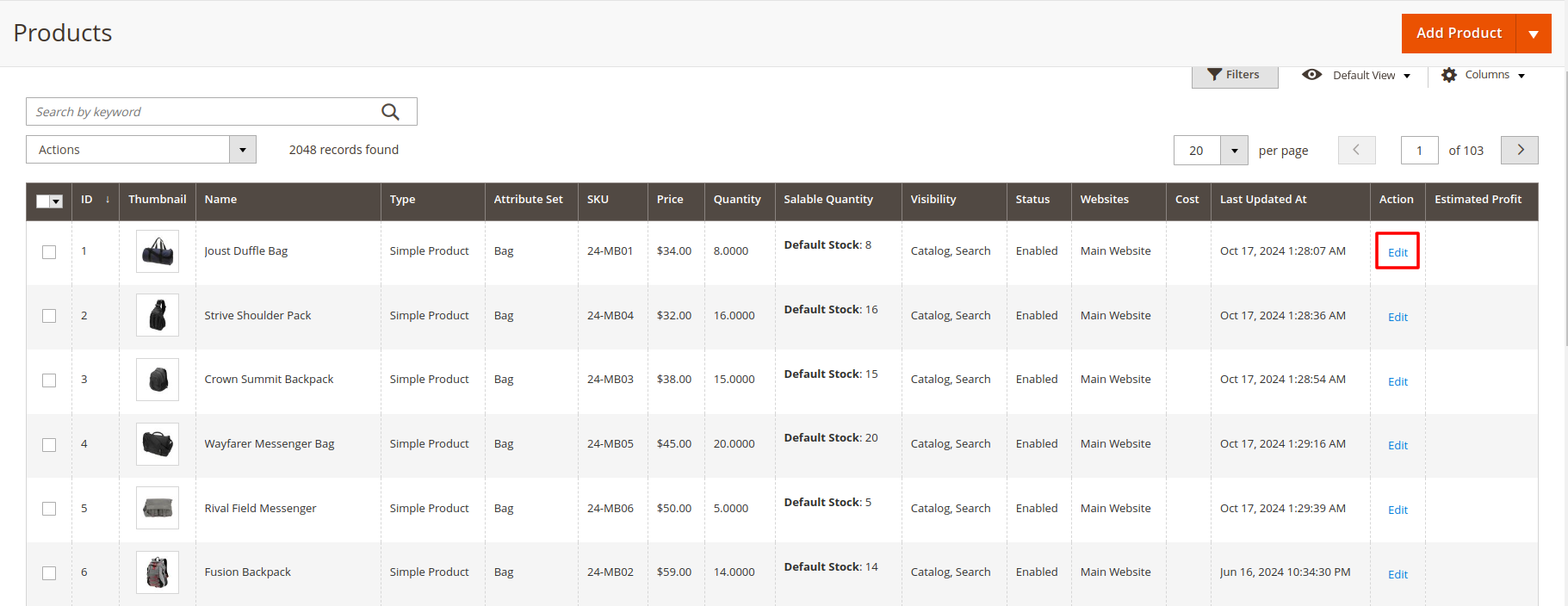
  • First of all click on Catalog → Products. Then Check Product Details.
  • When you click the "Edit" button, you are redirected to a list of multiple product Details and Attributes that you are able to Change.

Product Edit Page

product_edit_page
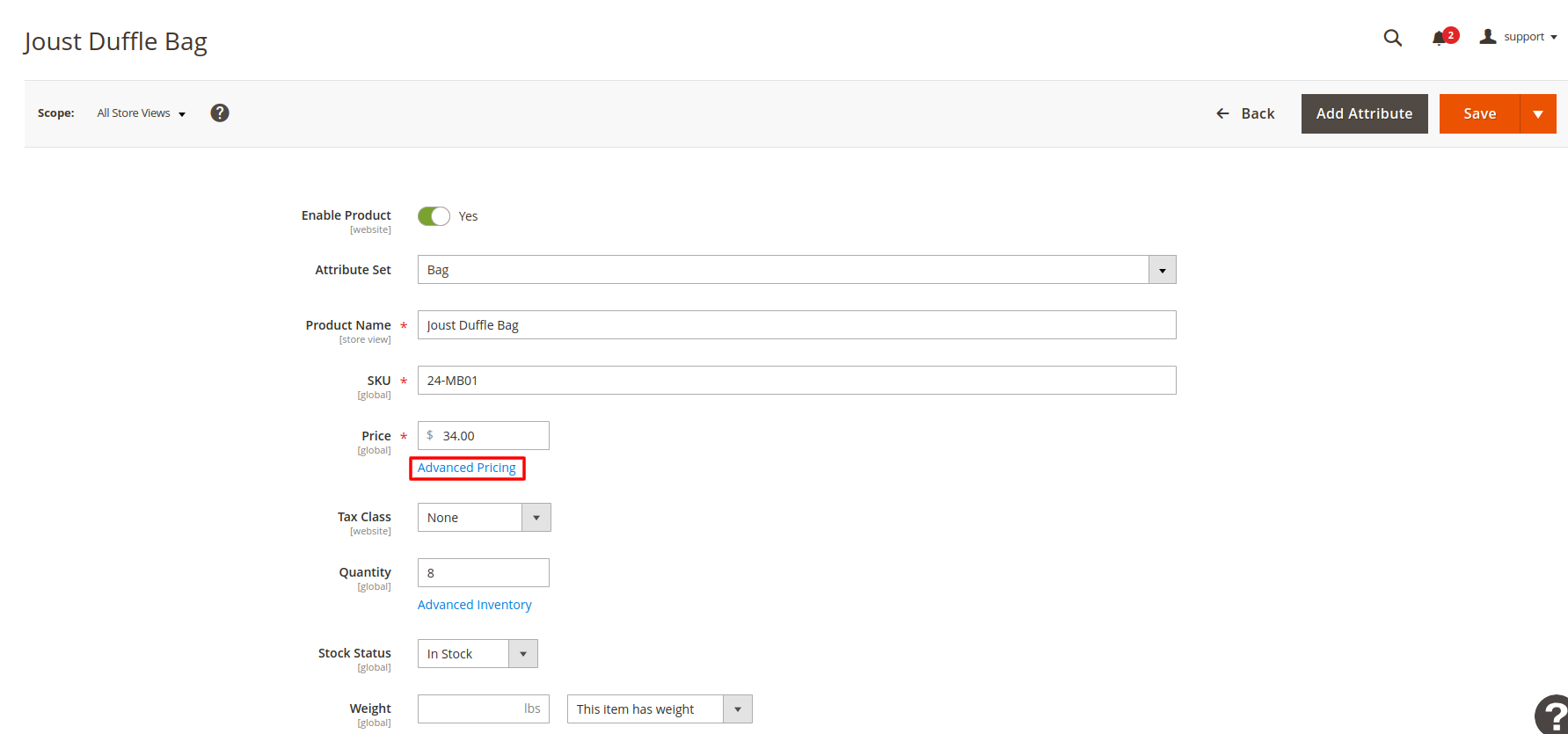
  • Click on Advanced Pricing. Then Insert product cost price on duration period.
  • The Edit Product button is a key feature in the Magento admin panel that allows store administrators to make modifications to existing products quickly and efficiently. By clicking this button, users are directed to a comprehensive product editing interface.

Insert Cost Price

insert_cost_price
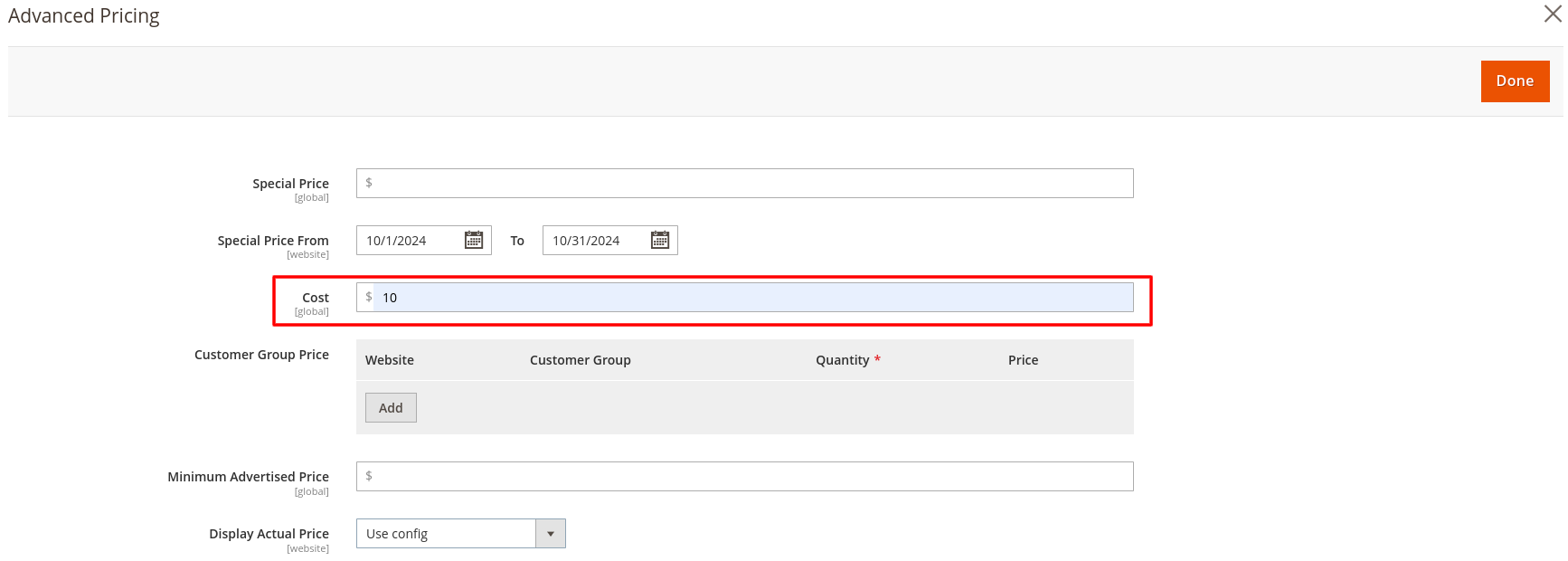
  • The Insert Cost Price feature in Magento is essential for managing the financial aspects of your product catalog. This functionality allows store owners to enter the cost price of each product, which is crucial for calculating profit margins and effectively managing pricing strategies.
  • After Insert Cost Price Save the product.

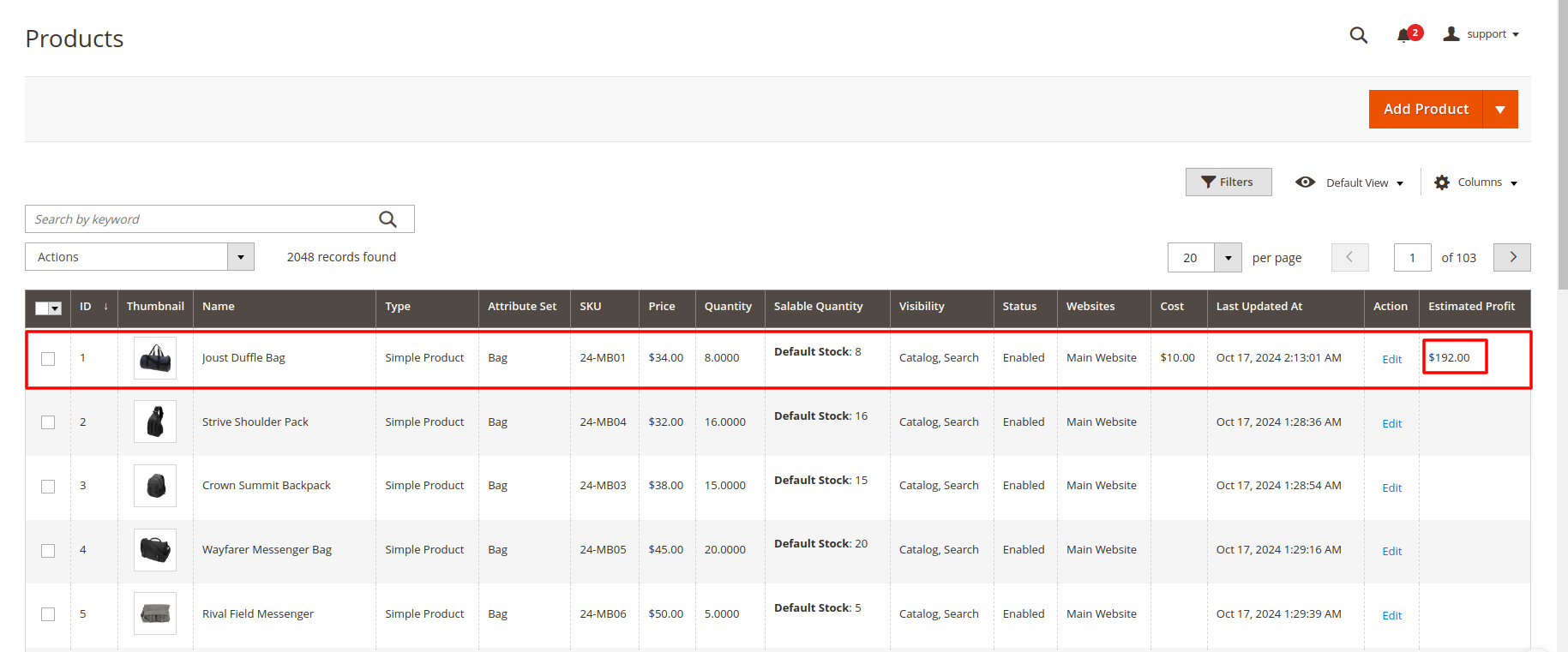
Estimated Product Profit

estimated_product_profit
  • The Estimated Profit feature displays critical profit insights directly within your product listings, enabling quick assessments of each product's profitability.
FAQs

Frequently Asked Questions

The "Estimated Profits" module provides real-time calculations of potential profits based on your sales data, helping you track store performance and financial health.
Yes, the module allows you to track profits for specific products, helping you identify your most profitable items.
Yes, you can input your expenses, such as shipping costs and taxes, to get a comprehensive view of your net profit.
Yes, it supports multiple currencies, allowing you to calculate profits in the currency of your choice, even if your store caters to international customers.
Yes, the module allows you to analyze profits over different time periods, enabling historical profit tracking and forecasting.
The calculation is based on the sales price, cost price, shipping, taxes, and any other fees associated with the sale, providing a detailed breakdown.
Yes, the module allows you to filter profits by product categories or brands, giving you more granular insights into your sales performance.
   Ask a question
REVIEWS

Changelog

1.1.1 – December 30, 2025

  • Upgraded for compatibility with Magento 2.4.8-p3.
  • Compatible with PHP version 8.4.

1.1.0 - September 1, 2024

  • Minor Bug Fixes

1.0.7 – May 14, 2024

  • Compatible with Magento Version 2.4.7-p3.
  • Small code adjustments.

1.0.6 – March 7, 2024

  • Compatible with Magento Version 2.4.3

1.0.5 – March 17, 2023

  • Compatible with Magento Version 2.4.2

1.0.4 – September 14, 2022

  • Compatible with Magento Version 2.4.1

1.0.3 – April 16, 2022

  • Compatible with Magento Version 2.4.0

1.0.2 – May 12, 2020

  • Updated for improved compatibility with Magento versions 2.3 and 2.4.

1.0.1 – January 26, 2019

  • Fully compatible with Magento 2.0, 2.1, 2.2, and 2.3 Community Edition.

1.0.0 – February 20, 2018

  • Release Initial Version.