
The Magento 2 Coupon Code in Minicart Extension allows customers to apply discount codes directly from the minicart, providing a seamless shopping experience and encouraging quicker use of promotional offers without navigating away from the checkout process.

User Guide & Documentation
Step-by-step setup manual for Coupon Code In Minicart Extension
Changelog v1.1.1
Compatible with Magento CE, EE · 2.3.x, 2.4.x
Coupon Code In Minicart Extension
- Display Grand Total in Mini Cart.
- Using Mini Cart Coupon Code.
- Ajax processing and Totals calculation.
- Better shopping experience for clients.
- Show Mini Cart Discount Amount.


$29
$49
41% OFF
No surprise fees
We are committed to being open and transparent with our customers. When you purchase our module, you automatically receive one year of free support service and free updates.
Why is this important?
- Seamless Installation and Configuration: We understand that setting up a new module can take time to configure according to your specific needs. That's why we offer a full year of free support. Our experienced team is here to assist you with installation, configuration, and any questions you might have. We're eager to share our expertise to ensure you get the most out of your purchase.
- Stay Updated with Magento (Adobe Commerce) Releases: Magento releases new versions approximately every three months. These updates can sometimes introduce compatibility challenges. To keep your store running smoothly, we provide a year of free access to the latest versions of our modules, ensuring that you can upgrade Magento and our modules without encountering any obstacles.
- Subscription Included: Renewing your subscription ensures continued access to the latest updates and support from our team. This means you can be confident that any issues you encounter with the extension will be resolved quickly and efficiently. You can cancel your subscription at any time without any additional fees.
Hyvä Bronze Partner
Adobe Commerce
Secure Checkout
Highlighted Features
-
Coupon Code Application
Allows customers to enter and apply coupon codes directly from the mini cart interface, without navigating away from the current page or going to the checkout process.
-
Real-Time Discount Calculation
Automatically recalculates the cart total and discount amount as soon as a coupon code is applied or removed in the mini cart.
-
Enhanced User Experience
Integrates coupon application smoothly within the mini cart, reducing the number of steps needed to apply a discount.
-
Display of Discounted Amount
Shows detailed information about the applied discount, including the discount amount, original cart total, and the updated total after applying the coupon code.
-
Validation and Error Handling
Includes validation mechanisms to check the validity of the coupon code, such as expiration dates, usage limits, and eligibility requirements. Displays error messages if a coupon code is invalid, expired, or not applicable.
-
Customizable Design
Provides options for customizing the look and feel of the mini cart, including how the discount and total amounts are displayed. This might include options for adjusting colors, fonts, and layout to match the store’s branding.
-
Compatibility with Other Extensions
Designed to work in conjunction with other cart, checkout, and payment-related extensions. Ensures that applying coupons does not conflict with other features or functionality in the store.
-
Performance Optimization
Optimized for performance to ensure that the mini cart’s responsiveness and speed are not negatively impacted by the coupon functionality.
-
Admin Configuration Options
Provides settings in the Magento admin panel to configure the mini cart coupon feature, such as enabling or disabling the feature, setting default behaviors, and adjusting display options.
Description
Configuration
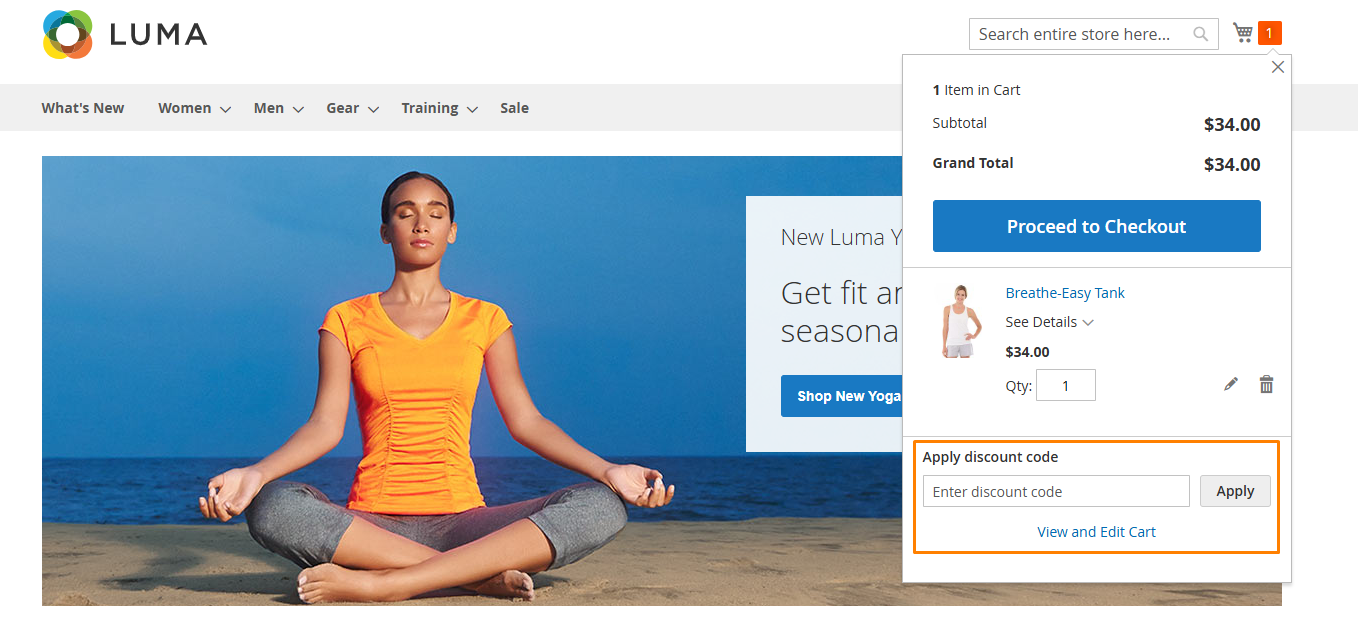
The Coupon Code in Minicart Extension for Magento 2 lets customers apply coupon codes directly in the Mini Cart, improving the shopping experience. It displays real-time discounts, configurable grand totals, and discount amounts, making the process quicker and more convenient. This boosts conversions, encourages coupon usage, and enhances store functionality with customizable promotions.
- Go to Stores → Configuration → MAVENBIRD EXTENSIONS → Mini cart Coupon.
- Select yes and enable the extension.
Create Cart Price Rule
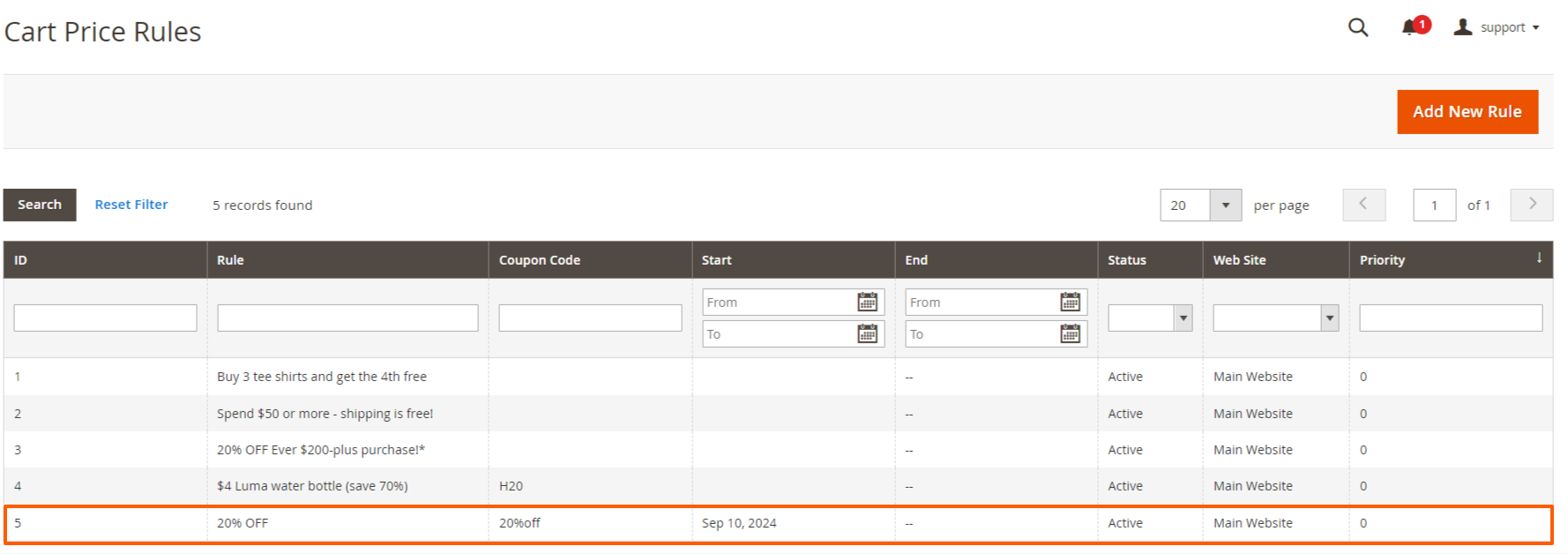
- Create cart price rule to go Marketing → Cart Price Rules.
- Create a rule for discount 20% of product applied when the coupon code is test.
Mini Cart With Coupon Applied

- In the minicart, coupon code section enter a coupon code like test then apply 10% discount so that display discount and cart total in minicart.
FAQs
Frequently Asked Questions
It allows customers to apply or remove coupon codes directly from the minicart without visiting the cart page.
It reduces steps in the checkout flow, making discounts instantly visible and improving conversion rates.
Yes. Customers can easily apply, remove, or replace coupon codes directly within the minicart.
Yes. It works seamlessly with Magento’s default cart price rules and promotional settings.
Yes. It supports multi-store environments and is compatible with most Magento themes.
Ask a question
REVIEWS
Real Time Discount Updates
The real time calculation of discount and totals works perfectly. As soon as a coupon is applied the mini cart updates instantly which looks very professional.
Improves Shopping Experience
The mini cart coupon field makes it much easier for customers to apply discounts instantly. They no longer need to navigate through multiple steps which improves overall user experience.
Great Feature for Quick Discounts
This extension allows customers to apply coupon codes directly from the mini cart without visiting the cart page. It makes the checkout process much smoother and helps customers use promotions more easily.
Very Convenient Coupon Application
The ability to apply coupon codes directly in the mini cart is extremely convenient. Customers can see their discounts immediately and proceed to checkout faster.
Great for Marketing Campaigns
We can run discount campaigns more effectively because customers can apply codes immediately from the mini cart.
Displays Discount Clearly
I like how the mini cart displays the applied discount amount and updated total clearly so customers know exactly how much they saved.
Better Checkout Flow
Allowing coupon codes in the mini cart shortens the checkout process and reduces unnecessary steps.
Great Conversion Booster
Since installing this extension more customers are using coupon codes because they are visible and easy to apply directly in the mini cart.
Great Feature for Quick Discounts
This extension allows customers to apply coupon codes directly from the mini cart without visiting the cart page. It makes the checkout process much smoother and helps customers use promotions more easily.
Very Useful Cart Enhancement
This module adds a small feature that makes a big difference in how customers interact with the cart.
Stable and Lightweight Module
The module runs smoothly and does not affect website performance or page loading speed.
Perfect for Promotional Campaigns
We run many promotional campaigns and this extension helps customers apply codes quickly which increases coupon usage.
Excellent User Experience Enhancement
The extension improves the shopping experience by allowing quick coupon application and instant price updates.
Good Compatibility with Other Modules
The extension works well alongside other cart and checkout modules without conflicts.
Encourages Coupon Usage
Customers are more likely to use coupon codes when the input field is easily accessible in the mini cart.
Very Practical Magento Extension
This extension adds a feature that Magento should ideally have by default. It improves the cart usability significantly.
Very Reliable Extension
We have been using this module for months and it works consistently without any issues.
Excellent for Customer Communication
I love using M2 CCM for communicating with my customers. The integration was seamless
Highly Recommended Extension
If you want customers to apply coupons easily and improve the checkout experience this extension is definitely worth installing.
Simple Yet Effective Extension
This module focuses on improving coupon usability and does it very well. Customers appreciate being able to apply coupons without leaving the current page.
Clean Mini Cart Layout
The coupon field integrates nicely into the mini cart layout without making it look cluttered.
Professional Shopping Experience
The extension gives the mini cart more functionality and improves the overall checkout experience.
Easy Installation and Setup
The installation was quick and configuration options are straightforward. It integrates smoothly with the Magento mini cart.
Very Convenient Coupon Application
The ability to apply coupon codes directly in the mini cart is extremely convenient. Customers can see their discounts immediately and proceed to checkout faster.
Good Performance
The extension is lightweight and does not slow down the mini cart or page loading times.
Works Smoothly on Magento 2.4
Installed this extension on Magento 2.4 and everything works perfectly. The AJAX update of totals is very fast.
Nice Design Customization
The customization options allow us to adjust the look of the coupon field to match our store theme.
Smooth AJAX Functionality
The AJAX processing recalculates totals instantly which keeps the shopping experience fast and responsive.
Improves Shopping Experience
The mini cart coupon field makes it much easier for customers to apply discounts instantly. They no longer need to navigate through multiple steps which improves overall user experience.
Effective Customer Communication
M2 CCM is a great tool for communicating with customers via various channels. It integrates seamlessly and makes handling customer queries much easier.
Easy Admin Configuration
The admin settings allow us to enable or disable the feature and control how the coupon field appears.
Improves Checkout Efficiency
Customers apply coupons faster and proceed to checkout with fewer steps.
Helpful Error Validation
If a coupon code is invalid the error message appears immediately which helps avoid confusion for customers.
Clean and Professional Interface
The coupon input section in the mini cart looks clean and fits well with our theme design. Customers find it easy to use.
Real Time Discount Updates
The real time calculation of discount and totals works perfectly. As soon as a coupon is applied the mini cart updates instantly which looks very professional.
Great for Mobile Users
Mobile customers benefit a lot from this feature because they can apply coupons without navigating through multiple pages.
Boosts Conversion Rates
This feature has improved our conversion rates by making it easy for customers to use coupons!
Effective Promotion Tool
This extension makes it easy for customers to apply discounts right at checkout. Love it!
Great for Upselling
Adding coupon codes in the minicart is brilliant! It encourages customers to complete their purchase!
Changelog
1.1.1 – December 30, 2025
- Upgraded for compatibility with Magento 2.4.8-p3.
- Compatible with PHP version 8.4.
1.1.0 - September 1, 2024
- Minor Bug Fixes
1.0.6 – June 8, 2024
- Fully compatible with Magento 2.4.7
1.0.5 – May 31, 2023
- Compatible up to Magento 2.4.6
1.0.4 – June 5, 2022
- Magento 2.4.4 compatibility added.
- Resolved minor issues.
1.0.3 – July 31, 2021
- Fully compatible with Magento 2.4.3
- Supports Multiple Coupons functionality.
- Resolved minor issues for improved stability.
1.0.2 – April 30, 2021
- Fully compatible with Magento 2.4.2
- Supports multiple coupon codes.
- Fixed JavaScript component loading issues.
- Corrected shipping price formatting error.
- Addressed various minor bugs.
1.0.1 – September 21, 2020
- Magento 2.4.0 compatibility ensured.
1.0.0 – January 24, 2018
- Initial Launch.