

A sticky header is a feature that remains fixed at the top of the page, even as users scroll down. It typically contains important elements like the main menu, top links, shopping cart, and logo, ensuring easy access at all times. In a Magento 2 store, this sticky header enhances the shopping experience by displaying product details such as the name, image, price, and an add-to-cart option, no matter how far the user scrolls down the product page.
You can observe the sticky header feature in action on the Magento 2 Admin product management page, which provides continuous access to essential functionalities.
The Sticky Header Component keeps the header fixed at the top during user scrolling. This effect, known as "Sticky" is a popular setting for your website's header. With this component, tracking becomes easier, and customers can conveniently add products to their cart even while scrolling through product details. Specifically, as you navigate to the product management area, you will see the sticky header component in action.
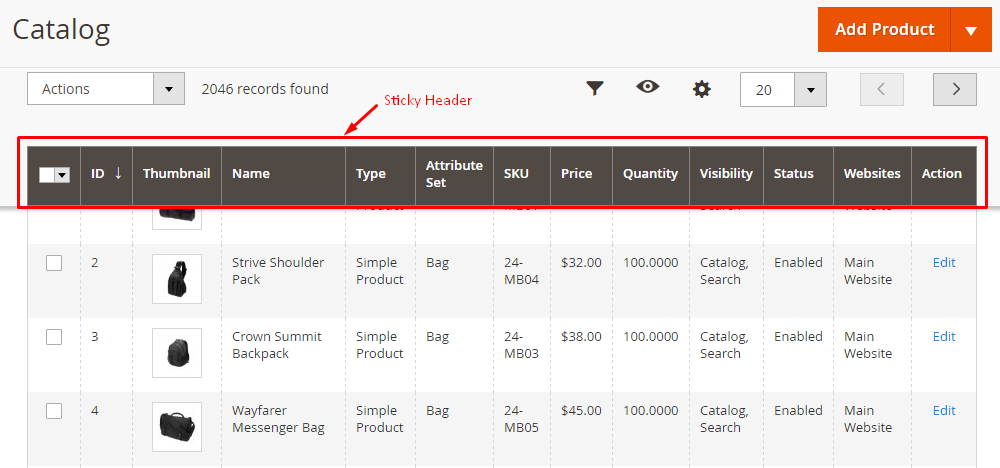
So how is the sticky header component created in Magento 2?
Magento 2 Sticky Header Component
- The sticky is applied for the display of the grid with the configuration:
- Magento_Ui/js/grid/sticky/sticky
- ...
- ...
- You can open the CMS page grid vendor\magento\module-cms\view\adminhtml\ui_component\cms_page_listing.xml to get more details
- Magento_Ui/js/grid/sticky/sticky
- cms_page_listing.cms_page_listing.listing_top
- cms_page_listing.cms_page_listing.cms_page_columns
- To change the template of the sticky header, you can use the following configuration:
- ui/grid/toolbar
- ui/grid/sticky/toolbar
By using the above settings, you will be able to activate the sticky header component on your Magento 2 site. Thanks for your reading!