

Magento 2 doesn't provide a native option to delete orders, which can clutter your admin panel with test or canceled orders. The Delete Order Extension by Mavenbird addresses this gap, allowing store admins to efficiently remove unwanted orders and related data directly from the backend.
Why Deleting Orders Is Essential for Magento Stores
- Test orders can accumulate, making the order grid cluttered and confusing.
- Canceled or fraudulent orders may need to be removed for accurate reporting.
- Keeping the order grid organized enhances backend efficiency and user experience.
- Deleting unnecessary orders ensures compliance with data management policies.
Key Features of Magento 2 Delete Order Extension
- Bulk Deletion: Remove multiple orders simultaneously from the Sales Order Grid.
- Single Order Deletion: Delete individual orders directly from the order view page.
- Delete Related Documents: Automatically remove associated invoices, shipments, and credit memos.
- Confirmation Prompts: Ensure accuracy with confirmation dialogs before deletion.
- Audit Logs: Maintain records of deleted orders for auditing purposes.
- User Permissions: Control access to deletion functionality with customizable permissions.
How It Works in Your Magento Admin
- Enable Module: Install via Composer or manual upload, enable the module, run setup upgrade, deploy static content, and flush cache.
- Configuration: Navigate to Stores → Configuration → Mavenbird Extensions → Delete Order to set user permissions and customize labels.
- Bulk Deletion: Go to Sales → Orders, select orders, and choose "Delete Orders" from the actions dropdown.
- Single Order Deletion: On the order view page, click the "Delete" button to remove the order.
- Delete Related Documents: In Sales → Invoices or Sales → Credit Memos, select items and choose "Delete" from the actions dropdown.
Business Benefits You Gain
| Benefit | Impact |
|---|---|
| Improved Backend Efficiency | A cleaner order grid enhances navigation and reduces confusion. |
| Accurate Reporting | Removing test and canceled orders ensures data integrity. |
| Compliance with Data Policies | Helps in adhering to data retention and deletion regulations. |
| Enhanced User Experience | Streamlined admin interface improves usability for store managers. |
When and Why to Use It
Use this extension when you need to remove test orders created during development, canceled orders, or any unwanted records that clutter your order management system. It's particularly useful for maintaining a clean and organized backend, ensuring accurate reporting, and complying with data management policies.
Order Management Screenshot:
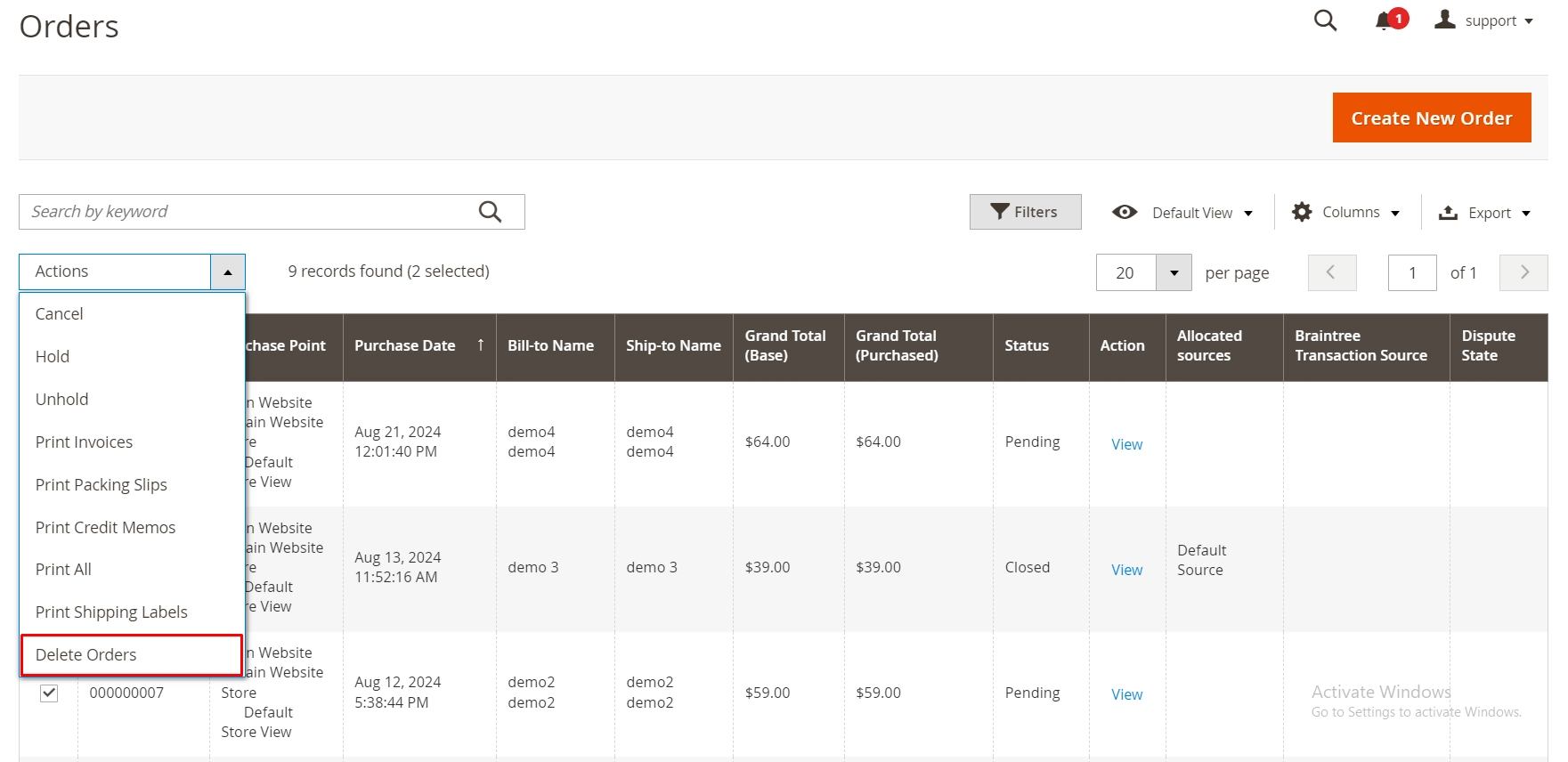
Mavenbird empowers Magento 2 store owners to maintain a clean and efficient order management system with the Delete Order Extension.
Contact Us today to streamline your order management process.