

Managing an eCommerce store is exciting, yet it can demand a significant amount of time. From handling orders and overseeing inventory to connecting with customers and promoting your products, there’s a wide range of responsibilities to juggle.
As your business expands, these recurring tasks can become overwhelming and harder to manage. This is where Shopify automation steps in. For many store owners, repetitive tasks result in long hours, higher costs, and the ongoing challenge of staying competitive.
Shopify automation enables you to save time, minimize errors, and propel your business forward—all with minimal effort.
In this blog, we’ll delve into the benefits of Shopify automation, discover how it can revolutionize your eCommerce store, and highlight top tools to help you get started.
Understanding Shopify eCommerce Automations: What Is It?

Shopify eCommerce automation involves using technology to complete tasks automatically. Essentially, tasks that are usually done manually or need human intervention can now be managed through apps or tools. This not only improves operational efficiency but also enhances accuracy in results.
With Shopify automation, you can engage customers, streamline processes, and grow your business effortlessly.
Several areas of eCommerce can benefit from automation to boost efficiency:
- Order Processing: Automatically send order confirmations and shipping notifications. For example, when a customer places an order, automation can trigger an email confirming their purchase and updating them on the shipping status.
- Inventory Management: Set up low-stock alerts and automate reorders to ensure popular products are always available, keeping your store well-stocked without manual tracking.
- Customer Engagement: Use chatbots to answer common questions and provide instant responses, enhancing the customer’s shopping experience.
- Marketing: Automate email campaigns, SMS marketing, and personalized recommendations for targeted engagement.
There are many more aspects of your Shopify store that can be automated. Don’t worry; as we proceed, this article will help you identify which areas of your store would benefit from automation.
With tools like Shopify Flow, you can create custom workflows to engage customers at key moments in their journey, from subscribing to your newsletter to making repeat purchases. We’ll explore this in more detail in the upcoming section.
What is Shopify Marketing Automation?
Shopify marketing automation refers to using automated tools and processes to manage and execute marketing tasks on your Shopify store. Its primary goal is to streamline marketing activities, enhance customer engagement, and ultimately increase sales, all without requiring constant manual input.
The main features of Shopify marketing automation include:
- Automated Emails: Send welcome emails, order confirmations, and follow-ups effortlessly. For instance, when a new customer subscribes to your newsletter, automation can trigger a personalized welcome email, ensuring immediate engagement.
- SMS Campaigns: Reach customers directly on their phones with tailored messages about promotions, order updates, or important announcements.
- Personalized Recommendations: Use customer data to suggest products, cross-sell, or upsell based on their previous purchases or browsing behavior, which boosts the likelihood of repeat sales.
Shopify’s automation capabilities are extensive and versatile. These tools are designed to adapt to the unique needs of your business, whether automating simple tasks or managing complex workflows. Shopify offers a user-friendly platform for building, customizing, and deploying automation quickly and efficiently.
Benefits of an Automated Shopify Store
There are numerous reasons to consider Shopify automation for your eCommerce store:
- Efficiency and Time-Saving: Automate repetitive tasks to free up time for strategic planning and creative projects.
- Cost-Effectiveness: Minimize the need for extensive manual work, reducing operational costs and maximizing your marketing budget.
- Consistency and Accuracy: Automation ensures flawless execution of customer communication and operations, enhancing professionalism and reliability.
- Improved Customer Experience: By automating essential but tedious tasks, you improve customer satisfaction. Automation enables timely, relevant interactions, creating a more engaging shopping experience.
- Scalability: Easily scale your marketing efforts and operations as your business grows without adding extra workload.
- Data-Driven Decisions: Leverage analytics from automation tools to track performance, optimize strategies, and make informed decisions.
How to Know Which Tasks to Automate?
We have discussed several eCommerce operations you can automate on your Shopify platform. However, it’s essential to recognize that not everything should be automated. Identifying which tasks to automate in your Shopify store is crucial.
Here’s how to approach it:
Identify Pain Points
Begin by assessing the areas of your business that frequently encounter issues or consume excessive time. Common pain points include:
- Repetitive manual tasks
- Delays in communication
- Inconsistent customer service
Analyze your workflow to pinpoint these specific areas and consider how automation could address these challenges.
Set Clear Goals
Establishing clear objectives for automation is vital.
Define what you aim to achieve—whether it’s improving efficiency, reducing errors, enhancing customer experience, or scaling operations. Clear goals will guide your automation strategy and help you measure its success.
Prioritize Tasks
Not all tasks carry the same weight when it comes to automation.
Focus on automating tasks that will have the highest impact on your business:
- Prioritize processes that are repetitive, time-consuming, or prone to human error.
- Consider automating order confirmations, shipping notifications, and customer follow-ups first to achieve quick wins and immediate improvements.
How to Automate a Shopify Store?
Now that you have identified the tasks you wish to automate, it's time to put your plan into action. Here are the three steps you need to follow:
Step 1: Choose the Tools
Select tools that align with your automation needs. Shopify offers built-in automation options, along with various third-party apps that can enhance your capabilities.
For example, if you want to send AI-generated emails to your customers for abandoned carts, promotional sales, etc., you can use apps like Shopify Email.
Step 2: Set Up Automations
Once you have chosen the tools, it’s time to set them up for action. If you are using any applications or third-party software, make sure to install and configure them properly.
- Utilize the app’s automation features to automatically send confirmation emails once an order is placed.
- Set up automated emails or SMS notifications to keep customers updated on their order status.
- Implement chatbots and messaging tools like Shopify Inbox or Tidio to handle common customer inquiries and provide instant support.
Step 3: Monitor & Improve
Regularly review the performance of your automation. Use analytics to track effectiveness and make necessary adjustments to optimize outcomes.
If you prefer to minimize the number of external apps, you can also use workflow automation tools such as Shopify Flow, MESA, and Mechanic.
How to Create Shopify Automation in Marketing
Creating marketing automations in Shopify is a simple process that can be completed in just a few steps. Before you begin, ensure you meet the following requirements for a smooth setup:
- Have a store on a Basic Shopify plan or higher.
- Install the Shopify Flow app for complete functionality.
- Grant permission access to necessary staff members, specifically for the Marketing and Flow App permissions.
Now that you're ready, follow these four straightforward steps to automate your marketing operations:
Step 1: Access the Shopify Admin
Navigate to the Marketing section in your Shopify admin.
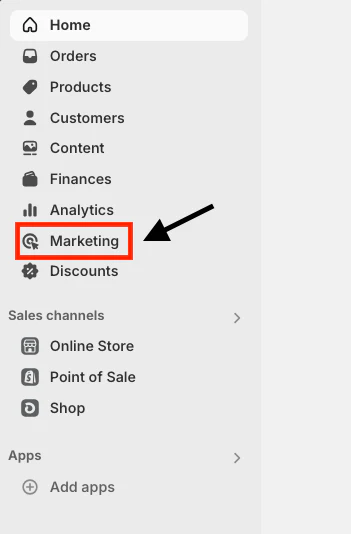
- Click on Automation to view available templates and options.
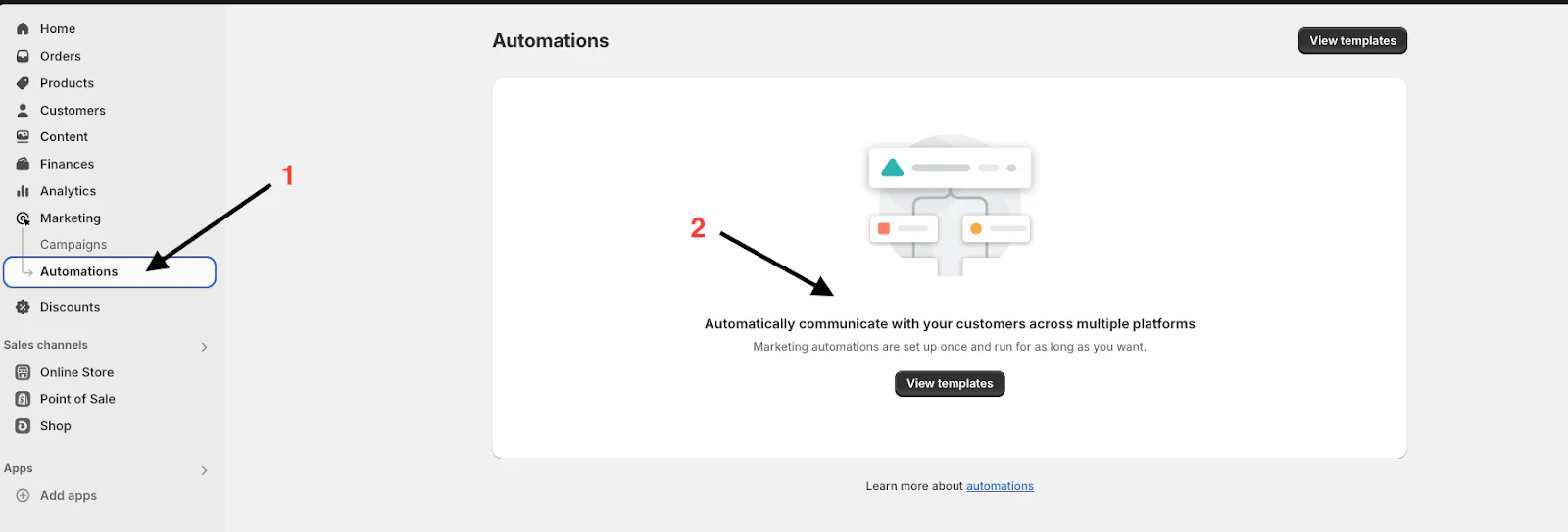
Step 2: Use Template
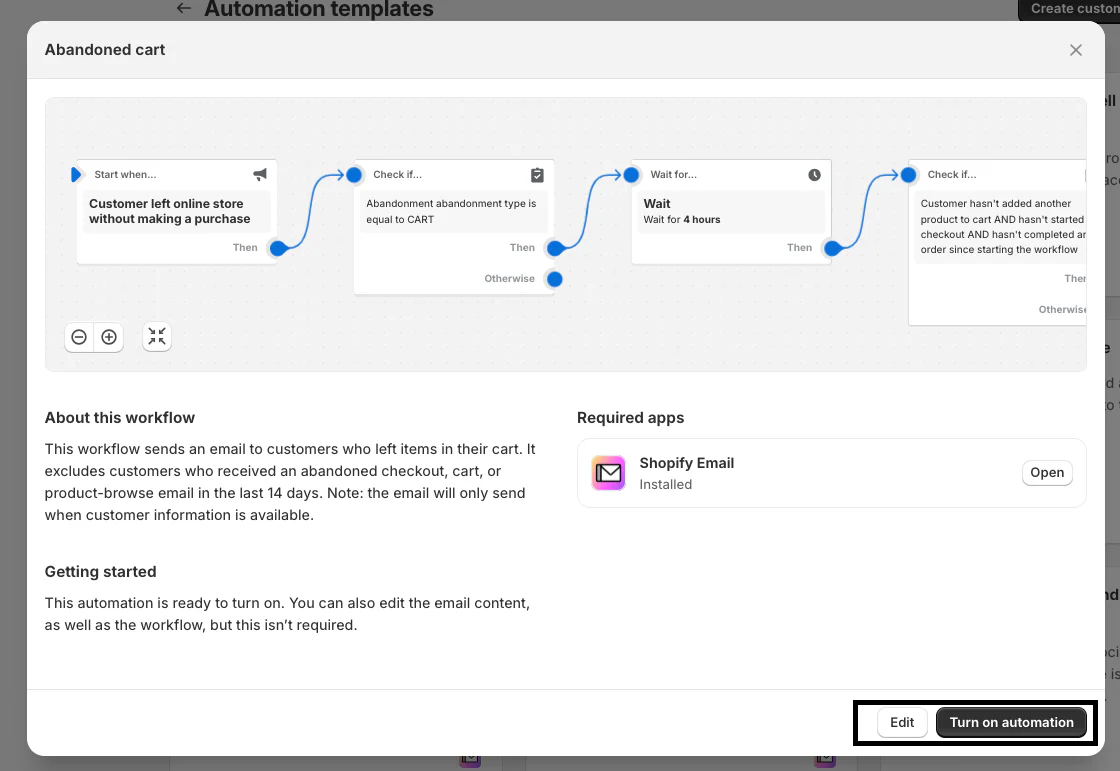
- Shopify offers a variety of pre-built templates for common marketing activities like abandoned cart emails, welcome emails, and win-back campaigns.
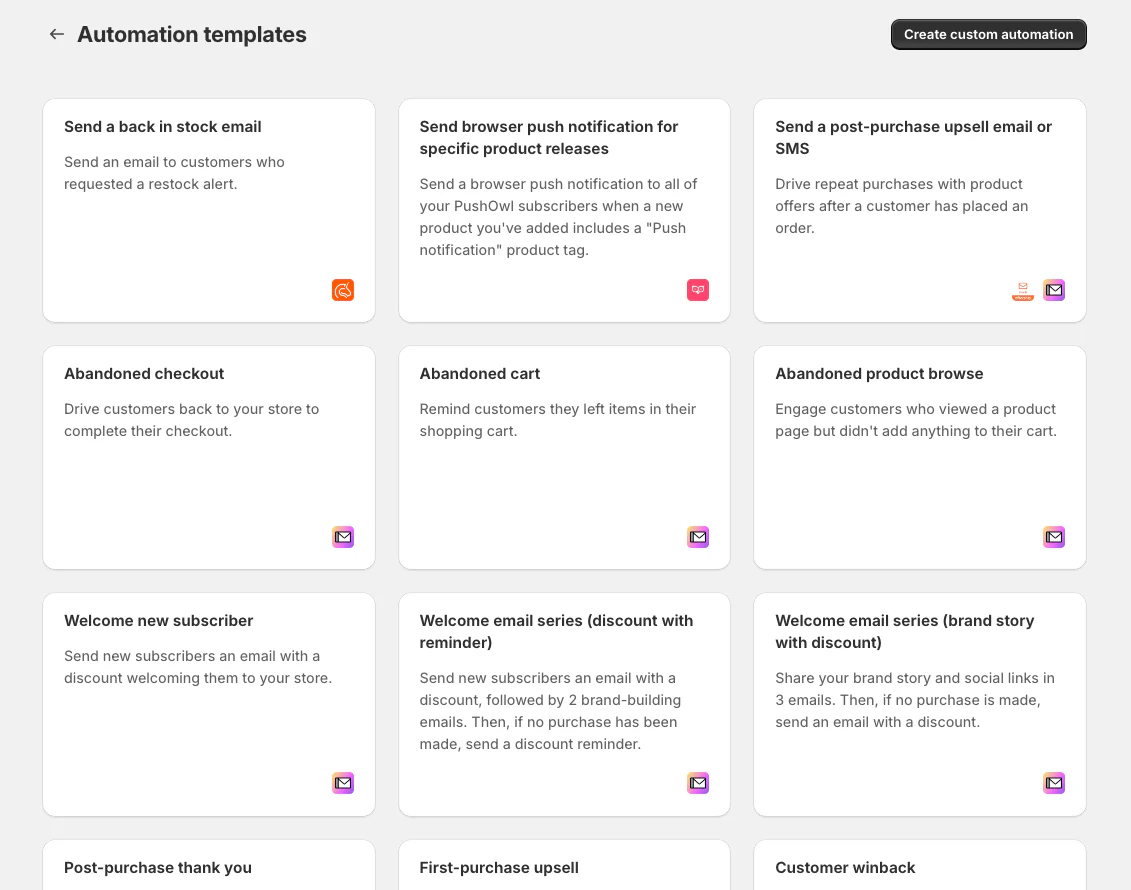
- Select a template that fits your needs, and customize it to match your brand and objectives.
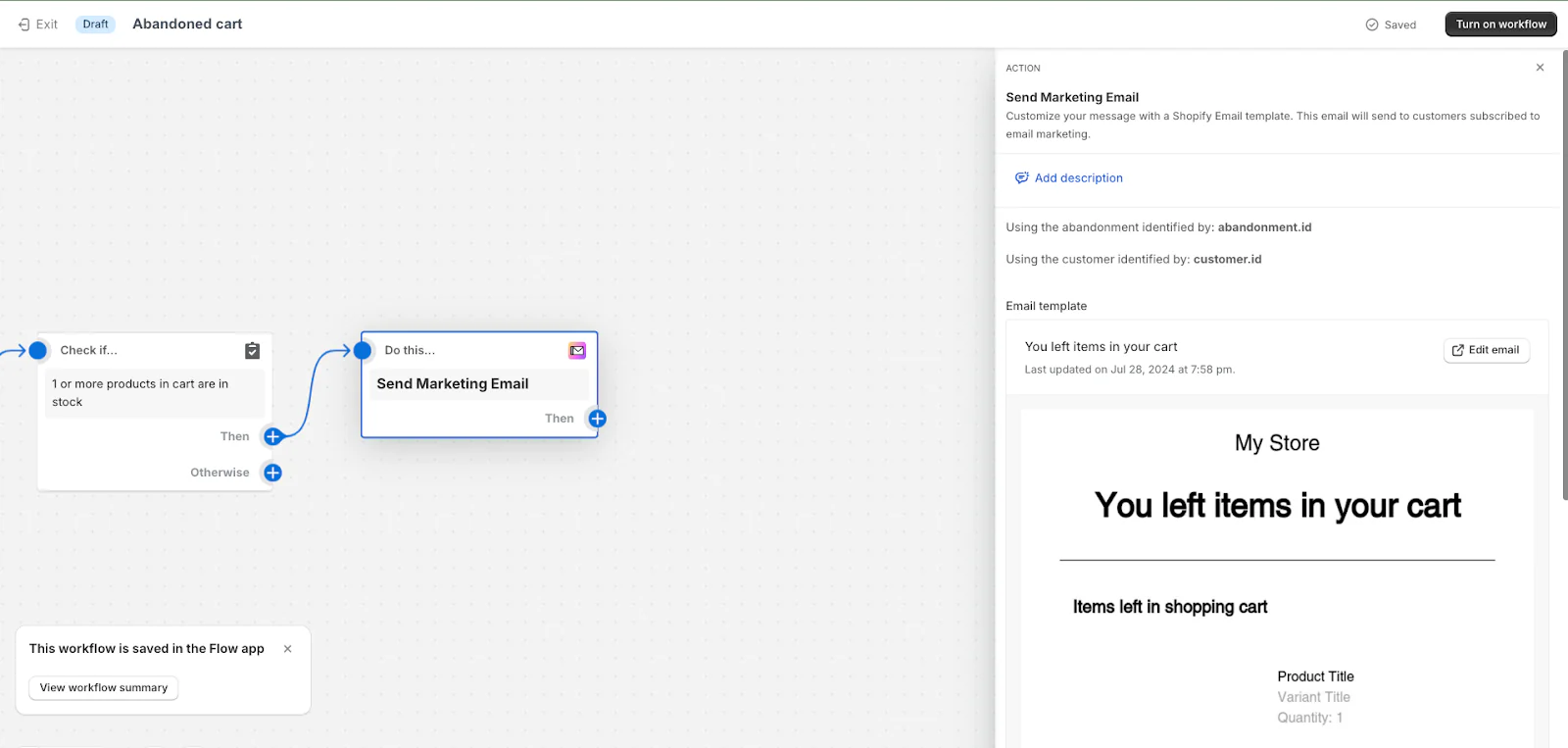
Step 3: Create Custom Automation
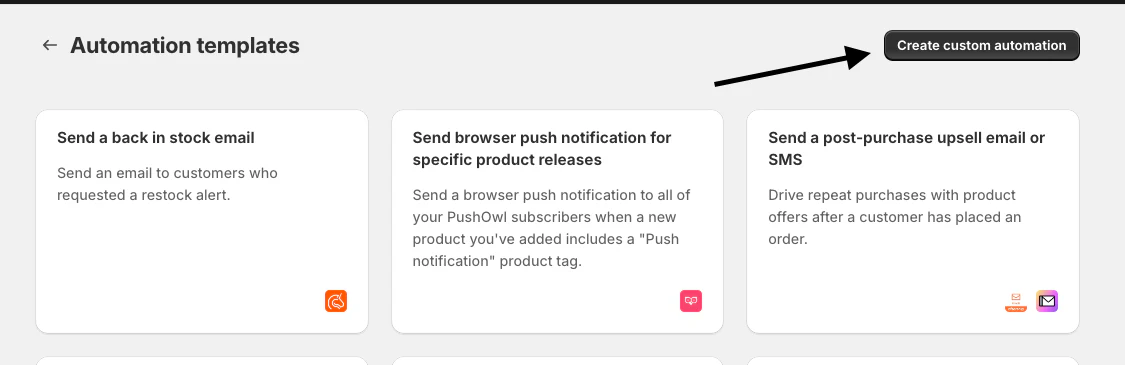
- For more specific needs, you can create custom Shopify automations using the available automation tools.
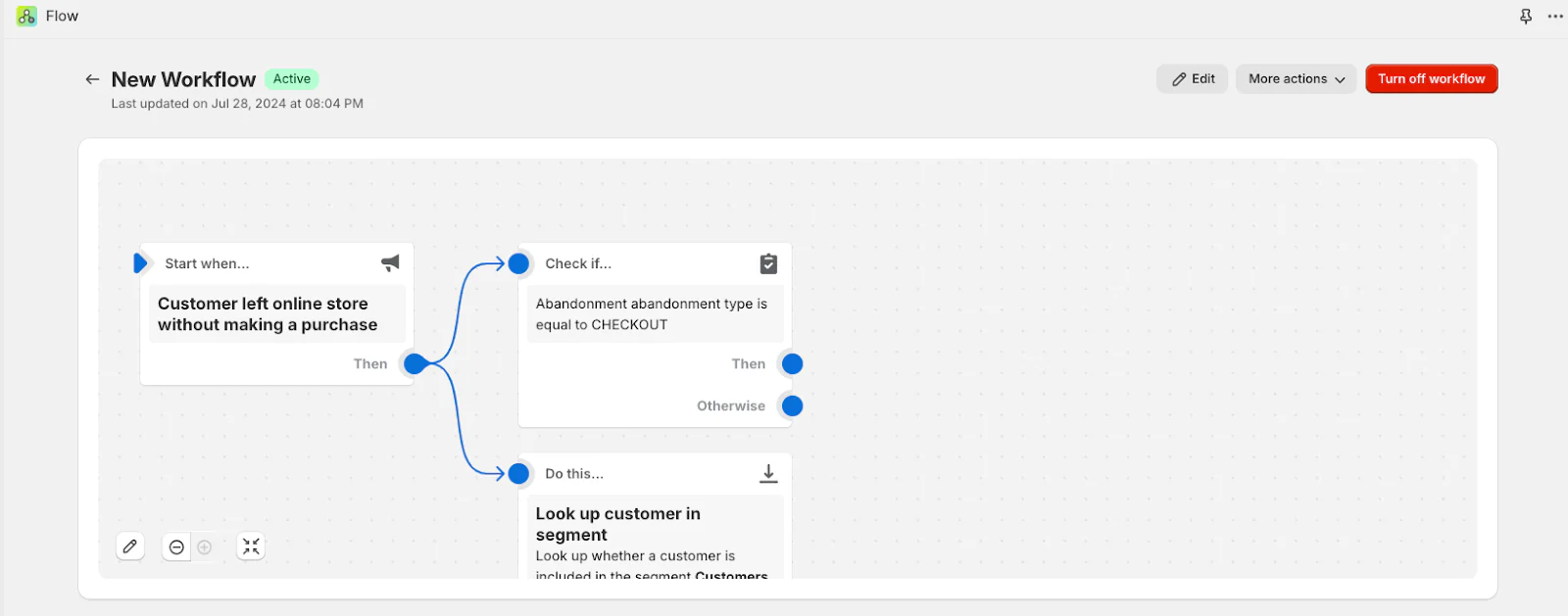
- Define your Trigger (e.g., a customer left online store without making a purchase).
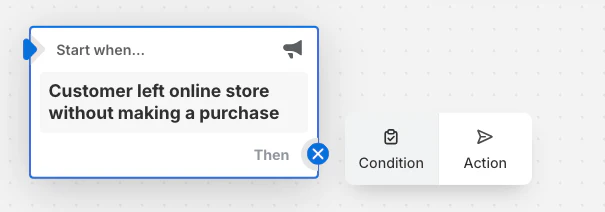
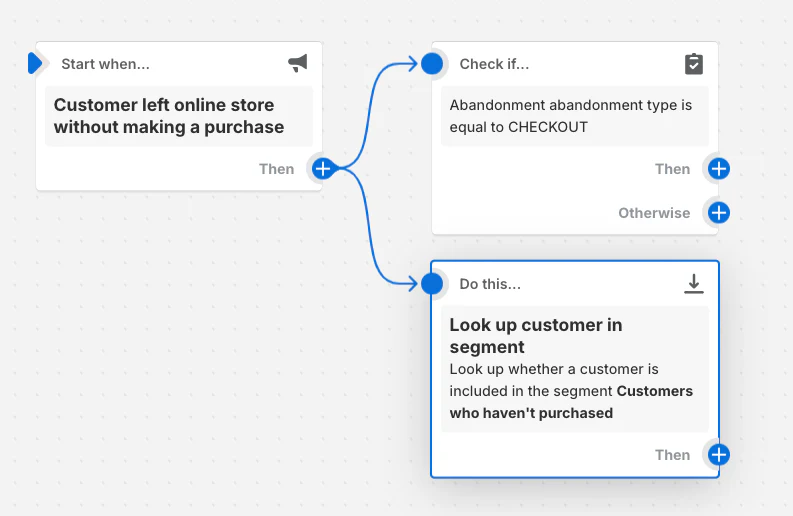
- Set up Conditions to refine when the automation should trigger (e.g., for events like cart abandonment).
- Specify the Action that should be taken (e.g., look up the customer in the segment).
Step 4: Activate the Automation
Once your automation is set up, you can activate it directly from your Shopify admin. Monitor its performance and make adjustments as needed to optimize results.
4 Best Tools for Shopify Automation
Here are our top four picks for the best tools for Shopify automation:
#1 - Shopify Flow
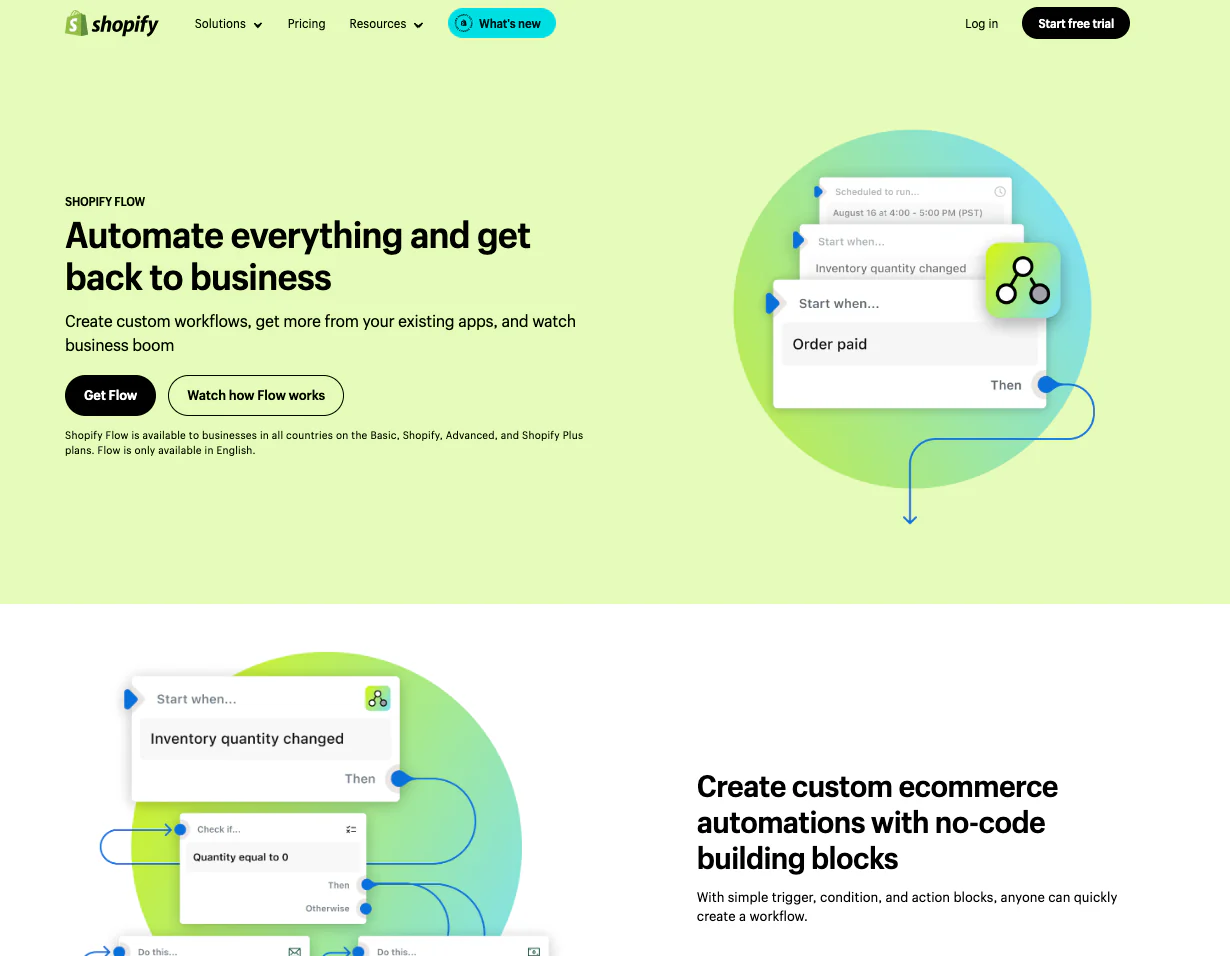
Shopify Flow was designed to assist merchants in streamlining their business operations without requiring extensive coding skills. In fact, Flow has successfully completed over $14,000 worth of unique tasks. It enables you to create custom workflows that automate repetitive tasks through a user-friendly drag-and-drop interface.
3 Key features of the Flow app include:
- A template library with hundreds of example templates for popular use cases.
- Conditional logic capability to tailor workflows to meet your specific business needs.
- Compatibility with a wide array of tools, including Slack, Email, Google Sheets, Trello, Asana, and Klaviyo.
Creating a Workflow Using Shopify Flow: Step-by-Step Guide
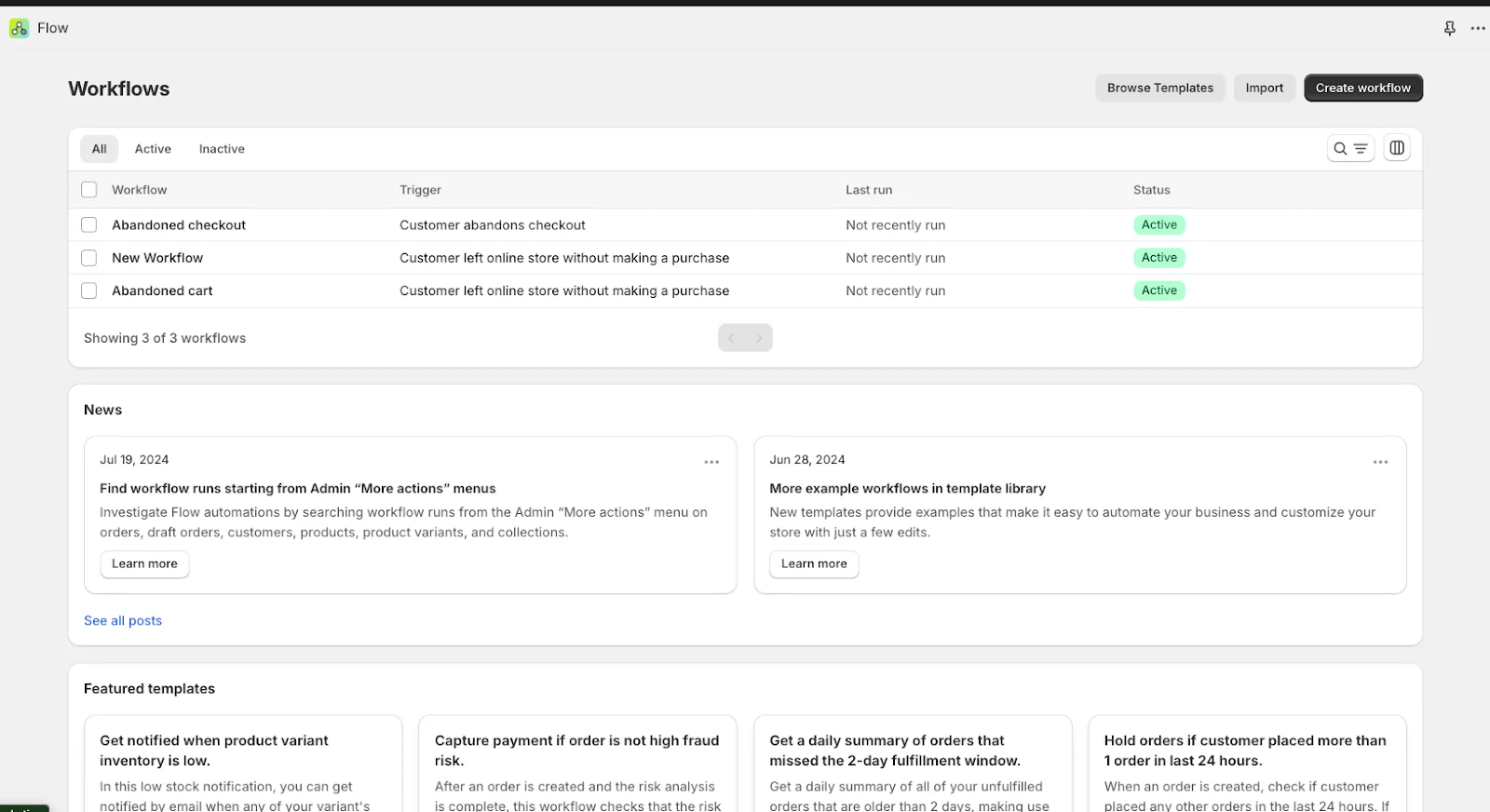
Follow these four steps to create an automated workflow using Shopify Flow:
Step 1: Select a Trigger
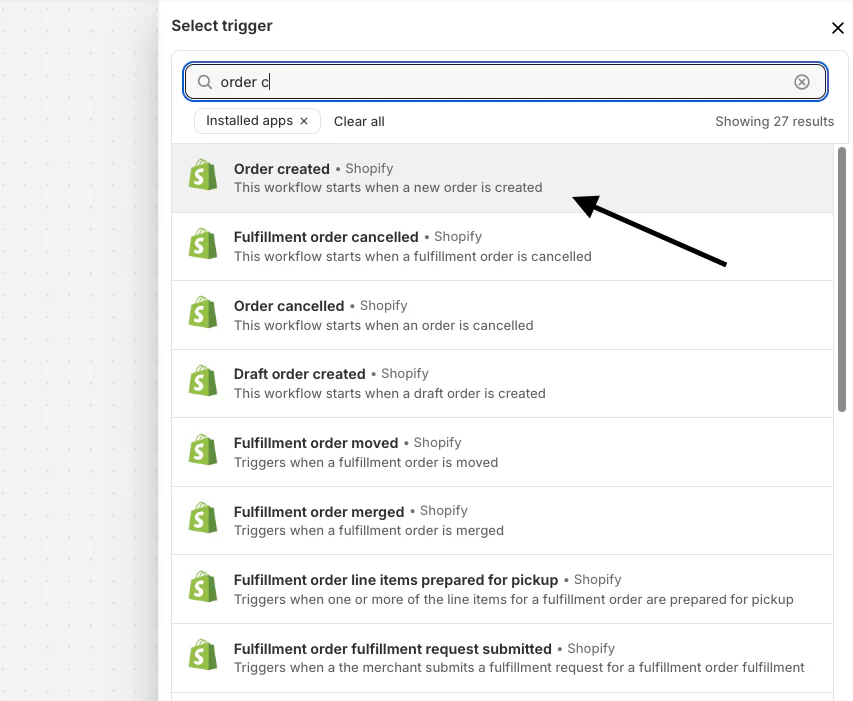
From the Shopify admin, navigate to Apps > Flow and click "Create workflow." Choose a trigger, such as "Order Created."
Step 2: Set Conditions
Define conditions that must be met for the workflow to proceed. For example, set a condition to check if the order value exceeds $250.
Step 3: Define Actions
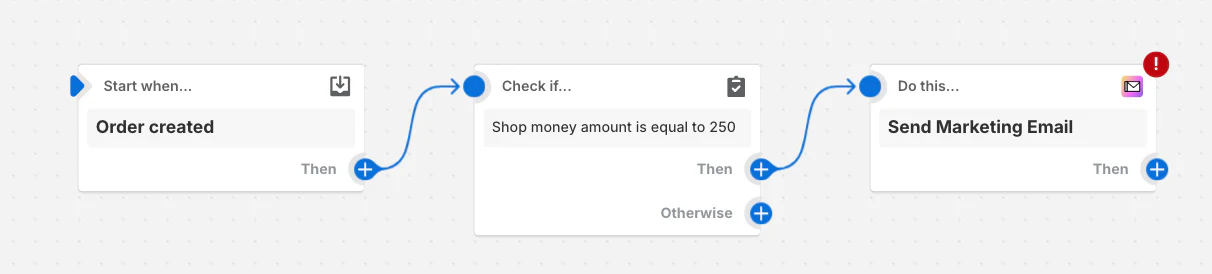
Specify what actions should occur when conditions are met. This could include sending a confirmation email or post-purchase upsell email.
Step 4: Activate Workflow
Name your workflow and click "Turn on workflow" to begin automating the process.
Alongside Shopify Flow, various third-party apps are available on the Shopify App Store that can automate your entire workflow or focus on specific tasks or areas.
# 2 - Zapier
Zapier is another workflow automation software similar to Shopify Flow. It allows you to connect Shopify with numerous other apps, enabling complex automation across various platforms. Zapier simplifies these workflows by automating tasks between apps without requiring any coding knowledge.
The four key features include:
- Connects with 5,000+ apps like Google Sheets, Slack, and Facebook.
- Create workflows that perform multiple tasks in sequence.
- Use if/then logic to perform different actions based on specific conditions.
- Run automations at specified times or intervals.
# 3 - Klaviyo
Klaviyo specializes in email marketing automation. This software utilizes customer data to create personalized email and SMS campaigns. It integrates seamlessly with Shopify and other tools, offering advanced segmentation and detailed analytics. This helps drive sales and enhance customer relationships in no time.
The four key features include:
- Target customers based on detailed behavioral and transactional data.
- Pre-built templates for email and SMS flows.
- Track revenue data and campaign performance in real time.
- Utilize customer data to send highly targeted and personalized messages.
#4 - Recharge

The Recharge app focuses on subscription billing and management. It offers features like customizable customer portals, dynamic bundles, and retention tools.
The four key features include:
- No-code customer portals for managing subscriptions.
- Offer curated product bundles or allow customers to create their own.
- Personalized offers and discounts to prevent cancellations.
- Seamless checkout process for one-time and subscription products.
While Shopify Flow provides a complete solution for automating internal store processes, third-party tools like Zapier, Klaviyo, and Recharge offer specialized functionalities that cater to more specific needs.
For instance, Zapier's extensive app integrations enable complex cross-platform workflows, Klaviyo excels in data-driven marketing automation, and Recharge simplifies subscription management.
There are plenty of Shopify automation apps in the Shopify App Store that you can consider. Depending on your needs, you can choose the one that best suits your purpose.