

Discover how to elevate your Shopify analytics by integrating Google BigQuery.
In today's fast-paced e-commerce landscape, it is essential for businesses to gain in-depth insights into their customers, products, and overall performance. As Shopify continues to grow as a leading e-commerce platform, leveraging advanced analytics has become vital for maintaining a competitive edge. One powerful tool that can enhance your Shopify analytics is Google BigQuery. This article will delve into the advantages of implementing advanced Shopify analytics with Google BigQuery and how it can transform your data analysis processes.
Understanding the Benefits of Advanced Shopify Analytics
 Leveraging Advanced Shopify Analytics for E-Commerce Success
In the realm of e-commerce, data is paramount for success. Whether it’s monitoring customer behavior, tracking conversion rates, or analyzing sales trends, access to comprehensive analytics can yield invaluable insights that inform decision-making. Advanced Shopify analytics empower you to explore your data in depth, revealing hidden patterns and trends that can optimize marketing strategies, enhance customer targeting, and improve overall performance.
By implementing advanced Shopify analytics, you can:
- Gain a holistic view of your business: Comprehensive analytics provide a complete overview of your store's performance, enabling you to identify areas for improvement and seize opportunities.
- Understand customer behavior: Advanced analytics allow you to track customer journeys, identify key touchpoints, and gain insights into preferences, helping you personalize their experience and enhance engagement.
- Optimize marketing efforts: Analyzing data on sales channels, advertising campaigns, and customer acquisition helps you fine-tune marketing strategies to reach the right audience at the right time, driving higher conversions and ROI.
Furthermore, advanced Shopify analytics can also assist you in:
- Enhancing inventory management: Analyzing sales data and inventory levels enables you to optimize stock levels, reduce excess inventory, and prevent stockouts, ensuring a seamless shopping experience for your customers.
- Identifying product performance: Detailed analytics help you pinpoint best-selling products, understand customer preferences, and make data-driven decisions on promotions or discounts to maximize sales.
Additionally, advanced Shopify analytics tools typically feature customizable dashboards and reports, allowing you to visualize data in an easily understandable manner. This visual representation of key metrics and KPIs aids in identifying trends, spotting anomalies, and making strategic decisions to propel your e-commerce business forward.
Leveraging Google BigQuery for E-commerce Data Analysis
 Integrating Shopify Data with Google BigQuery
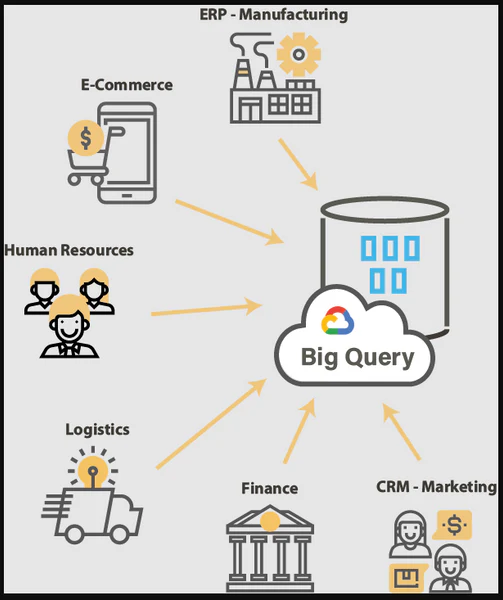
Google BigQuery, a robust and scalable cloud-based data warehouse, provides an ideal solution for leveraging the vast amounts of data generated by your Shopify store. Its seamless integration with Shopify allows you to extract, transform, and load data directly into BigQuery, enabling complex queries and the generation of actionable insights.
One of the standout features of Google BigQuery is its capability to handle large datasets quickly and efficiently. Thanks to its distributed computing architecture, it supports parallel processing, ensuring rapid data retrieval and analysis. With BigQuery, you can eliminate slow, manual data processing and embrace real-time insights that enhance your decision-making.
 Integrating Your Shopify Data with Google BigQuery
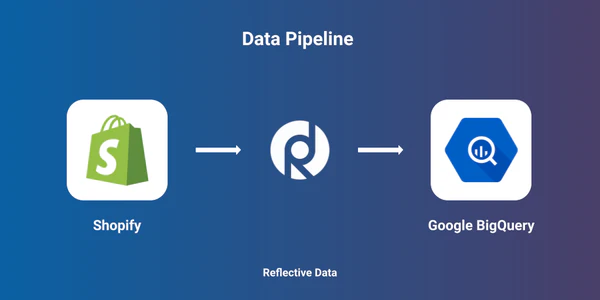
Integrating your Shopify data with Google BigQuery is a simple process. First, you need to set up a BigQuery project and create a dataset to store your Shopify data. Next, you can utilize the Shopify API or a data pipeline tool to extract your data and load it into BigQuery. Once your data is in BigQuery, you can begin utilizing its advanced querying capabilities to explore and analyze your Shopify store's data.
Optimizing Data Collection for Enhanced AnalyticsFor accurate and comprehensive analytics, it's vital to ensure that your data collection is properly configured. One effective way to optimize data collection is by enabling the Enhanced E-commerce feature in Shopify. This feature offers detailed insights into user interactions, product performance, and sales funnels, providing you with a deeper understanding of how customers navigate your store and make purchasing decisions.

Additionally, you can implement custom event tracking to capture specific actions that users take on your Shopify store, such as adding items to their cart or completing a purchase. By monitoring these events, you'll be able to measure key performance indicators and gain valuable insights into the effectiveness of your marketing campaigns and website layout.
Building Custom Reports and Dashboards with BigQuery
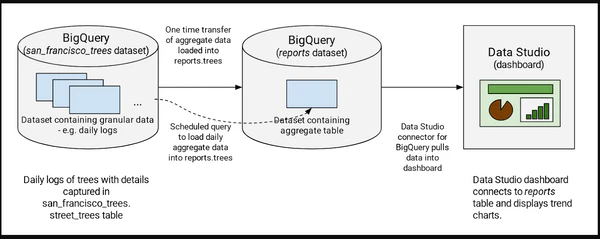
A powerful feature of Google BigQuery is its capability to generate custom reports and dashboards tailored to your specific business needs. With its integration with data visualization tools like Google Data Studio, you can create visually appealing and interactive dashboards that provide real-time insights into your Shopify store's performance.
Custom reports and dashboards allow you to:
- Monitor key performance indicators (KPIs): Visualize important metrics such as sales, conversion rates, and average order value in real-time, enabling you to track progress and identify any anomalies.
- Create data-driven strategies: With access to up-to-date analytics, you can make informed decisions that guide marketing campaigns, product development, and overall business strategies.
- Share insights across teams: Custom dashboards facilitate collaboration by allowing teams to access and analyze data together, fostering a data-driven culture within your organization.
Utilizing Machine Learning for Predictive Analytics
Incorporating machine learning algorithms into your Shopify analytics can elevate your data analysis significantly. With Google BigQuery's integration with machine learning tools like TensorFlow, you can harness the power of AI to make precise predictions and recommendations based on historical data.
Some applications of machine learning in Shopify analytics include:
- Customer segmentation: Identify distinct customer segments based on their demographics, behaviors, and purchase history, allowing you to tailor marketing efforts and personalized recommendations to each segment.
- Inventory management: Predict demand for various products, optimize inventory levels, and prevent stockouts and overstocking, ensuring smooth operations and customer satisfaction.
- Churn prediction: Anticipate when customers are likely to churn based on their interactions, enabling you to implement targeted retention strategies and minimize customer attrition.
Enhancing Marketing Strategies with Advanced Analytics
In today's competitive digital landscape, maintaining an edge demands a commitment to continuously enhancing your marketing strategies. Advanced analytics offer the insights necessary to refine your marketing efforts and achieve improved results.
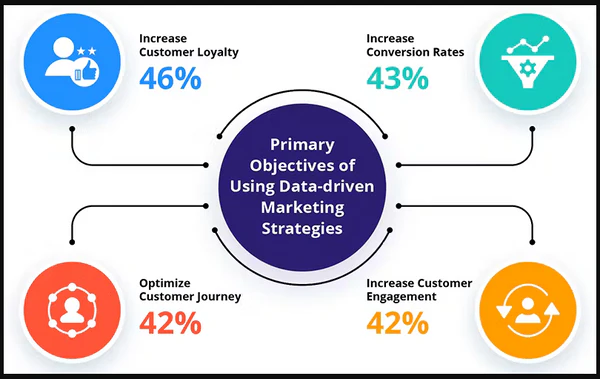
By leveraging advanced Shopify analytics alongside Google BigQuery, you can:
- Track marketing campaign performance: Evaluate the effectiveness of various marketing channels, campaigns, and promotions, enabling you to allocate resources efficiently and enhance your return on investment.
- Identify customer acquisition sources: Discover which sources attract the most valuable customers, allowing you to direct your marketing budgets towards the most effective channels and platforms.
- Personalize marketing messages: Analyze customer behavior and preferences to craft personalized and targeted marketing messages that resonate with each individual, boosting engagement and conversion rates.
Tracking Customer Behavior and Trends
Understanding your customers and their preferences is essential for establishing a successful e-commerce business. The combination of advanced Shopify analytics and Google BigQuery can yield valuable insights into customer behavior and trends.
By tracking customer behavior and trends, you can:
- Identify popular products: Evaluate product performance to see which items are selling well and leverage those trends by refining your marketing and inventory strategies.
- Understand purchase patterns: Gain insights into when and how customers make purchases, enabling you to optimize pricing strategies, provide relevant promotions, and enhance the overall customer experience.
- Analyze cart abandonment: Pinpoint reasons for cart abandonment and implement recovery strategies, such as targeted email campaigns or personalized discounts, to regain lost sales.
Implementing Real-time Data Analysis for Shopify
In the fast-paced world of e-commerce, real-time data analysis is becoming increasingly essential. Google BigQuery enables you to process and analyze data in real-time, ensuring that you have access to the most current information whenever you need it.
Real-time data analysis allows you to:
- Respond quickly to changes: With real-time insights, you can proactively react to market trends, customer needs, and emerging opportunities, ensuring your business remains agile and competitive.
- Identify potential issues: Detect anomalies or unusual patterns in real-time, allowing you to address any issues promptly and prevent potential revenue loss.
- Optimize customer experience: Real-time insights into customer behavior and preferences enable you to deliver personalized experiences, timely promotions, and targeted recommendations that enhance customer satisfaction and loyalty.
Measuring ROI and Performance Metrics with BigQuery
Measuring the return on investment (ROI) and performance metrics of your Shopify store is crucial in determining the success of your business strategies. Google BigQuery provides comprehensive analytics tools that allow you to track and measure various performance metrics accurately.
By leveraging BigQuery's capabilities, you can:
- Calculate ROI: Analyze the effectiveness of marketing campaigns, sales efforts, and other business initiatives by measuring the return on investment generated.
- Track sales performance: Monitor key sales metrics, such as revenue, conversion rates, average order value, and customer lifetime value, enabling you to identify areas for improvement and implement targeted strategies.
- Assess website performance: Analyze website analytics, load times, and user experience metrics to optimize your website's performance and ensure a seamless browsing experience.