

Magento 2 Patch Setup Guide – Step-by-Step
Complete guide for vendors and developers to apply security and custom patches in Magento 2, with a proper setup flow.
Step 1: Prepare Your Environment
- Ensure Magento 2 is installed (version 2.4.x or higher).
- SSH or local access to the Magento root directory.
- Composer installed and configured.
- Optional: Git installed for custom patch creation.
Step 2: Apply Official Magento Security Patch
- Create a folder at Magento root called
m2-hotfixesand place your patch file there. - Install the Magento quality patches tool:
composer require magento/quality-patches --ignore-platform-reqs
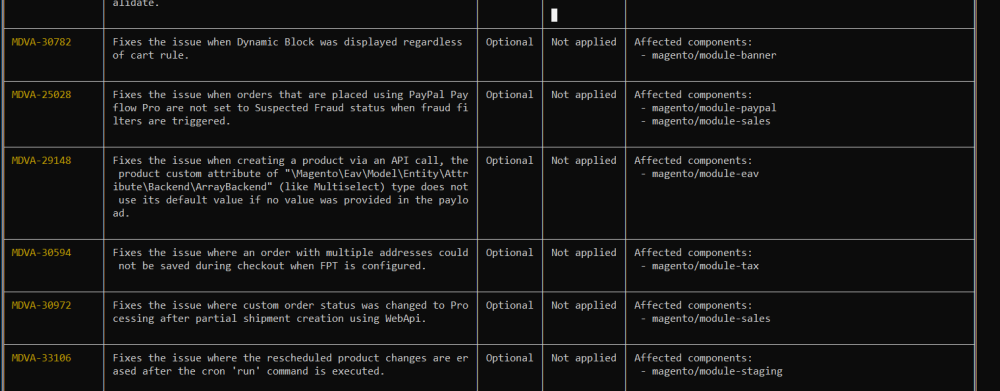
- Check the status of all patches:
vendor/bin/magento-patches status
- Apply a specific patch:
vendor/bin/magento-patches apply {patch_id}
Example:
vendor/bin/magento-patches apply MDVA-30977-V2
- Revert a patch if needed:
vendor/bin/magento-patches revert {patch_id}
Example:
vendor/bin/magento-patches revert MDVA-34665
Step 3: Create and Apply a Custom Patch
- Modify the file you want to patch, e.g.,
vendor/magento/module-customer/Block/CustomerData.php. - Create a modified copy with your changes:
CustomerDataModified.php. - Generate the patch:
diff -u CustomerData.php CustomerDataModified.php > diff.patch
- Move
diff.patchto your module folder:app/code/NAMESPACE/MODULENAME. - Edit the top lines of
diff.patchto this format:
diff --git a/Block/CustomerData.php b/Block/CustomerData.php
index 3ee2rd..8349152 111644
--- a/Block/CustomerData.php
+++ b/Block/CustomerData.php
- Apply the patch using Git:
git apply diff.patch
Step 4: Apply Patch via Root composer.json
- Install composer patch plugin:
composer require cweagans/composer-patches --dev
- Edit your root
composer.jsonto include the patch:
"extra": {
    "patches": {
        "magento/module-customer": {
            "Fix CustomerData.php bug": "m2-hotfixes/diff.patch"
        }
    }
}
- Apply the patch via Composer:
composer update
Step 5: Clear Cache & Recompile Magento
php bin/magento cache:clean
php bin/magento cache:flush
php bin/magento setup:upgrade
php bin/magento setup:di:compile
php bin/magento setup:static-content:deploy -f
Always run these commands after applying patches to ensure proper functionality.
Step 6: Verify Patch Applied
- Check module functionality.
- For security patches, ensure they appear in the applied patch list using:
vendor/bin/magento-patches status