Catalog management becomes clumsy when admins must navigate away to edit each product. The **Admin Category Product Link** extension solves this by embedding direct “Edit” links in the category product grid—enabling faster updates, better workflow, and fewer errors.
Why Direct Edit Links in Category Grids Matter
- No more switching tabs or opening product lists to find the right SKU.
- Instant access speeds catalog updates and corrections.
- Reduces the chance of editing the wrong product or misplacing a product in categories.
- Improves admin efficiency in stores with large, complex catalogs.
Key Features of the Magento 2 Admin Category Product Link Extension
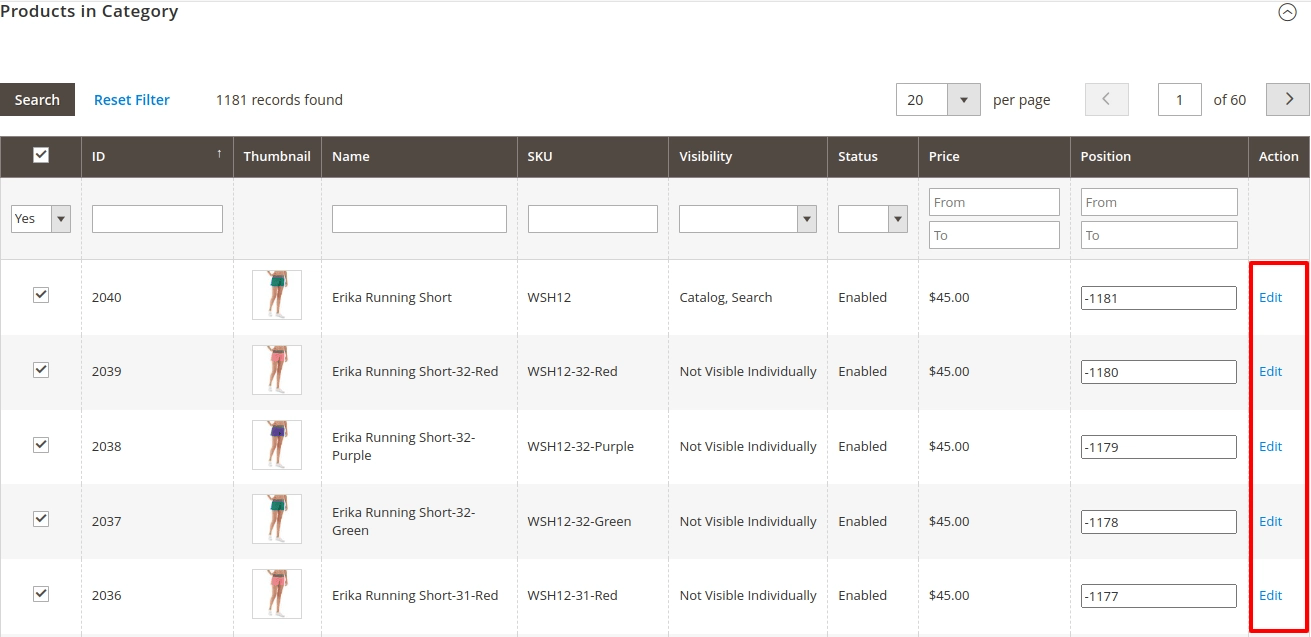
- Inline Edit Link: Adds an “Edit” action to each product row in the “Products in Category” grid.
- Direct Redirect: Clicking the edit link brings you directly to the product edit page.
- Bulk Linking / Unlinking Support: Manage many category-product relationships in one go.
- Flexible Grid Interface: Works with filters and search to help admins find products to edit faster.
- Low Overhead Integration: Adds functionality without heavy customization or performance tradeoffs. (Built as an extension)
How It Works in Your Admin Panel
- Navigate to Categories: Admin → Catalog → Categories → “Products in Category” tab.
- Edit Link Appear: Each product listed in that grid has an “Edit” link next to it.
- Go to Product Edit Page: Clicking the link opens Magento’s built-in product edit form.
- Make & Save Changes: Admin edits attributes (price, stock, description, etc.) and saves—all without manual navigation.
Business Benefits You Achieve
| Benefit | Impact |
|---|---|
| Faster Updates | Admins make changes with one click, reducing delay |
| Reduced Navigation Overhead | Less jumping between grids and product pages |
| Lower Error Rate | Reduces editing wrong SKUs or mis-categorization |
| Improved Workflow | Admin experience becomes more efficient |
Admin Use-Case Scenario
Suppose you want to update stock or price for products under “Shoes” category. With the extension active, you click “Edit” next to each product in that category’s grid, change values, and save—without navigating to separate product listings. Management time per SKU drops significantly.
Category Products Grid Example:
MavenBird delivers tools to streamline admin workflows and speed up catalog management with practical extensions like **Admin Category Product Link**.
Want to edit products faster from categories?
Contact Us today and streamline your backend workflow.
Contact Us today and streamline your backend workflow.