📘
User Guide & Documentation
Step-by-step setup manual for Admin Category Product Thumbnail Extension
View →
Changelog v1.1.1 Compatible with Magento CE, EE · 2.3.x, 2.4.x

Admin Category Product Thumbnail Extension

Admin Category Product Thumbnail Extension enables store admins to view product thumbnails directly within the category product grid, making it easier to identify and manage products. This improves backend navigation, enhances catalog organization, and saves time during product management.


  • Displays product thumbnails in the category management section for quick visual identification.
  • Enhances the admin's ability to manage categories by providing a visual reference of products.
  • Integrates thumbnails into the category tree or product listing.
  • Improves speed and accuracy in managing large catalogs.
  • Works seamlessly with other admin customization modules.
  $0
No surprise fees

We are committed to being open and transparent with our customers. When you purchase our module, you automatically receive one year of free support service and free updates.

Why is this important?

  • Seamless Installation and Configuration: We understand that setting up a new module can take time to configure according to your specific needs. That's why we offer a full year of free support. Our experienced team is here to assist you with installation, configuration, and any questions you might have. We're eager to share our expertise to ensure you get the most out of your purchase.
  • Stay Updated with Magento (Adobe Commerce) Releases: Magento releases new versions approximately every three months. These updates can sometimes introduce compatibility challenges. To keep your store running smoothly, we provide a year of free access to the latest versions of our modules, ensuring that you can upgrade Magento and our modules without encountering any obstacles.
  • Subscription Included: Renewing your subscription ensures continued access to the latest updates and support from our team. This means you can be confident that any issues you encounter with the extension will be resolved quickly and efficiently. You can cancel your subscription at any time without any additional fees.
Hyvä Bronze Partner
Adobe Commerce
Secure Checkout

Highlighted Features

  • Product Thumbnails in Category Management

    Displays product images in the category management interface, helping admins quickly identify and categorize products.

  • Enhanced Admin Interface

    Improves the admin grid with product thumbnails, making categorization and inventory management more efficient and intuitive.

  • Configurable Display

    Allows customization of thumbnail size and grid layout for a tailored and organized admin experience.

  • Performance Optimization

    Optimizes image loading for smooth admin panel navigation, even with large product catalogs, ensuring a responsive workflow.

  • Easy Installation and Configuration

    Quick setup with minimal configuration, requiring no technical expertise for installation and activation.
Description

Category Page

Category page

The Admin Category Product Thumbnail Extension for Magento 2 displays product thumbnails in the category management panel, offering a visual aid for easier organization. It enhances user experience, streamlines category management, reduces errors, and is especially helpful for stores with large product catalogs.
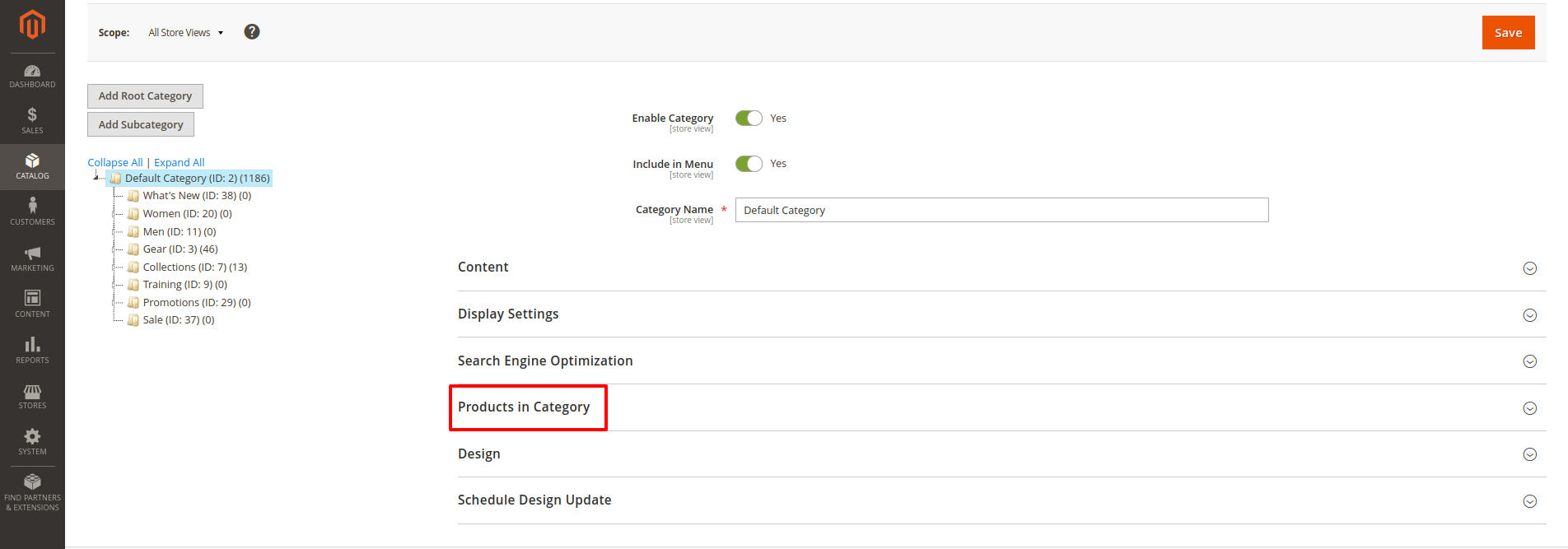
  • First of all click on Catalog → Categories → Product in Categories.
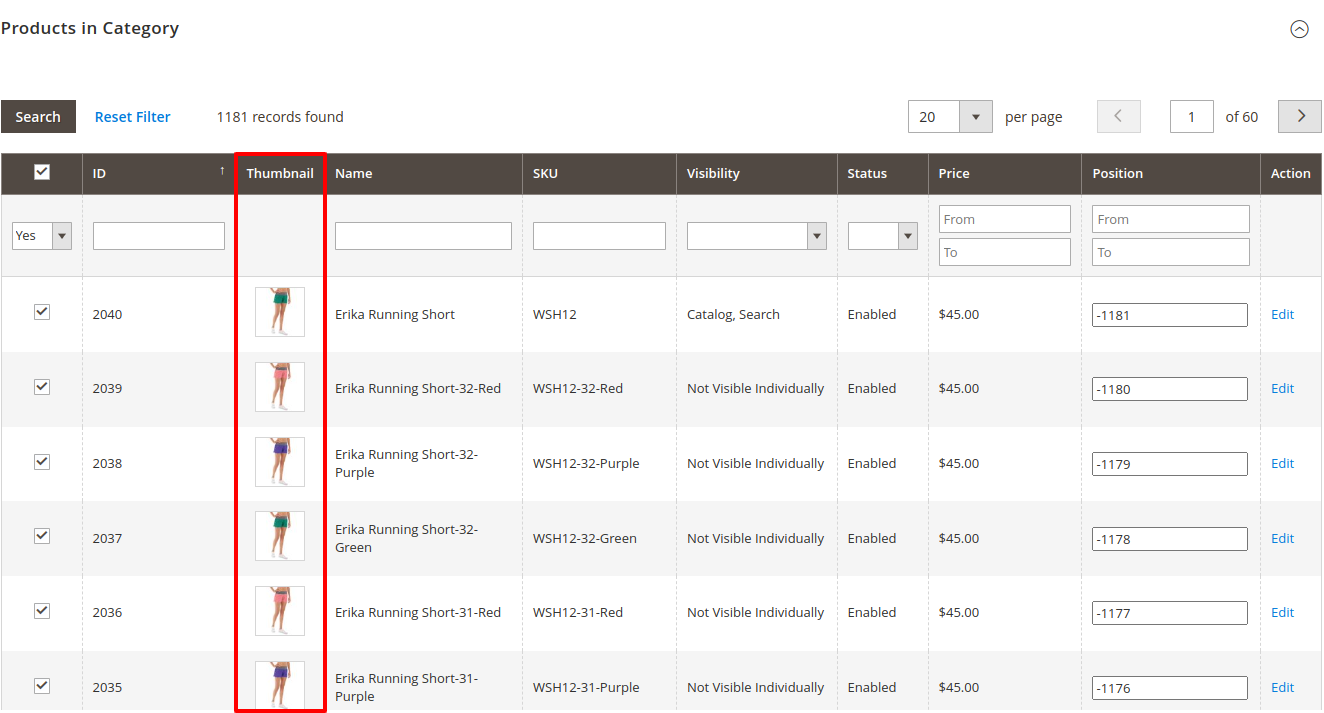
  • When you click the "Product in Category" button, you are redirected to a list of multiple products within that category.
  • When managing products in a category with the “Admin Category Product Thumbnail ” module, you may encounter scenarios where a single category contains multiple products. Clicking on a product within such a category typically leads to a detailed view or edit page specific to that product.

Admin Category Product Thumbnail

admin category product thumbnail
  • Simplifies the process of adding and updating product thumbnails, allowing admins to easily associate relevant images with each product to improve visual appeal and user understanding.
  • Ensures that each product’s thumbnail accurately represents its features, making it easier for users to identify and engage with products within the admin interface.
  • Provides intuitive tools for cropping, resizing, and optimizing thumbnails, helping maintain consistent and high-quality visuals across different categories and devices.
FAQs

Frequently Asked Questions

If your product thumbnails are not displaying in the category admin section, check the following: Ensure that the thumbnails are correctly uploaded for each product. Verify that your extension is properly installed and configured. Clear the Magento cache and reindex data. Check for conflicts with other extensions that may affect thumbnail visibility.
If thumbnails are generating but appear distorted, try these solutions: Check the original image dimensions and aspect ratio to ensure they match the thumbnail settings. Review the extension settings for thumbnail size configurations. Ensure that any image optimization settings or third-party modules are not altering image dimensions incorrectly. Regenerate the thumbnails using the extension’s settings if available.
To check for compatibility issues with other extensions: Disable all other extensions temporarily and test the thumbnail functionality. Review the var/log/system.log and var/log/exception.log files for errors related to the thumbnail generation. Enable developer mode by running php bin/magento deploy:mode:set developer and observe any error messages. Check for known compatibility issues on the extension developer’s website or forums.
   Ask a question
REVIEWS

Changelog

1.1.1 – December 30, 2025

  • Upgraded for compatibility with Magento 2.4.8-p3.
  • Compatible with PHP version 8.4.

1.1.0 - September 1, 2024

  • Minor Bug Fixes

1.0.7 – May 10, 2024

  • Compatible with Magento Version 2.4.7-p3.

1.0.6 – March 3, 2024

  • Compatible with Magento Version 2.4.3

1.0.5 – March 13, 2023

  • Compatible with Magento Version 2.4.2
  • Small code adjustments.

1.0.4 – September 10, 2022

  • Compatible with Magento Version 2.4.1

1.0.3 – April 12, 2022

  • Compatible with Magento Version 2.4.0

1.0.2 – May 8, 2020

  • Updated for improved compatibility with Magento versions 2.3 and 2.4.

1.0.1 – January 22, 2019

  • Fully compatible with Magento 2.0, 2.1, 2.2, and 2.3 Community Edition.

1.0.0 – February 16, 2018

  • Release Initial Version.