📘
User Guide & Documentation
Step-by-step setup manual for Admin Category Product Link Extension
View →
Changelog v1.1.1 Compatible with Magento CE, EE · 2.3.x, 2.4.x

Admin Category Product Link Extension

Admin Category Product Link Extension adds direct product links in the category product grid, allowing admins to quickly access and edit product details. This enhances backend navigation, saves time, and improves catalog management efficiency.


  • Allows admins to easily link products to categories directly from the admin panel.
  • Simplifies the process of assigning products to categories without navigating away from the product editing page.
  • User-friendly interface within the product management section.
  • Supports multi-store and multi-language setups.
  • Easily customizable to fit specific admin workflows.
  $0
No surprise fees

We are committed to being open and transparent with our customers. When you purchase our module, you automatically receive one year of free support service and free updates.

Why is this important?

  • Seamless Installation and Configuration: We understand that setting up a new module can take time to configure according to your specific needs. That's why we offer a full year of free support. Our experienced team is here to assist you with installation, configuration, and any questions you might have. We're eager to share our expertise to ensure you get the most out of your purchase.
  • Stay Updated with Magento (Adobe Commerce) Releases: Magento releases new versions approximately every three months. These updates can sometimes introduce compatibility challenges. To keep your store running smoothly, we provide a year of free access to the latest versions of our modules, ensuring that you can upgrade Magento and our modules without encountering any obstacles.
  • Subscription Included: Renewing your subscription ensures continued access to the latest updates and support from our team. This means you can be confident that any issues you encounter with the extension will be resolved quickly and efficiently. You can cancel your subscription at any time without any additional fees.
Hyvä Bronze Partner
Adobe Commerce
Secure Checkout

Highlighted Features

  • Direct Product-Category Association on Product Edit Page:

    Allows administrators to link or unlink products from categories directly while editing a product. This feature integrates seamlessly into the product edit page, providing a convenient way to manage product-category associations without navigating away.

  • Real-time Category Update:

    Changes to product-category associations are applied immediately, ensuring that the updated associations are reflected on the frontend without delay. This real-time update feature is crucial for maintaining accurate category listings.

  • Compatibility with All Product Types:

    Supports all Magento 2 product types, ensuring that any product, whether simple, configurable, virtual, or otherwise, can be managed with this extension.
Description

Category Page

category page

The Admin Category Product Link Extension for Magento 2 simplifies linking products to categories from the admin panel, offering an intuitive interface for easy product management. It improves efficiency, organization, and usability, while also supporting bulk actions for faster product-category assignments.
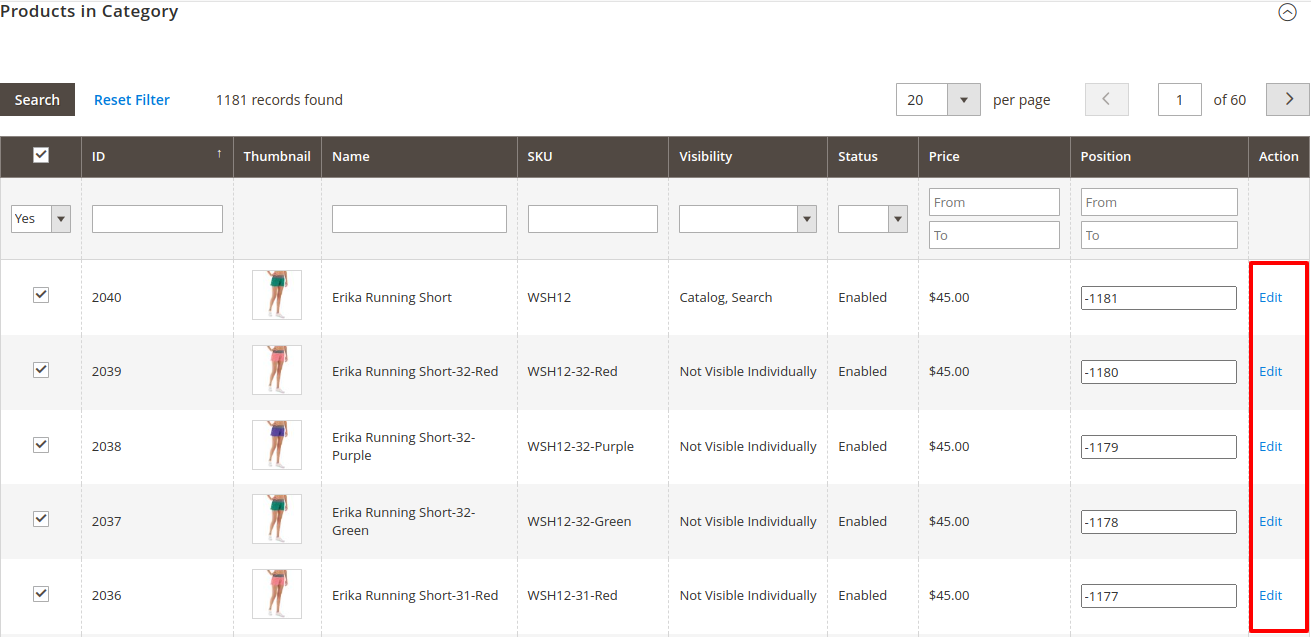
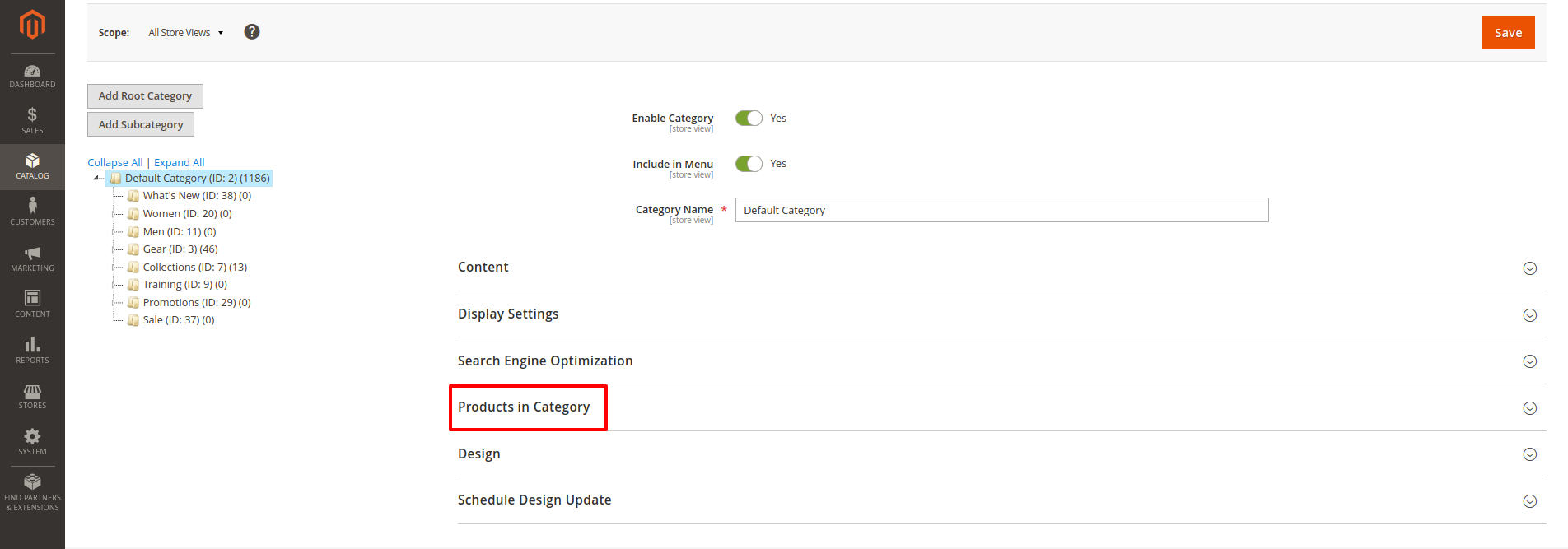
  • First of all click on Catalog → Categories → Product in Categories. Then Check Edit Link for Direct Edit the Product
  • When you click the "Product in Category" button, you are redirected to a list of multiple products within that category. However, direct editing of the products from this list is not possible. To address this, an "Edit" link needs to be created, allowing administrators to directly access and modify individual product details.

Admin Category Product Link

admin category product link page
  • Multiple "Edit" links are provided for each product in the list, allowing administrators to quickly navigate to the specific product they need to update.
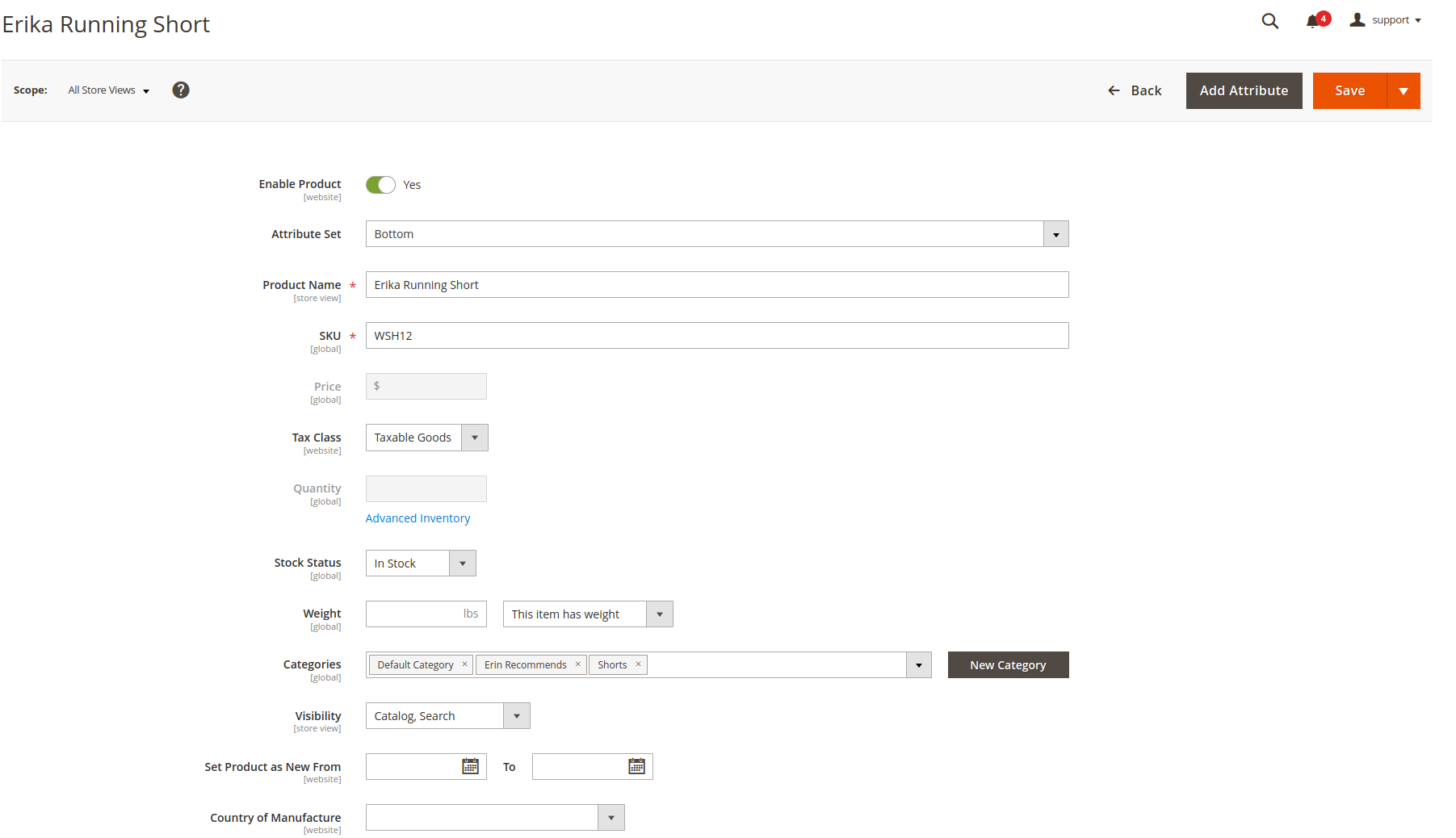
  • Edit Page

    edit page
  • Administrators can make changes to product details such as price, description, and stock levels directly from the edit page. Once modifications are made, they can be saved instantly, ensuring that the product information is always up-to-date.
  • After updating product information, changes are saved with a single action, minimizing disruption and allowing for quick updates. This feature ensures that product details are promptly reflected in the catalog.
  • Edits are applied in real-time, so any updates made to product attributes are immediately visible on the front end. This ensures that customers see the most current product information without delay.
  • FAQs

    Frequently Asked Questions

    If category product links are not displaying, ensure that the extension is correctly installed and configured. Check the logs for any errors and clear the cache. If the issue persists, try disabling other extensions that might conflict with your Category Product Link Extension.
    This error may occur due to permission issues or incorrect configurations. Ensure that the file and folder permissions are set correctly for your Magento installation. Additionally, check if the database connection is properly configured and that there are no conflicts with other extensions.
    A database error could stem from a variety of issues, such as a misconfigured database connection, outdated database schema, or issues with other extensions affecting database operations. To resolve this, check your database connection settings, run database upgrades, and ensure your MySQL version is compatible with Magento 2.
    Performance issues may arise from heavy queries or conflicts with other extensions. To improve performance, try optimizing your database by cleaning up old or unnecessary data, disabling unused extensions, and ensuring your server resources are sufficient. Also, check for any inefficient queries logged in the Magento profiler.
       Ask a question
    REVIEWS

    Changelog

    1.1.1 – December 30, 2025

    • Upgraded for compatibility with Magento 2.4.8-p3.
    • Compatible with PHP version 8.4.

    1.1.0 - September 1, 2024

    • Minor Bug Fixes

    1.0.7 – May 9, 2024

    • Compatible with Magento Version 2.4.7-p3.

    1.0.6 – March 2, 2024

    • Compatible with Magento Version 2.4.3

    1.0.5 – March 12, 2023

    • Compatible with Magento Version 2.4.2
    • Small code adjustments.

    1.0.4 – September 9, 2022

    • Compatible with Magento Version 2.4.1

    1.0.3 – April 11, 2022

    • Compatible with Magento Version 2.4.0

    1.0.2 – May 7, 2020

    • Updated for improved compatibility with Magento versions 2.3 and 2.4.

    1.0.1 – January 21, 2019

    • Fully compatible with Magento 2.0, 2.1, 2.2, and 2.3 Community Edition.

    1.0.0 – February 15, 2018

    • Release Initial Version.